FEATURERuntime Statistics for FunctionsRead more
← Back to Changelog

AI Agent Presence in the Collaborative Editor

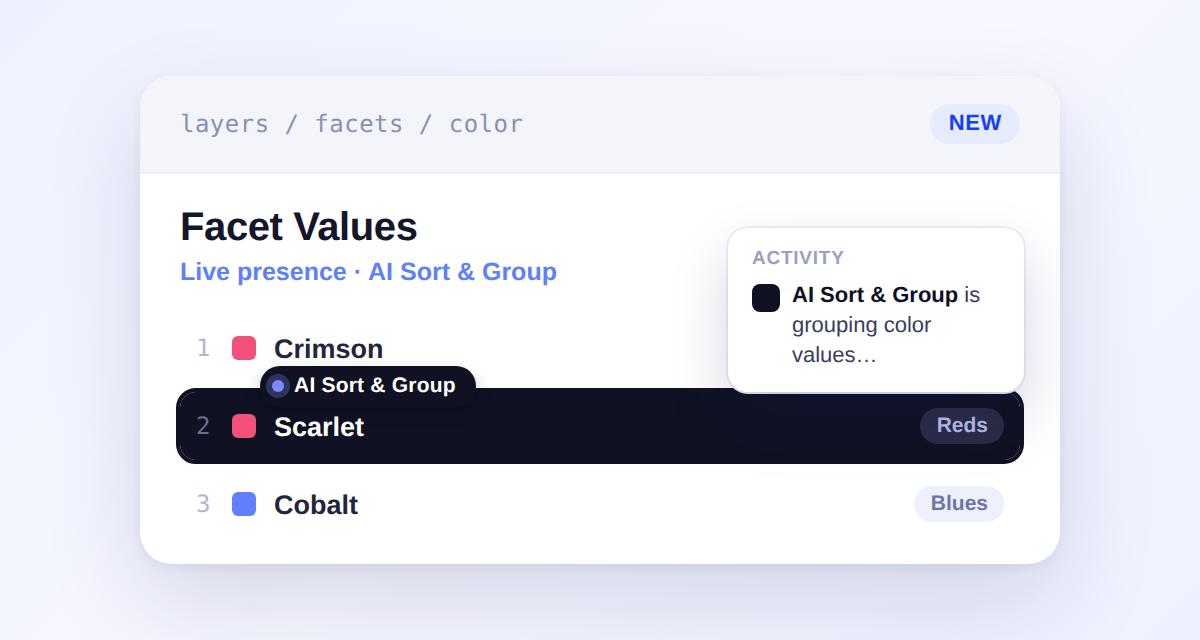
Facet values editor showing an AI Sort & Group agent badge actively reordering a value, with an activity feed popover describing its progress

AI agents connected through MCP — and the dashboard's own AI Sort & Group action — now show up live in the collaborative editor, right alongside your team. You'll see an agent's own colored badge and row highlighting as it works, plus an activity feed that narrates what it's doing in plain language.

Nothing an agent does publishes on its own: AI Sort & Group organizes facet values into an unsaved draft that a teammate reviews and saves, just like any other collaborative edit.

Learn more

Subscribe to the changelog

Releases land wherever your team already reads.

Slack

Subscribe to changelog

1

Choose a Slack channel

Open the Slack channel where releases should land. Most teams use #product-updates.
2

Subscribe to releases

Paste this command into the Slack channel.

/feed subscribe https://www.uselayers.com/changelog/rss.xml
3

Approve the confirmation post

Approve the confirmation Slack post. From then on each release arrives as a message with its title, date, and link.