FEATURERuntime Statistics for FunctionsRead more
← Back to Changelog

Cleaner Sort Preview Filters

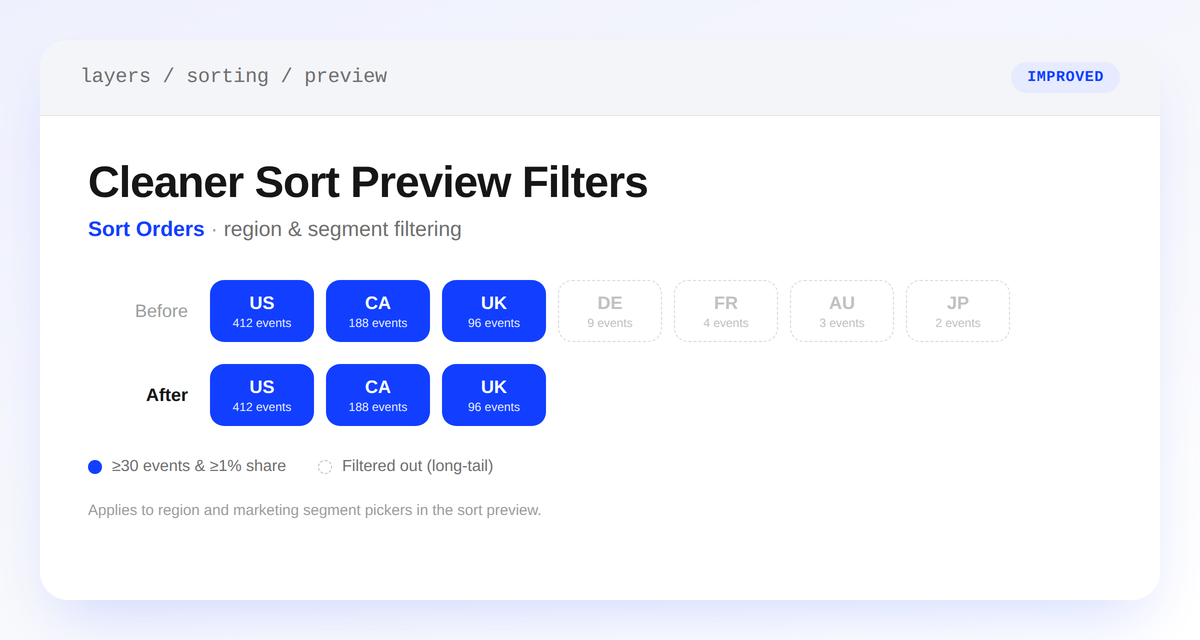
Sort preview region picker showing a long list of low-traffic values before, and a short list of only significant regions after

The sort order preview's region and marketing segment pickers now only list values with enough traffic to actually change the preview — a region or segment needs at least 30 events and 1% of total traffic to show up.

Previously, the pickers listed every value with any coverage data, including long-tail regions and segments too small to affect sorting. Now you'll only see options that matter, so it's faster to find a meaningful preview.

If a value you expect isn't listed, it hasn't yet reached the significance threshold — wait for more traffic, or preview a broader value instead (the country rather than a specific city, for example).

Learn more

Subscribe to the changelog

Releases land wherever your team already reads.

Slack

Subscribe to changelog

1

Choose a Slack channel

Open the Slack channel where releases should land. Most teams use #product-updates.
2

Subscribe to releases

Paste this command into the Slack channel.

/feed subscribe https://www.uselayers.com/changelog/rss.xml
3

Approve the confirmation post

Approve the confirmation Slack post. From then on each release arrives as a message with its title, date, and link.