FEATUREManage DimensionsRead more
← Back to Changelog

Manage Dimensions

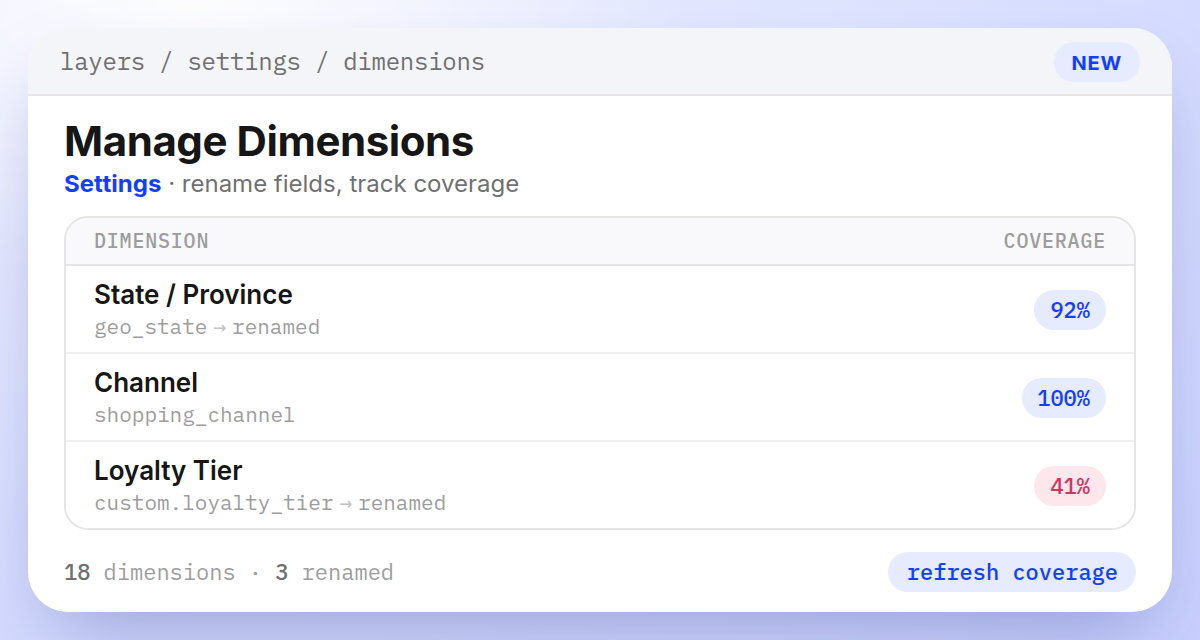
Dimensions settings page showing renamed fields like State / Province (from geo_state) and Loyalty Tier (from custom.loyalty_tier), with coverage percentages for each

Know your dimensions by the names your team already uses.

The new Dimensions page under Settings → Data & Sync lists every contextual field Layers records with your search and browse events, from country and channel to any custom parameters your storefront sends.

Rename a dimension, add a description for teammates, and check its coverage: how many events carry a value, and how many distinct values you've recorded.

Renaming only changes the display label. Your rules, metrics, and sort orders keep working exactly as they did before.

Learn more

Subscribe to the changelog

Releases land wherever your team already reads.

Slack

Subscribe to changelog

1

Choose a Slack channel

Open the Slack channel where releases should land. Most teams use #product-updates.
2

Subscribe to releases

Paste this command into the Slack channel.

/feed subscribe https://www.uselayers.com/changelog/rss.xml
3

Approve the confirmation post

Approve the confirmation Slack post. From then on each release arrives as a message with its title, date, and link.