FEATURESchedule-Aware Rule Publication StatesRead more
← Back to Changelog

Schedule-Aware Rule Publication States

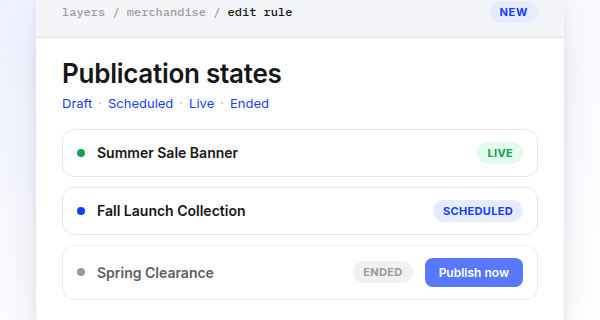
Merchandising rule rows showing Live, Scheduled, and Ended status pills, with a Publish now button on the ended rule

Merchandising rules now derive a single publication state from their schedule, and publishing respects it.

Every rule shows as Draft, Scheduled, Live, or Ended, and publish actions check the schedule window first. You can't publish a rule before its start date or after its end date, and bulk publish skips those rules and names them.

When a rule has a schedule, the Publish/Unpublish button asks you to confirm, since Publish now clears the schedule and Unpublish now sets the end date to right now.

Automatic schedule publishes and unpublishes also show up in Config History with a reason label, so you can tell them apart from a manual edit.

Learn more about rule scheduling

Subscribe to the changelog

Releases land wherever your team already reads.

Slack

Subscribe to changelog

1

Choose a Slack channel

Open the Slack channel where releases should land. Most teams use #product-updates.
2

Subscribe to releases

Paste this command into the Slack channel.

/feed subscribe https://www.uselayers.com/changelog/rss.xml
3

Approve the confirmation post

Approve the confirmation Slack post. From then on each release arrives as a message with its title, date, and link.