Agentic Commerce on Shopify: A 90-Day Plan and a 32-Store Catalog Check
Eligible Shopify stores already share products with ChatGPT and Copilot by default. We checked 10,072 products in 32 stores and built a 90-day plan.
Key takeaways
If you sell on Shopify, your products have probably been showing up in ChatGPT since March, and you didn't have to switch anything on. The question for next quarter is what you do about it.
This guide covers where agentic commerce on Shopify stands in late November 2026, what we found when we checked 10,072 products across 32 Shopify stores, and a 90-day plan that works around peak season.
The plan is also a one-page PDF you can download at the end.
Three guides go deeper on the parts you'll build or test: what agents read from your catalog, Storefront MCP for Shopify Plus, and the golden-query method for scoring an AI shopping agent.
What is agentic commerce on Shopify right now?
Agentic commerce is shopping where an AI assistant finds, compares, and sometimes buys products for a shopper inside the conversation.
On Shopify, it's already running. Eligible stores share products with ChatGPT, Microsoft Copilot, and Meta through Shopify Catalog, and with Google AI Mode and Gemini through Merchant Center as that rolls out.
Orders land in your Shopify admin with the channel attributed, and you keep the customer relationship.
Most of that setup arrived in the past fourteen months. Each change below links to its primary source.
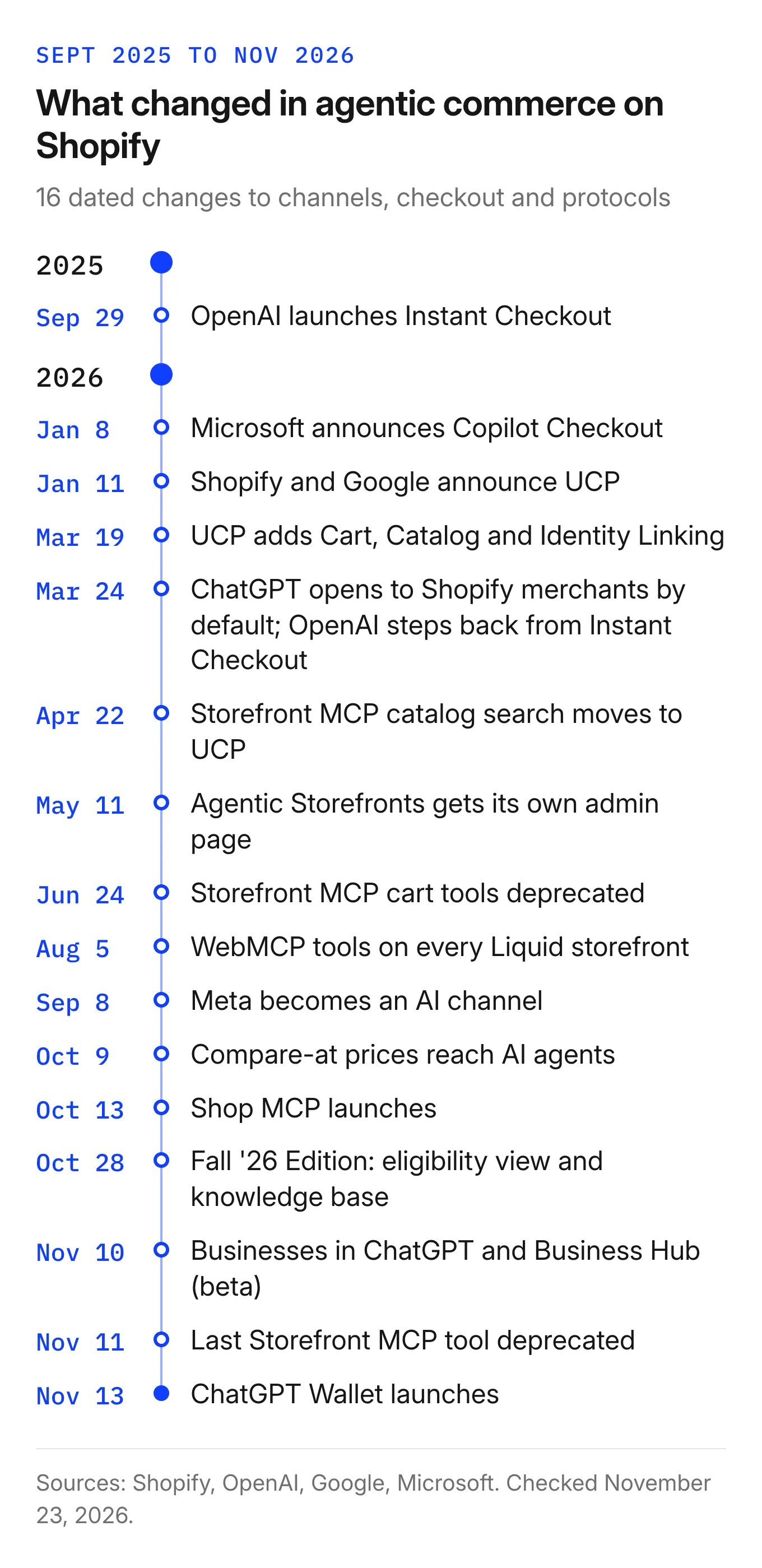
- Sep 29, 2025: OpenAI launches Instant Checkout in ChatGPT, built on the Agentic Commerce Protocol with Stripe
- Jan 8, 2026: Microsoft announces Copilot Checkout; Shopify merchants are enrolled automatically after an opt-out window
- Jan 11, 2026: Shopify and Google announce the Universal Commerce Protocol (UCP)
- Mar 19, 2026: UCP adds Cart, Catalog, and Identity Linking capabilities
- Mar 24, 2026: ChatGPT opens to Shopify merchants by default; OpenAI steps back from Instant Checkout
- Apr 22, 2026: Shopify moves Storefront MCP catalog search to UCP tools at
/api/ucp/mcp - May 11, 2026: Agentic Storefronts gets its own admin page with performance and query insights
- Jun 24, 2026: Shopify deprecates the Storefront MCP cart tools; by November, the catalog and cart tools on
/api/mcpare gone - Aug 5, 2026: WebMCP tools go live on every Liquid storefront for browser agents
- Sep 8, 2026: Meta becomes an AI channel in the Agentic section
- Oct 9, 2026: Compare-at prices start flowing to AI agents through Shopify Catalog
- Oct 13, 2026: Shop MCP launches for any agent, with Shop Pay checkout
- Oct 28, 2026: Fall '26 Edition: a Shopify Catalog eligibility view, a merchant-approved knowledge base, and Shop Pay in personal AI agents
- Nov 10, 2026: OpenAI launches Businesses in ChatGPT and Business Hub (beta)
- Nov 11, 2026: Shopify deprecates the last Storefront MCP tool, for policies and FAQs, maintained until January 15, 2027
- Nov 13, 2026: OpenAI launches ChatGPT Wallet: a US Pro user's agent can pay on a merchant's own checkout
Is it worth anything yet?
The early numbers are real but small, and most describe US retail as a whole. Four of them, each dated:
- Traffic: Adobe Analytics measured AI-referred traffic to US retail sites rising 693.4% in the 2025 holiday season, and added that "the base of users remains modest."
- Conversion: In September 2026, AI-referred visits converted 90% better than other traffic, by Adobe's count. In August 2025, they had converted 9% worse.
- Trust: Shopify's 2026 holiday survey of 18,000 shoppers in nine countries: 65% are likely to use AI for a shopping task, and 29% trust AI to make the purchase.
- Forecasts: Morgan Stanley forecasts $190 billion to $385 billion of US ecommerce spending by agentic shoppers in 2030; McKinsey forecasts up to $1 trillion of US retail revenue.
The gap between 65% and 29% is the one to plan around. Shoppers will let AI build a shortlist long before they let it pay.
Shopify has also published results from individual merchants. In October 2026, it reported an outdoor brand with five times as many AI-referred US orders as a year earlier.
A beauty brand's AI-referred sales nearly tripled, and a hypoallergenic apparel brand's grew 276%. Shopify gave no base numbers, so treat them as examples.
It's also uneven. On rollout day in January, an early-access merchant in the Shopify Community posted that there were no agentic sales yet.
Which AI channels can sell your products, and where does checkout happen?
Shopify's agentic storefronts cover ChatGPT, Microsoft Copilot, Google AI Mode and Gemini, Meta, and its own Shop app.
With agentic checkout on, ChatGPT's agent can complete some purchases in the chat; the rest finish on your own checkout in an in-app browser.
Copilot, Google, and Meta also run Shopify-powered agentic checkout when it's on.
Those are two different decisions. One merchant in the Shopify Community described "two separate considerations": products appearing in AI conversations, and checkouts that happen on the AI platform "without ever visiting your site."
Here is where each channel stands, checked against Shopify's Help Center on November 23, 2026:
- ChatGPT
- How your products get there: Shopify Catalog, by default
- Where checkout happens: With agentic checkout on, ChatGPT's agent completes some purchases in the chat; the rest finish on your checkout in ChatGPT's in-app browser or a new tab
- What to know: Needs Shopify Catalog eligibility and three store policies
- Microsoft Copilot
- How your products get there: Shopify Catalog
- Where checkout happens: Shopify-powered agentic checkout, US shoppers only
- What to know: No fees beyond payment processing; custom pixels and product bundles aren't supported
- Google AI Mode and Gemini
- How your products get there: Google and YouTube channel or Merchant Center
- Where checkout happens: Agentic checkout, still rolling out
- What to know: Needs a Merchant Center account and sales to the US, Canada, or Australia
- Meta
- How your products get there: Shopify Catalog, by default since September 8, 2026
- Where checkout happens: Agentic checkout where activated
- What to know: You must sell to at least one of 11 listed countries
- Shop app
- How your products get there: Shopify Catalog; can't be switched off in the Agentic section
- Where checkout happens: Managed in the Shop sales channel
- What to know: Counts in your Agentic report
- Personal AI agents (Muse from Meta, Claude Duet, Instinct)
- How your products get there: Shopify Catalog, through Shop
- Where checkout happens: Shop Pay inside the agent
- What to know: Nothing to activate; orders show the agent as the source
ChatGPT changed the most this year. OpenAI moved away from standalone Instant Checkout.
Shopify now says that, with agentic checkout on, ChatGPT's agent can complete some purchases with agentic tools such as UCP and WebMCP.
Since November 13, ChatGPT Wallet lets a US ChatGPT Pro user's agent complete purchases after the user approves each one.
OpenAI says its payment tokens work with existing checkout flows, though risk systems may still flag legitimate agent purchases.
Perplexity isn't on Shopify's list as of November 22, 2026. Its Instant Buy runs on PayPal and names merchants on other commerce platforms.
Each channel also has its own country rule. Copilot's agentic checkout shows only to US shoppers; Google needs you to sell to the US, Canada, or Australia; and Meta needs one of 11 listed countries.
If you sell across multiple markets, check each channel's list against yours.
On fees, Shopify lists none beyond payment processing for Copilot and Google agentic checkout. For ChatGPT, Shopify says there are no transaction fees beyond standard processing.
Discovery through Shopify Catalog is on by default for eligible stores; where checkout happens depends on the channel.
What are UCP, Shopify Catalog, and Shop MCP, and do you need to do anything?
UCP, the Universal Commerce Protocol that Shopify built with Google, is the shared language agents use to search, build carts, and check out. Shopify Catalog is the structured product data they read.
Shop MCP is Shopify's hosted connection for agents. Your store already publishes its UCP profile, so there is nothing to install, and the work left for you is in your product data.
Shopify Catalog: Shopify's structured product source. Shop, AI platforms, and agents use it to search and understand titles, descriptions, images, pricing, options, and availability.
Being in it doesn't guarantee a placement. Shopify says each channel "controls the final ranking, wording, and shopping experience" (Shopify Help Center).
UCP: An open standard co-developed by Shopify and Google that covers shopping from discovery to post-purchase support. It works with any payment processor.
On Shopify's UCP page, merchants and agents declare the capabilities they support, and the protocol negotiates the difference. Your store's profile already sits at /.well-known/ucp.
Trust tiers: Agents that authenticate with a token can get permission to complete checkouts themselves. Other agents send the buyer to your checkout page.
Shop MCP: Shopify's hosted MCP server for any agent, live since October 13, 2026. It searches over 1 billion products in Shopify Catalog, builds carts, and completes Shop Pay checkout.
ACP: OpenAI's Agentic Commerce Protocol now covers product discovery, with merchants sharing feeds and promotions. OpenAI says Shopify merchants are already covered through Shopify Catalog, with no extra work.
Checkout Kit and ECP: Checkout Kit embeds Shopify checkout inside an app, and Shopify says UCP's Embedded Checkout Protocol was born from it. Neither needs action from you unless you build your own app or agent.
WebMCP: Since August 5, 2026, browser agents can search, manage carts, and go to checkout on Liquid storefronts, in the shopper's own tab. Agent support is limited to Chromium browsers through an origin trial.
Since September 28, browser agents can also read and update checkouts, handing control back to the buyer for steps like 3D Secure, with no merchant setup.
If you built on Storefront MCP: The catalog and cart tools on the per-store /api/mcp endpoint were removed. Catalog search moved to UCP tools in April, and the cart tools followed.
The last tool, for policies and FAQs, is maintained until January 15, 2027. Shopify points developers to Shop MCP or UCP at /api/ucp/mcp.
If an agency built an AI chat on the old endpoint, have it checked before January 15.
llms.txt and agents.md: Every Shopify store already serves /agents.md, /llms.txt, and /llms-full.txt. You can change what they say with Liquid templates in your theme.
For llms.txt, MCP, ACP, and UCP side by side, see the four-layer table in our guide to what agents read from your catalog.
What should you check in Sales channels > Agentic this week?
Open Sales channels > Agentic and confirm four things. Your store is eligible for Shopify Catalog and shows a product count, and your Terms of service, Privacy policy, and Return and refund policy are complete.
The channels you want are on, and the knowledge base facts agents receive are correct. In order:
- Find the section. If Sales channels > Agentic is missing, you aren't opted out. Shopify says it's usually staff permissions or an unpinned menu item.
- Check eligibility. An eligible store sees its Shopify Catalog product count; an ineligible one sees a reason. Each product needs a title, at least one image, a price above zero, and a published, listed status.
- Complete three policies. Terms of service, Privacy policy, and Return and refund policy are required for every AI channel.
- Choose your setting. "Manage for me" is the default, and it enrolls your store in new channels and features automatically. You can turn access off one channel at a time, so decide on purpose.
- Review the knowledge base. Since Fall '26, agents that ask Shopify about your store get only facts you published. Check your return window, shipping destinations, and gift services.
- Run the search preview. Try your five biggest queries and note your listing quality signals. Shopify calls the preview a directional signal, because channels re-rank results.
- Optional: claim your ChatGPT profile. Business Hub is separate from Shopify Catalog, and Shopify merchants can verify through their store. One Community member planned to check the Shopify channel first, which is the right order.
How do you read the Agentic sales report without fooling yourself?
Read the Agentic report as a mix of channels. Shopify includes Shop app sessions, referrals, and sales in it, combines two kinds of sales into one figure, and shows no analytics for headless stores yet.
Log each channel separately every week, and compare conversion using Shopify's own definition.
The report gives four metrics per AI channel: sales, orders, online store sessions, and online store conversion. Shopify calculates conversion as sessions that completed checkout divided by sessions.
Read as one number, it misleads in three ways:
- Shop is inside it. Shopify counts Shop as an agentic storefront, and Shop app sessions, referrals, and sales are all included in the report.
- Two kinds of sales are summed. The sales figure adds referral sales and agentic-checkout sales together.
- Headless stores see nothing yet. Agentic analytics aren't available for headless stores, so Hydrogen brands need another source for now.
Our answer is a weekly three-number log. It takes one row per week, per channel, with Shop on its own row, and it uses only Shopify's metrics plus one test you run yourself:
- Orders
- What you log: Orders per channel (Shop, ChatGPT, Copilot, Google, Meta)
- Where it comes from: Sales channels > Agentic
- Conversion
- What you log: Online store conversion per channel
- Where it comes from: The same report, Shopify's definition
- Mirror test
- What you log: How many of 10 fixed, unbranded category prompts show your products, per channel
- Where it comes from: You, with the same wording every week
For the mirror test, type the same 10 prompts into ChatGPT, Copilot, and Gemini, logged out where you can. Record appearance counts out of 10, never a "rank," because answers vary from run to run.
The 90-day plan download at the end of this guide includes this log as a blank table, one row per week for 13 weeks.
Two more dashboards sit outside Shopify. Google's Merchant Center shows AI performance insights, including share of voice in AI Mode and AI Overviews.
ChatGPT's Business Hub shows mentions and website clicks once you claim your business. Neither feeds your Shopify report.
Expect December to jump. Adobe forecasts AI traffic to US retail sites will rise 130% this holiday season, so judge your own numbers against your week 1 baseline.
Should you leave every AI channel on?
For most stores, yes. Turning a channel off can take up to 7 days to stop sharing your products through Shopify Catalog, and they stay findable through web crawling.
To hide a live product completely, Shopify points to Unlisted status, which also hides it from Google and your own store search. Fix the data instead, product by product.
Some merchants want none of it. "I don’t want to be on the AI shop channels," one wrote in the Shopify Community. That's a fair position, and the switch works like this.
What switching a channel off does:
- Stops that channel's Shopify Catalog access from that point on.
- Takes up to 7 days for sharing to stop.
What it doesn't do:
- Remove your products from AI answers. They can still be found the way search engines such as Google list them.
Blocking AI crawlers in robots.txt is a separate switch. Shopify says it affects only open-web discovery, and Shopify Catalog keeps sending data to the channels you've activated.
If your products need explaining: One merchant asked whether to "trust an AI to sell them" for products "that need a lot of explaining." Put compatibility, sizing, and use-case facts in the description field itself.
A reply in the same thread put the catch plainly: AI assistants "mostly read standard Shopify descriptions and variant titles, not text trapped inside product images, custom theme tabs, or external product option widgets."
Copilot and Google also ask for legal disclosures in the first 6,000 characters of your descriptions.
If you hide prices or sell B2B: A merchant in the same thread worried that "a price you hide on your site could still show inside ChatGPT or Copilot." Agentic storefronts are D2C only, and shared products show the D2C price.
Shopify excludes B2B-only products when it can identify them. If an app or theme edit hides your B2B prices, Shopify might not detect them. Our guide to B2B pricing on Shopify Plus covers the setup.
If legal or brand must approve each channel: Keep "Manage for me" on if you want new channels added automatically. Switch it off, or turn off single channels, if each one needs sign-off.
Where you write store-level facts: Your knowledge base and your llms.txt are the two places you control what agents read about the store itself.
Our view: leave the channels on, and put the effort into the data they read.
What did we find when we checked 10,072 products in 32 Shopify stores?
The common gap was description length. Across 10,072 products from 32 well-known Shopify brands, the median store had 66% of products with a standard description under 50 words.
The typical store's median description was 36 words, and almost every product had images. Shopify's own listing score measures description length, so start there.
Why we checked: Shopify publishes the product fields AI platforms consider. Its listing insights score description word count, image coverage, and variant and option completeness.
We hadn't seen anyone publish what real stores look like against that list, so we measured it.
How we checked: On November 22, 2026, we read the public product JSON of 40 direct-to-consumer brands on Shopify, one store at a time, with pauses between requests.
Eight didn't serve product JSON, so we left them out instead of counting them as zero.
That left 32 stores across 11 categories and 10,072 products, up to 500 per store. None is a customer of ours, and we don't name any of them.
The sample is hand-picked, not random, and not limited to Shopify Plus. It's a one-day snapshot from the weekend before Thanksgiving, when sale pricing runs high.
Nothing here measures AI visibility or sales. Shopify notes that relevance also depends on popularity, engagement, and brand recognition.
| Field (from Shopify's list) | Median store, % of products (stores above 25%) |
|---|---|
| Standard description under 50 words (including empty) | 66.0% (22 of 32) |
| Standard description empty | 8.2% (7 of 32) |
| Image missing | 0.0% (0 of 32) |
| Product type empty | 1.0% (3 of 32) |
| Tags missing | 0.1% (3 of 32) |
| Code-like values in non-size options | 0.5% (0 of 32) |
| Every public variant unavailable | 5.8% (5 of 32) |
| Compare-at price above the selling price | 41.1% (19 of 32) |
Then we removed gift cards, shipping protection, samples, bundles, warranties, donations, $0 items, and sold-out items. That left 8,074 products.
Even then, 18 of the 32 stores had more than half of their merchandise under 50 words of standard description, and the other 14 sat at or below half. The median store sat at 76%.
Stores ranged from 0% to 100% on this measure, with 37 to 492 products each after the cleanup.
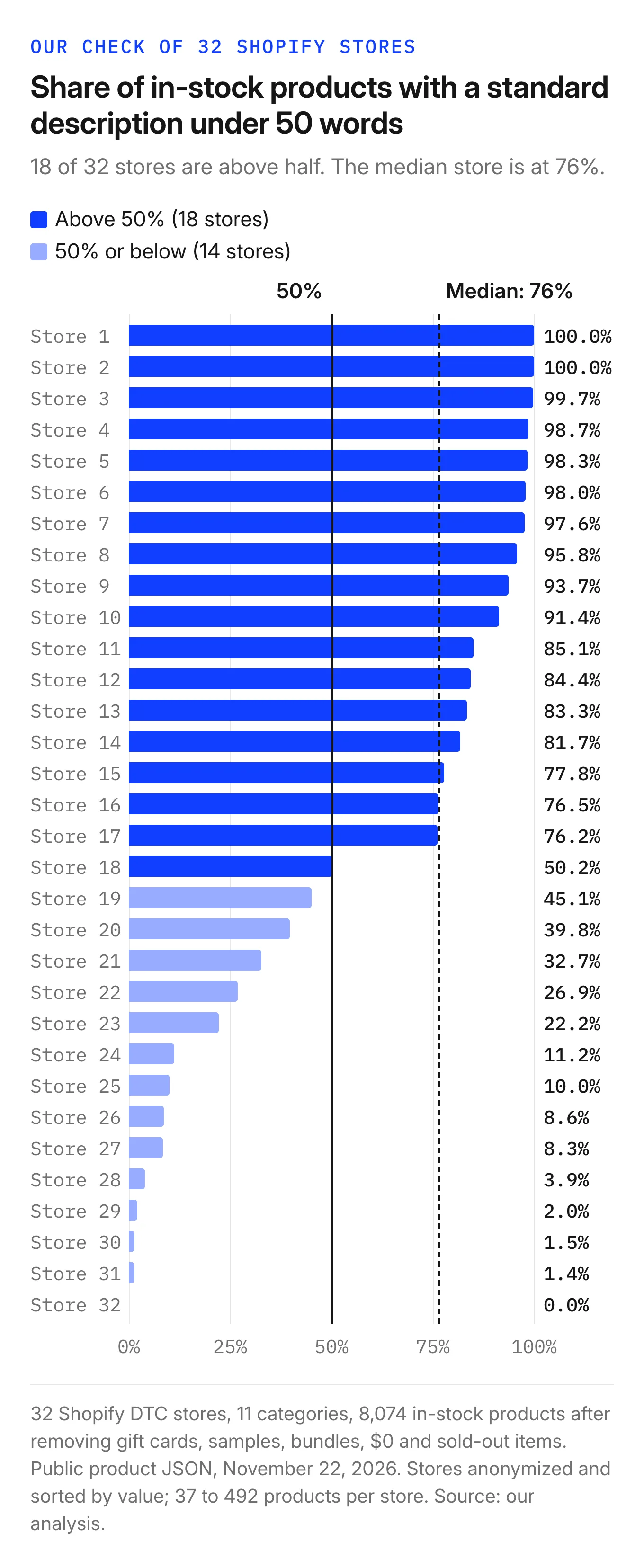
One limit applies to that number. Public JSON shows only the standard description field, and many brands keep longer copy in metafields or theme tabs.
A short standard description means the default field is thin. Whether agents see thin copy depends on what Shopify Catalog is mapped to.
What was fine: Images. The median store had 0% of products without an image, and the typical store's median was six images per product.
Product type was usually filled in (median store 1% empty), though 3 of 32 stores left it empty on more than a quarter of products. Code-like option values were rare.
What we couldn't see: Public product JSON doesn't include barcodes, image alt text, Shopify product category, metafields, reviews, or policies. You can count three of those from your own product export:
- Share of variants with a Variant Barcode filled in
- Whether Product Category is set on each product
- Share of image rows with Image Alt Text
What to fix first: If your long copy lives in metafields, the Channel mapping page lets you point Shopify Catalog at those fields. You can't map product category there, so set that on the product.
So your fix may be a mapping change before it's a rewrite. A Community member noted how many catalogs store useful data "in undocumented metafields / metaobjects."
Channel mapping also groups variants into one listing. If your variants live as separate products, our guide to Combined Listings covers that problem, and our filtering guide covers option names that filters can use.
Compare-at prices: About half of the products we saw (52.3%) carried a compare-at price above the selling price.
Shopify Catalog now passes compare-at prices to agents, and you choose which one it uses as the list price.
One US-only lever: Shopify says products badged through Shop Promise "can also rank higher" in the Shopify Catalog data shopping agents use.
Adobe measured rendered pages rather than product data, and it also found product pages weakest. Its April 2026 benchmark scored US retail product pages 66% AI-readable on average, below homepages at 75%.
For field-by-field fixes, run the checks in our agent-readiness checklist.
Do your merchandising rules carry into ChatGPT and Copilot?
No. ChatGPT and Copilot rank products from Shopify Catalog data, Google works from your Merchant Center feed, and Shopify says each channel controls the final ranking and wording.
Your pins and ranking rules apply on your storefront and on assistants you run that search through your own engine. Elsewhere, your levers are data and settings.
We sell search and merchandising software, and this answer works against our own category. Shopify's documentation is plain about it:
- The Agentic search preview shows raw Shopify Catalog output, and channels "often re-rank results based on their own logic".
- Shopify's developer docs let agent platforms "replace Shopify's product ranking with your own".
- Being in Shopify Catalog doesn't guarantee an appearance or a position in any AI answer.
That splits control into two columns:
Yours: product data and its Channel mapping, store policies, knowledge base facts, channel and checkout settings, and what you publish in llms.txt or agents.md.
The channel's: ranking, the wording of answers, the shopping experience, and which checkout path a given AI uses.
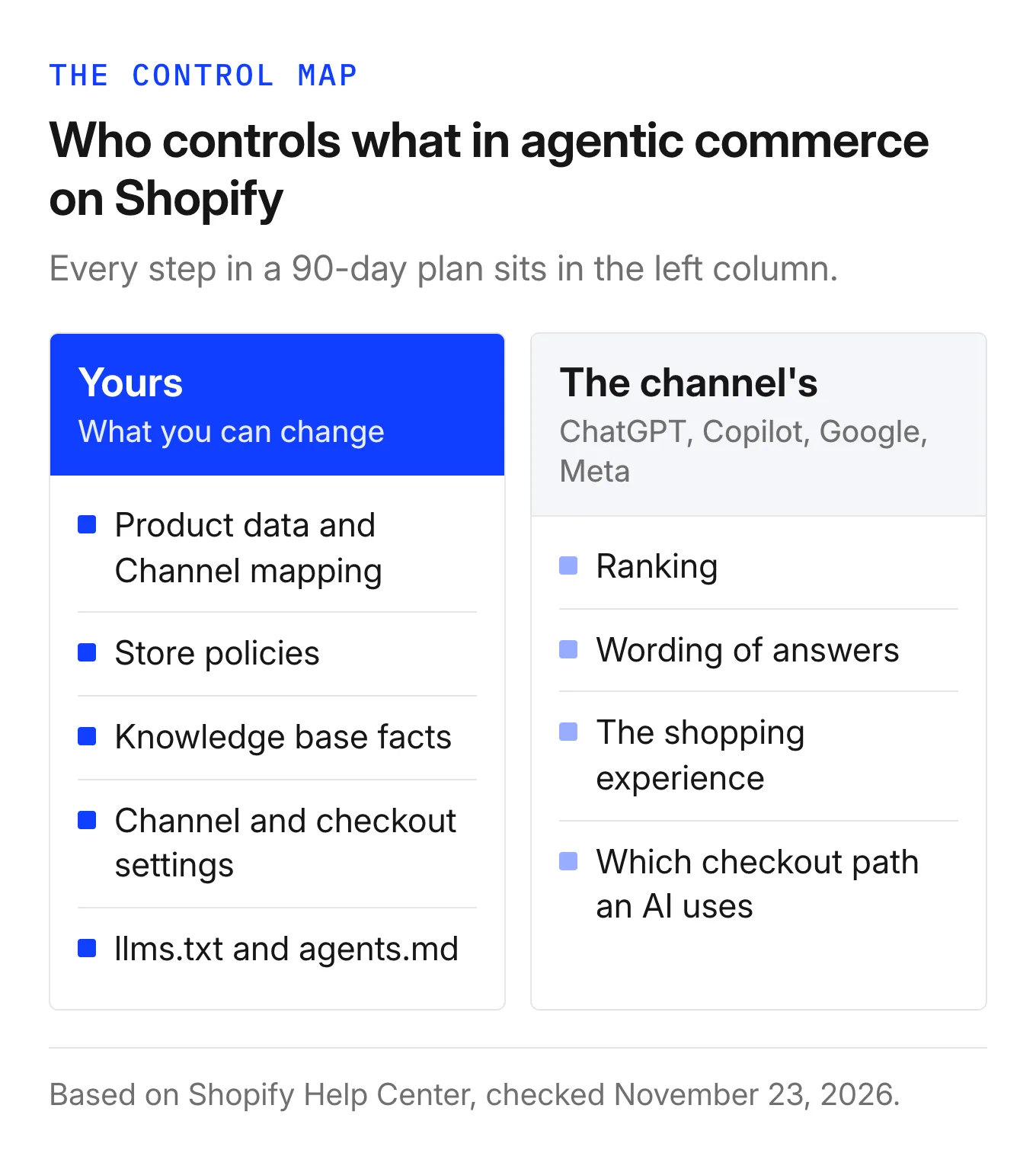
Every step in the 90-day plan below sits in the first column. Your rules still apply in two places:
- Your storefront. AI-referred visitors land there, and Adobe found they converted 90% better than other US retail traffic in September. What they find depends on your AI Search and your custom ranking.
- Assistants you deploy. An assistant that searches through your own engine carries your rules with it. Our read-only Storefront MCP server has a
browsetool documented with "sort orders, merchandising, and faceted filtering."
For the first, start with zero-result searches and an audit of your autocomplete and search results. For the second, run the parity tests in Storefront MCP for Shopify Plus.
A self-check: Take 10 head queries from your own search analytics. For each, compare the top results in the Agentic search preview with your live site search. Expect differences, and don't expect pins to close them.
Where do our MCP servers and AI connectors fit?
We do two things here. Our Claude connector and ChatGPT plugin let your team run merchandising and search settings from an AI assistant, with store-scoped permissions.
Our read-only Storefront MCP server lets you put an assistant in front of shoppers that searches through your own ranking. Neither puts your products into ChatGPT shopping; Shopify Catalog does that.
On our sales calls this year, the agent question we heard was whether merchants could run their merchandising from an AI assistant.
For your team: Our Claude connector and ChatGPT plugin connect to our MCP server. You sign in, then choose which stores and permissions the connection gets, and it can never exceed your own access.
From there, an assistant can adjust Merchandising rules and investigate products with you.
For automations: Service accounts give agents and scripts their own credentials and store roles, separate from any person on your team.
For shoppers: Our Storefront MCP server is read-only and uses your storefront API token, so you can put an AI assistant into customer-facing experiences. Its tools include search-text, browse, and recommendations.
For feedback from agents: Agentic Feedback adds a block to your store's llms.txt, so agents can report specific search and discovery problems back to us through the app proxy.
Shopify now serves /llms.txt automatically, so you add that block through an llms.txt.liquid or agents.md.liquid template in your theme.
For checking our index: The How AI sees this product panel shows what we indexed for a product, what we left out, and why. It describes our on-site search index. What ChatGPT reads comes from Shopify Catalog.
What does a 90-day agentic commerce plan look like?
Run it around peak. In weeks 1 to 4, through December, confirm your settings, complete your policies, and start a weekly report log without touching the catalog.
In weeks 5 to 9, in January, rewrite descriptions for top sellers, map metafields, and fill barcodes. In weeks 10 to 13, rerun your checks against the baseline.
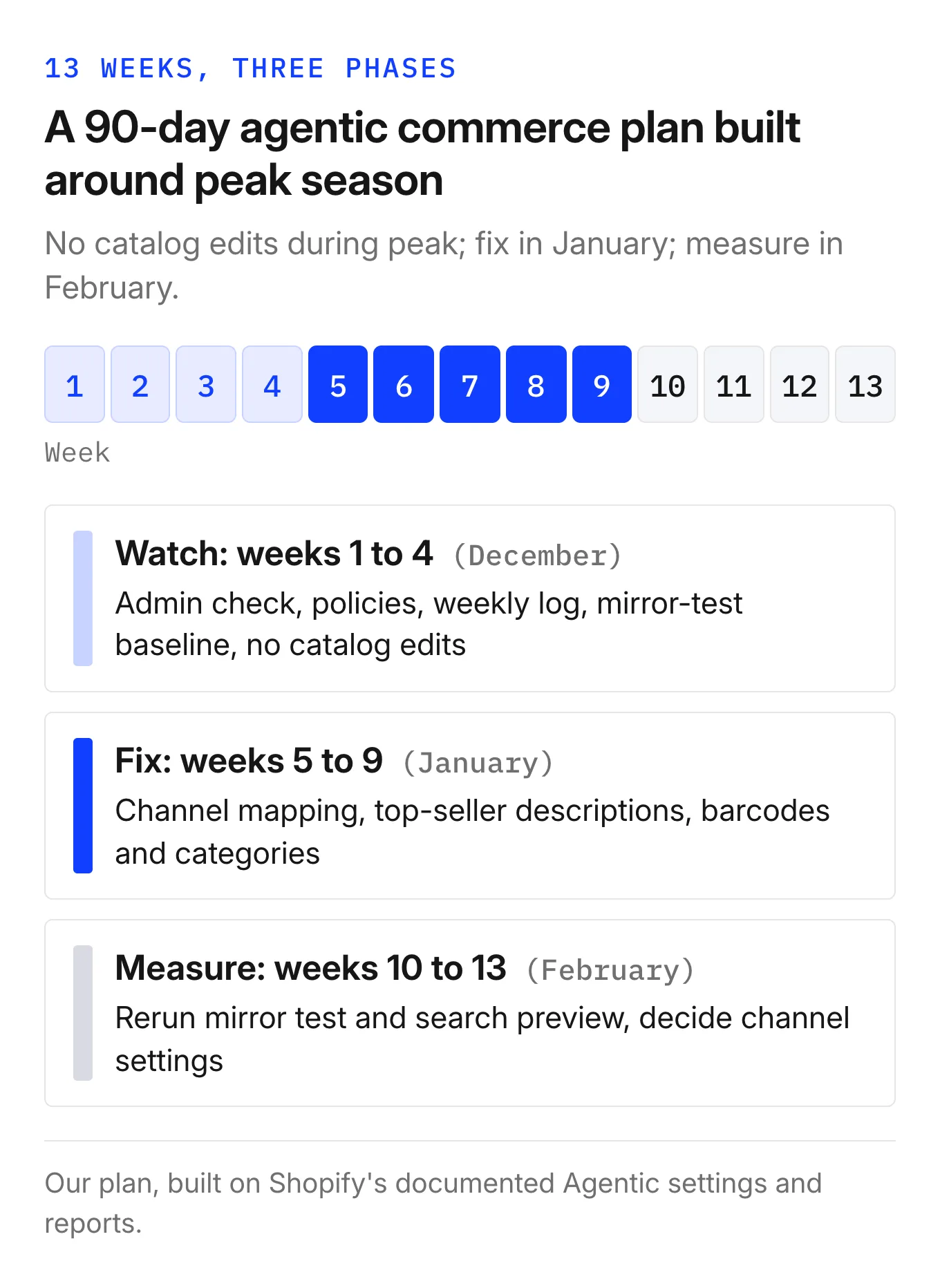
Catalog edits wait for January because December is peak, and peak is a bad time to change product data across a store. December is also your cleanest baseline, since you change nothing and only watch.
- Week 1: Run the admin check above; screenshot your settings; fix any Ineligible reason
- Owner: Head of ecom
- Done when: Product count visible, policies complete
- Week 1: Baseline: 10 unbranded mirror-test prompts per channel; log appearances out of 10
- Owner: Merchandiser
- Done when: Baseline table saved
- Weeks 1 to 4: Weekly three-number log, with Shop broken out
- Owner: Analyst
- Done when: Four weekly rows
- Week 2: Review the knowledge base; claim your ChatGPT Business Hub profile if you want its insights
- Owner: Head of ecom
- Done when: Facts published
- Week 2: Ask your fraud and bot-protection providers how they treat agent purchases; don't auto-cancel them by rule
- Owner: Head of ecom and payments owner
- Done when: Provider answer logged
- Weeks 3 to 4: Export products; count short descriptions, barcodes, categories, and alt text (no edits during peak)
- Owner: Merchandiser
- Done when: Gap list for your top 50 sellers
- Weeks 5 to 6: Channel mapping: point title and description at richer metafields; set the list-price source
- Owner: Merchandiser and developer
- Done when: Mapping saved
- Weeks 5 to 8: Rewrite top-seller descriptions: fit, material, use case, compatibility; legal disclosures early
- Owner: Copy and merchandising
- Done when: Top 50 above your word target
- Weeks 6 to 8: Fill barcodes and Shopify product category where you have them
- Owner: Merchandiser
- Done when: Coverage logged
- Week 7: If you run your own on-site assistant, run the parity tests
- Owner: Developer
- Done when: Eight tests logged
- Weeks 8 to 9: If you're evaluating an on-site AI shopping agent, score it with golden queries
- Owner: Merchandiser
- Done when: Scored set
- Weeks 10 to 12: Rerun the mirror test and search preview; compare with week 1
- Owner: Merchandiser
- Done when: Before-and-after table
- Week 13: Decide channel settings for the next quarter, with numbers
- Owner: Head of ecom and growth
- Done when: One-page decision
The week 2 payments step is there because OpenAI says risk systems may flag legitimate ChatGPT Wallet purchases, and browser agents can now work inside checkout. A blanket rule against bots could cancel real orders.
Set your own word target. We used 50 words as a floor for measuring; Shopify's listing insights count words but publish no threshold.
For scoring any AI that answers shoppers on your site, our write-up on how we evaluate search quality shows the metrics we use on our own engine.
The whole plan fits on one printable page. The PDF has:
- The six-step week 1 admin check
- All 13 plan rows, each with a tick box, an owner, and a done-when
- A blank 13-week log for the three numbers
- Three notes on reading your results
The channels run whether you act or not. What you control is the product data they read and what AI-referred shoppers find once they land on your store.
That second part is what we build: search and merchandising for Shopify Plus. If you want a second pair of eyes on your catalog and your on-site search before January, book a demo.
FAQs
1. Is my Shopify store already selling in ChatGPT? Probably, if it's eligible. Shopify turns agentic storefronts on by default, and ChatGPT reads eligible products through Shopify Catalog. Check Sales channels > Agentic for a product count, and complete your three store policies.
2. Can shoppers buy inside ChatGPT? Partly. With agentic checkout on, ChatGPT's agent can complete some purchases in the chat; the rest finish on your checkout. Since November 13, ChatGPT Wallet lets US Pro users approve each agent payment.
3. What is the difference between agentic storefronts and claiming my business in ChatGPT? Agentic storefronts send your products to ChatGPT through Shopify Catalog. Business Hub, in beta since November 10, 2026, covers your business profile: you claim it and see mentions and website clicks. You can use both.
4. Does the Agentic sales report include the Shop app? Yes. Shopify counts Shop as an agentic storefront, and Shop app sessions, referrals, and sales are all in the report. The sales figure also sums referral and agentic-checkout sales, so split each channel out first.
5. Do I need to do anything for Shopify UCP? There's nothing to install. Your storefront already publishes a UCP profile at /.well-known/ucp. What you control is your product data, policies, knowledge base, and which channels can use Shopify Catalog.
6. Can I hide some products from AI channels? To hide a live product, Shopify points to Unlisted status, which also hides it from Google and your store search. Switching a channel off takes up to 7 days, and crawlers still find products.
7. Does blocking AI crawlers in robots.txt stop ChatGPT from showing my products? No. Blocking AI crawlers affects only open-web discovery. Shopify Catalog still sends product data to the agentic storefronts you've activated. To stop that, change Shopify Catalog access in Sales channels > Agentic.
8. Is Perplexity one of Shopify's agentic storefronts? Not as of November 22, 2026. Shopify's Help Center lists ChatGPT, Google AI Mode and Gemini, Microsoft Copilot, and Meta. Perplexity's Instant Buy runs through PayPal and names merchants on other commerce platforms.
9. Do my search app's merchandising rules apply in ChatGPT? No. ChatGPT and Copilot rank Shopify Catalog data, Google uses your Merchant Center feed, and each channel controls the final ranking. Your pins and ranking rules apply on your storefront and in assistants using your engine.
10. What happened to Shopify's Storefront MCP? Shopify moved it to UCP. The catalog and cart tools on /api/mcp were removed, and the policies and FAQs tool works until January 15, 2027. Developers use Shop MCP or UCP at /api/ucp/mcp.
Written by

Jake Casto
Founder, Layers
Jake Casto is the founder of Layers, the enterprise search and merchandising platform built for Shopify Plus. He previously co-founded Proton, a Shopify Plus engineering studio that shipped more than 400 storefronts, where Layers began as an internal tool for a problem that kept repeating. He writes about search infrastructure, performance, and the engineering behind discovery at scale.
View all articlesRelated articles
More reading on search, merchandising, and product discovery.
Making Your Shopify Plus Catalog Agent-Ready: What ChatGPT, AI Agents, and Perplexity Actually See
What ChatGPT, AI agents, and Perplexity read from your Shopify Plus catalog, the five fields that decide an agent pick, and how to audit yours. By the Layers team.

Deb Mukherjee
Jun 19, 2026 · 16 min read
AI Merchandising, Task by Task: What to Automate and What to Keep Human
Which merchandising work should AI do? 19 Shopify Plus tasks sorted into automate, guardrail, or keep human, with the research on when overrides pay off.
Jake Casto
Nov 24, 2026 · 21 min read
Strikethrough Pricing in Search Results: When a Compare-at Price Helps and When it Backfires
The median store in our 32-store Shopify sample had 41% of products struck through. Which search tiles should keep that line, and which rules apply?

Lukas Tanasiuk
Nov 24, 2026 · 20 min read