AI Merchandising, Task by Task: What to Automate and What to Keep Human
Which merchandising work should AI do? 19 Shopify Plus tasks sorted into automate, guardrail, or keep human, with the research on when overrides pay off.
Key takeaways
Much of a merchandiser's week goes to decisions a spreadsheet could make: pushing sold-out styles down, clearing their pins, switching a sale rule on at midnight, re-sorting best sellers every morning.
The rest goes to calls no model should make alone.
We build merchandising software for Shopify Plus, so we have a stake in this. It also means we can show you exactly where our own automation stops, and why.
On our sales and customer calls, the pain we hear most is a team moving products around collections by hand. Below is a four-question test for that work and 19 common merchandising tasks sorted into automate, guardrail, or keep human.
The research comes from forecasting experiments published in Management Science and from field studies at an auto-parts retailer and at Zara.
What is AI merchandising?
AI merchandising is software that decides where products appear (collection order, groupings, recommendations, and where a search lands) from live signals such as sales, inventory, engagement, and query meaning.
It keeps updating those decisions without anyone re-sorting by hand. Rules-based automation, by contrast, only executes conditions a person wrote.
Vendor pages that rank for this term often blur it with one-to-one personalization. Four different things get sold under the label, and each one fails in its own way:
- Rules-based automation
- What decides: conditions a person set
- Who writes the logic: you
- Shopify Plus example: an automated collection adds products that match your conditions
- What goes wrong: the rule goes stale
- AI merchandising
- What decides: scored signals like sales and inventory
- Who writes the logic: you pick the signals; software ranks
- Shopify Plus example: a collection ranked by the last 7 days of sales
- What goes wrong: thin data, since new products have no sales history
- Personalization
- What decides: the shopper's context
- Who writes the logic: you set the segments; software varies the result
- Shopify Plus example: a collection ranked by sales in the visitor's country
- What goes wrong: too little signal per segment
- AI search
- What decides: the meaning of the query
- Who writes the logic: software interprets; you set the policy
- Shopify Plus example: results scored on meaning, keywords, engagement, freshness, and stock
- What goes wrong: vague or broad queries
Shopify's automated collections add products that "must match" conditions you set. Our Best Selling sort ranks by total sales over the last 7 days, and new products sit near the bottom because they have no sales history.
Segmented sorting ranks by each visitor's context, such as country, and falls back to the overall value. That's the personalization entry above, and it only pays off with enough signal; here's when personalization beats a bestseller list.
Our search ranking scores every result on "semantic similarity, keyword matching, engagement metrics, freshness, and inventory status." Compare that with the rules era, when teams kept synonym lists by hand.
Gartner's Anushree Verma draws a similar line for AI in general: use "AI agents when decisions are needed, automation for routine workflows and assistants for simple retrieval" (Gartner, June 2025).
Shopify covers part of this natively. New collections default to a "Most relevant" sort based on sales performance, and you can ask Sidekick to reorder a collection. Related product recommendations are generated automatically for every product.
How do you decide what to automate?
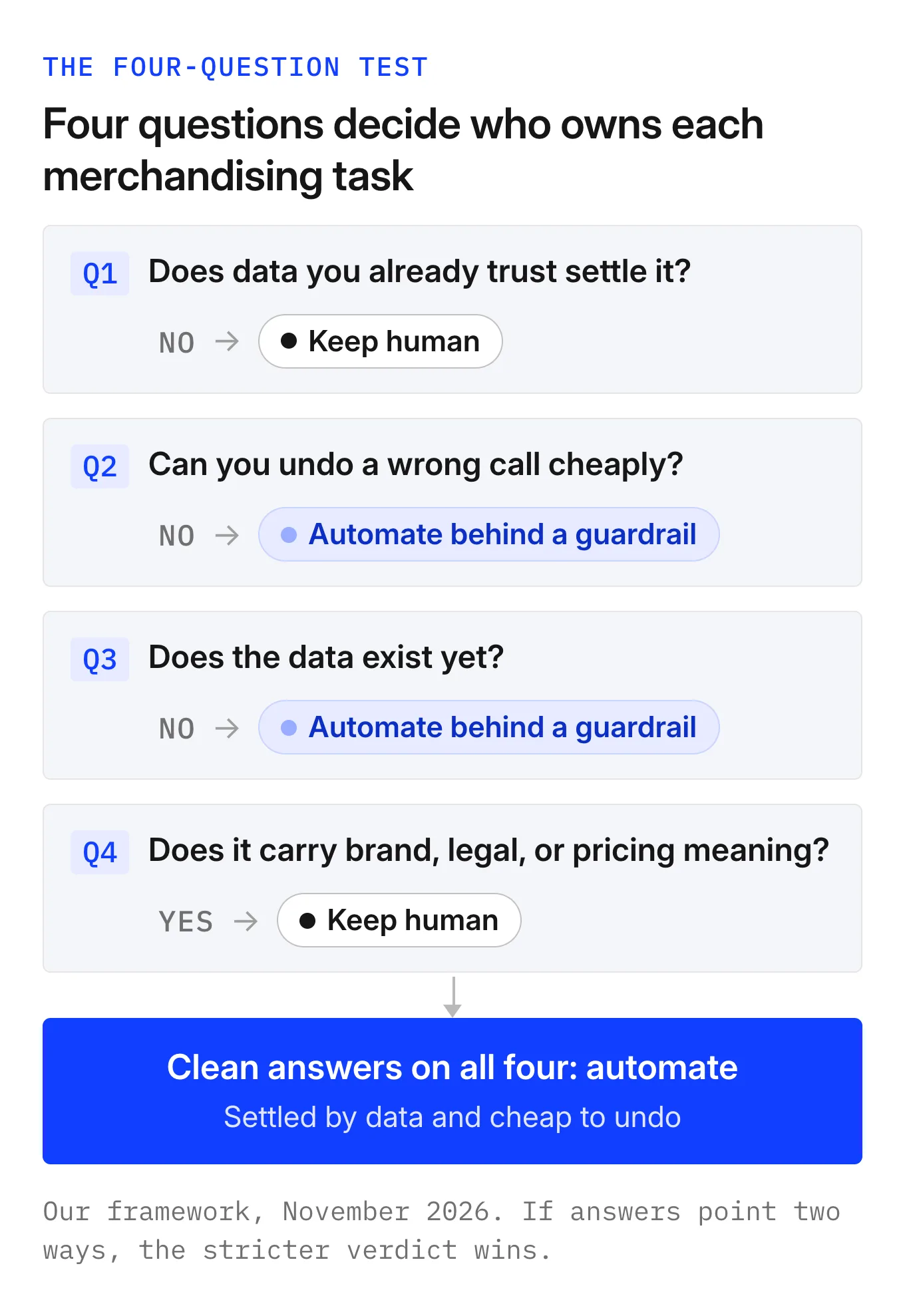
Ask four questions about each recurring decision. Does data you already trust settle it? Can you undo a wrong call cheaply? Does the data exist yet? Does it carry brand, legal, or pricing meaning?
Clean answers mean automate. Thin data or costly mistakes mean a guardrail. Brand, legal, or pricing meaning means a person decides.
- Does data you already trust settle it? Zero inventory settles whether a product belongs on row one, and a priority rule can push out-of-stock products to the bottom. No field settles which product tells your holiday story.
- Can you undo a wrong call cheaply? A misfiring scheduled rule shows up in Config History with a reason, and you can restore the old version. You can't undo a price cut that taught shoppers to wait for a sale.
- Does the data exist yet? New products have no sales history, so a sales-based sort places them near the bottom. They also get category-level recommendation fills that can look unrelated.
- Does it carry brand, legal, or pricing meaning? "Eco-friendly" on a badge is an environmental claim that US regulators expect you to back up. No sales field holds a brand rule like never promoting pork in a kosher store.
A "no" on question 2 or 3 means a guardrail. A "no" on question 1, or a "yes" on question 4, means a person decides and software carries it out. If the answers point two ways, the stricter verdict wins.
The spectrum itself isn't ours. NIST's AI Risk Management Framework says human-AI configurations "can span from fully autonomous to fully manual."
Gartner's top autonomy level has agents acting "independently within defined guardrails, with humans reviewing exceptions, audit logs and aggregated outcomes rather than individual decisions" (Gartner, May 2026). Mapping that spectrum onto three merchandising columns is our own framework.
Which merchandising tasks should you automate, guard, or keep human?
Of the 19 merchandising tasks we mapped, 7 are safe to automate outright, 7 should run automatically behind a guardrail, and 5 should stay with a person.
The safe ones are settled by inventory, dates, or recent sales and are cheap to undo. The human ones set the goal, the story, the price, or a public claim.
Under each task, "runs automatically" describes what our merchandising rules and related features do today, checked against our public docs in November 2026.
Automate: 7 tasks
- Push sold-out products below in-stock ones
- Runs automatically: priority rule demotes zero inventory; search ranking weighs stock
- A person owns: which locations count as sold out
- Guardrail: preview; location scope
- Clear pins and recommendation slots when a product sells out
- Runs automatically: pins deleted on sell-out; blocks hide products with no available variants
- A person owns: re-pinning after a restock
- Guardrail: change log
- Re-rank collections by recent sales every day
- Runs automatically: 7-day sales sort as default; Trending offered only after a per-store backtest
- A person owns: the metric and window
- Guardrail: backtest; staged metric switches
- Switch campaign rules and drops on and off on schedule
- Runs automatically: rules, pins, and banners publish on schedule; drops land in pinned slots
- A person owns: the campaign and its dates
- Guardrail: change log labels each scheduled flip
- Send "returns" or "shipping" searches to the policy page
- Runs automatically: daily crawler creates informational redirects
- A person owns: edits to crawler redirects
- Guardrail: manual redirects win; source badge
- Compute data badges (new, % off, low stock)
- Runs automatically: computed attributes from dates, prices, and variant availability
- A person owns: badge wording and design
- Guardrail: preview
- Watch for problems (buried sellers, dead pins, ignored searches), detection only
- Runs automatically: nightly insights; daily anomaly review
- A person owns: the fix
- Guardrail: insights never change live ranking
Guardrail: 7 tasks
- Give new arrivals exposure in a sales-based sort
- Runs automatically: soft boost lifts tagged new products into view
- A person owns: tagging, removing the tag after launch, hero pins
- Guardrail: pins beat boosts
- Reorder the front page of broad searches
- Runs automatically: AI reranking on broad queries only
- A person owns: strength setting; retagging misclassified products
- Guardrail: 0% is off; demotes only past 50%; log of demoted products
- Fill recommendation blocks
- Runs automatically: strategy-driven blocks; category fills for new products
- A person owns: strategy per placement; curated complements
- Guardrail: minimum products and fallbacks; hide out of stock
- Push clearance and final-sale products down
- Runs automatically: demote expressions; soft demotion in search
- A person owns: what counts as clearance
- Guardrail: shopper intent wins; relevance threshold
- Order and group filter values
- Runs automatically: AI proposes an order and groups
- A person owns: the call to save or discard
- Guardrail: lands as an unsaved draft
- Apply a suggested fix
- Runs automatically: insights stage boosts and metric switches; some search fixes run automatically
- A person owns: reviewing and publishing
- Guardrail: staged edits; Fix status shows rollbacks
- Redirect product-intent searches to a collection
- Runs automatically: semantic matching on terms you configured
- A person owns: the destination
- Guardrail: test that product searches don't trigger it
Keep human: 5 tasks
- Decide what the ranking optimizes for
- Runs automatically: ranking by the metric you chose
- A person owns: the choice between revenue, units, margin, and sell-through
- Guardrail: sort order experiments (Beta)
- Pick hero products and campaign stories
- Runs automatically: pins, including ad-landing products pinned per campaign
- A person owns: which products, and why
- Guardrail: the dead-pin insight
- Set markdown depth and prices
- Runs automatically: nothing; prices sit outside merchandising rules
- A person owns: price and depth
- Guardrail: pricing tools with a person approving
- Write claim badges and banner messaging
- Runs automatically: banner slots, targeting, and schedules
- A person owns: claims and creative
- Guardrail: legal review for claims
- Decide what never gets promoted, as a written policy
- Runs automatically: policy applied to every AI step in search
- A person owns: the policy
- Guardrail: shopper intent takes precedence
The guardrail tasks are where most of the value and most of the risk sit.
To sort your own work, the one-page worksheet below gives you a 10-row grid for the four questions, the scoring key, five steps to run it, and these 19 tasks as a sorted reference.
Which merchandising tasks are safe to automate today?
Automate the work that follows mechanically from inventory, dates, and recent sales. Pushing sold-out products down, clearing their pins, re-ranking by last week's sales, and switching scheduled campaigns on and off all qualify.
Data settles each one, and a mistake costs minutes. Making a person approve each change mostly adds delay; a change log serves you better.
Sold-out products sink. A priority rule can push "out of stock, discontinued, low ratings" products to the bottom "while maintaining primary sort order for the rest."
None of Shopify's built-in collection sorts uses inventory: the options are relevance, best selling, alphabetical, price, date created, and manual.
A person still decides which warehouses count. For sell-out deletion, a product is sold out only "when it has zero inventory at all of the checked locations."
On our calls, out-of-stock products ranking too high came up about 13 times across roughly 8 accounts.
Sold-out pins clear themselves. When a pinned product's inventory reaches zero, we delete its pin from the rule. The limit is in our own docs: "If the product comes back in stock, you need to re-pin it manually."
Best sellers re-rank every day. Our default ranks by the last 7 days of sales. We offer a Trending sort only after a backtest shows that a short window predicts next week's sales for that store.
Rainbow Shops built a "What's Hot" sort from 7-day, style-level sales data, so its collection pages reorder each day based on what's selling. David Cost runs it alongside manual adjustments:
"Layers gives us the power to set dynamic, automated sort orders, make manual adjustments wherever needed, and do everything in between. That flexibility is incredibly powerful." - David Cost, VP of eCommerce and Digital, Rainbow Shops
Campaigns switch on and off by schedule. Rule scheduling publishes and unpublishes rules on a time window, and changes "typically take effect within about a minute of the configured time."
Each automatic flip is logged with a reason, so you can tell it apart from a manual edit.
Product drops can be merchandised before launch; at launch time, the products appear in their pinned positions. Scheduling and drops came up on our calls about 11 times across roughly 8 accounts.
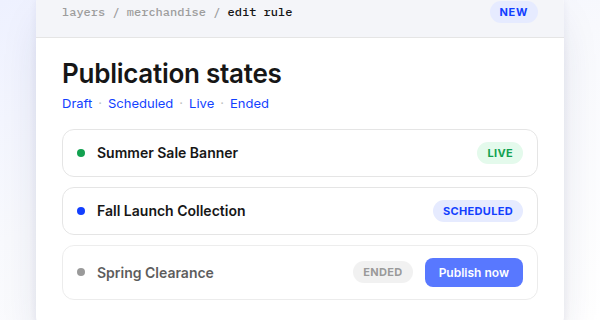
Product illustration: each rule shows whether it's a draft, scheduled, live, or ended, and its schedule moves it between states.
Policy searches go to policy pages. A daily page crawler creates semantic redirects for pages shoppers search for, like returns and shipping. It skips terms that conflict with redirects you created by hand.
Data badges compute themselves. Computed attributes create values such as discount percentage or days available from other product data. You can use them for badges, filters, sorting, and rules.
Problems get flagged daily. Lab Insights flags a top seller stuck below the first page and a pinned product that draws clicks but converts far worse than the collection. The anomaly review "never changes live ranking on its own."
Why not approve each one? Gartner warns that approvals "can degrade under time pressure or approval fatigue, creating a false sense of safety." For these seven tasks, a change log with rollback does more than a sign-off on every change.
Which tasks need guardrails, and what does a good guardrail look like?
Seven tasks should run automatically but behind a guardrail, because the data is thin or a mistake is visible to every shopper.
Those seven are new-arrival exposure, broad-search reranking, recommendations, clearance demotion, filter ordering, suggested fixes, and product redirects. A good guardrail shows the change before shoppers see it, limits how far it can go, and logs it.
- New arrivals. A soft boost lifts tagged new products into view, and hero launches get pins, which beat the boost. A person removes the tag after launch so products "compete on sales alone." Here's why new arrivals sink in a best-seller sort.
- Broad searches. In our AI search, AI reranking works only on broad queries, set by a strength dial: "Specific and long-tail queries are unaffected by the dial." Each decision is logged with the products it demoted, so you can retag them.
- Recommendations. Blocks generate recommendations "based on context, customer behavior, and configurable rules." Cold start is the known failure: if a new product's category is broad or wrong, its fills "can look unrelated."
- Thin recommendation results. If a recommendation block returns fewer than your minimum, a fallback chain takes over. Shopify draws a similar line: only related recommendations are auto-generated, and complementary ones need manual setup.
- Clearance. A Demote expression keeps final-sale and clearance products available but out of the top rows. In search, soft demotion lets highly relevant items resist, and a shopper who searches for clearance still gets clearance.
- Filters. AI Sort and Group proposes an order for filter values, and "the change lands as an unsaved draft."
- Suggested fixes. An insight's sort-order action "opens a staged edit; it does not publish a change automatically." Some search fixes do run automatically and report their progress in Fix status, including why a fix was rolled back.
- Product redirects. When a search should land on a collection, test the redirect so it doesn't "trigger unexpectedly for product searches."
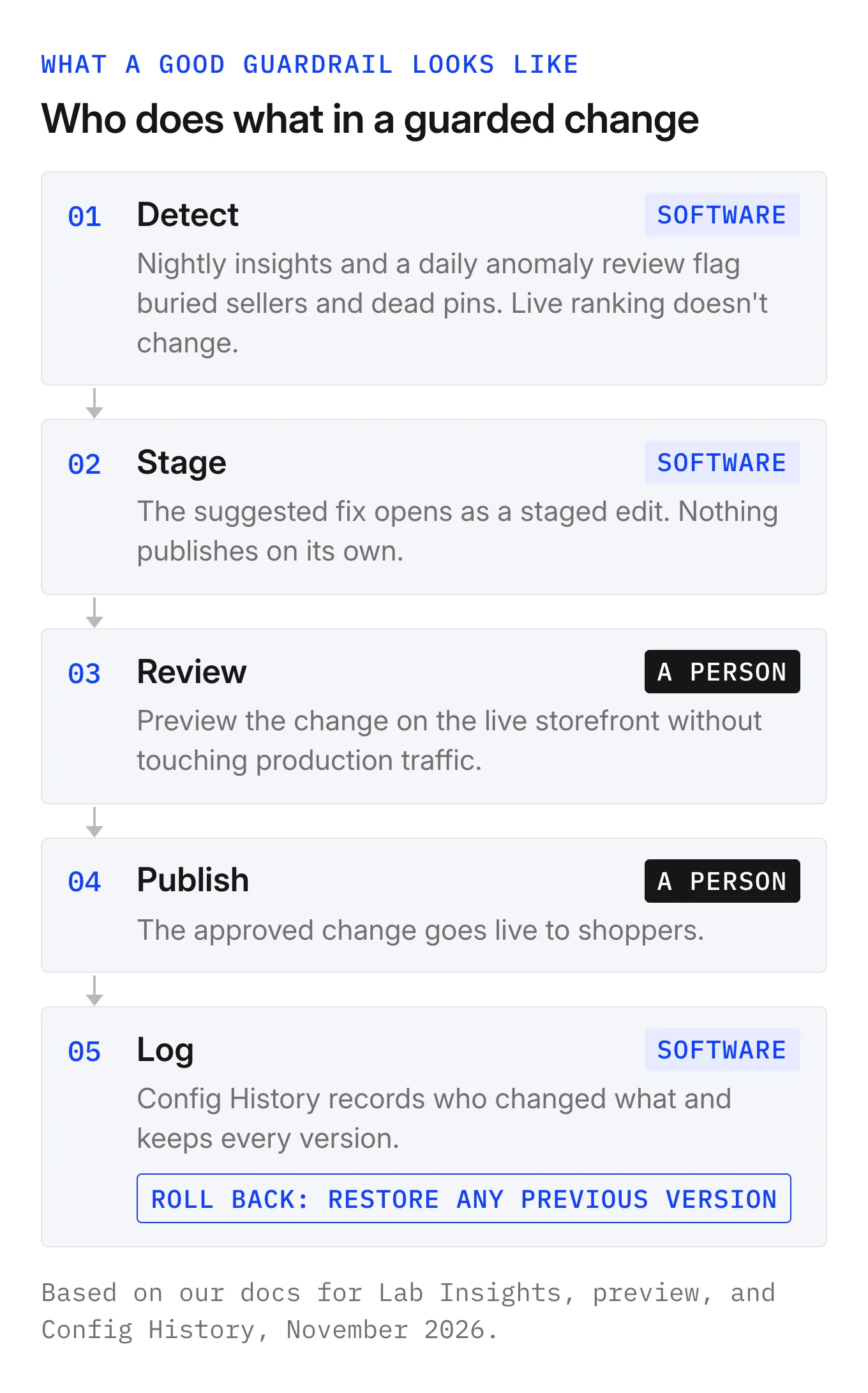
Five guardrails are worth insisting on, whoever builds your tools:
- Preview on the live storefront. Preview shows how your pins, expressions, and settings will look to shoppers "without affecting production traffic."
- Staged edits you review. AI assistants prepare shared drafts, and "drafting alone does not change what shoppers see." Saves through our MCP server go to human review by default, though a few writes, like a collection's default sort, apply immediately.
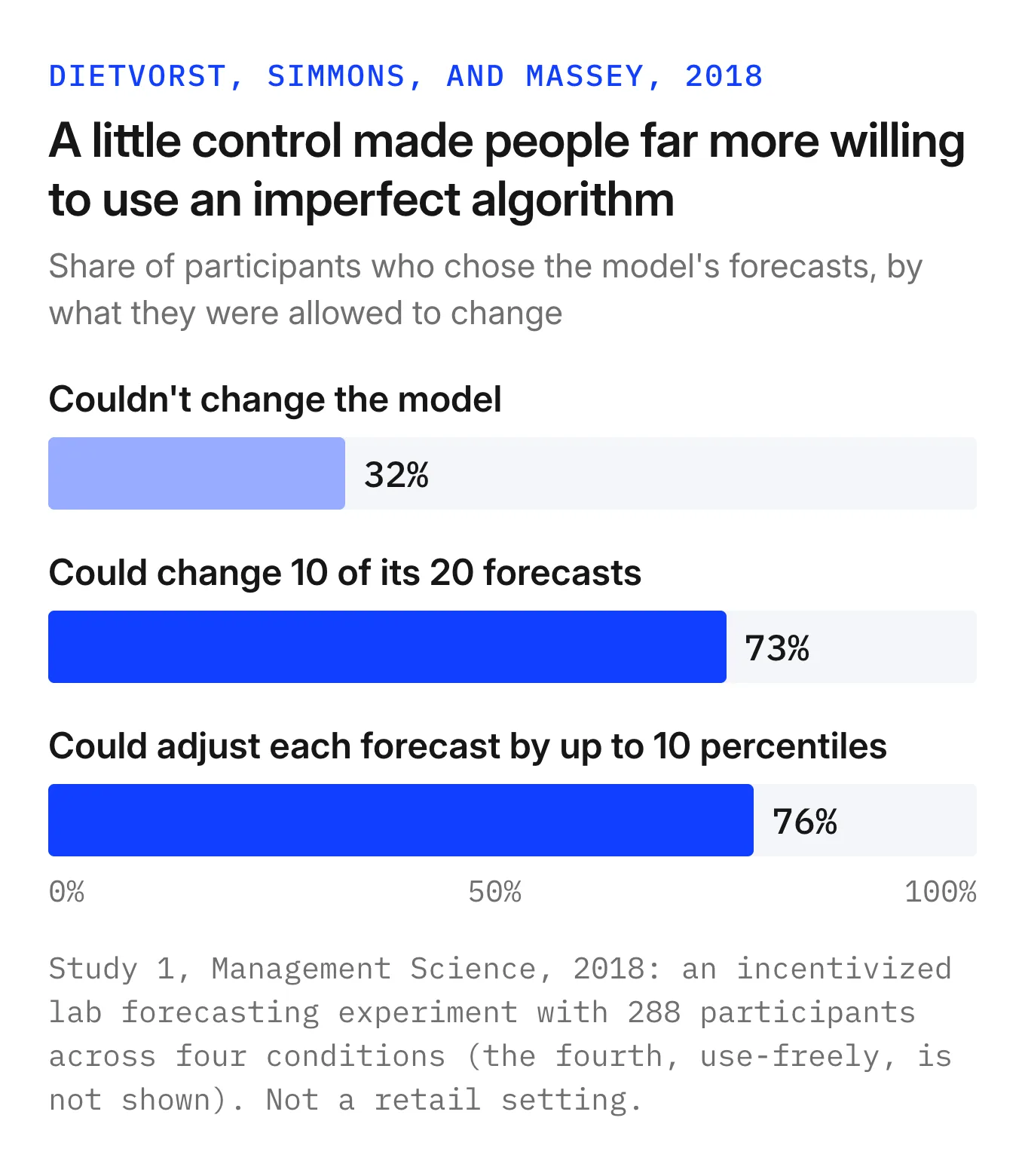
- Bounded strength. A dial or a cap. In a forecasting experiment, 32% of participants chose an imperfect algorithm they couldn't change, versus 73% to 76% when they could adjust it within limits. Capped adjustments also beat unlimited ones on accuracy.
- A change log with rollback. Config History lets you restore any version. Forrester says teams must be able to "find, renew, compare, edit, approve, and reverse" an assistant's change "the same way it would if a human created it manually."
- A test before you trust it. Forrester recommends "sandbox environments, approval checkpoints, and careful testing" for changes that touch revenue or pricing. Our sort order experiments (in Beta) run a challenger sort against your current one on real traffic.
Want to see where these guardrails sit on your own catalog? Book a demo.
Which merchandising decisions should stay human?
Keep five decisions with people: what the ranking optimizes for, which products carry the story, how deep a markdown goes, what a badge or banner claims, and what must never be promoted.
Software can carry out each one at scale. It shouldn't choose them, because the right answer depends on strategy, taste, or legal exposure.
The objective. Ranking by revenue favors higher-priced products; ranking by units favors products that sell often.
BCG's view is that "Agents execute rather than invent a differentiated strategy," and that leaders must set priorities like "growth versus margin" explicitly. If margin is your goal, start with sorting by margin while keeping discovery.
Hero products and campaign stories. Pins always win over boosts. Dynamic linking puts the products from an ad first on the landing collection for shoppers who arrive from that campaign; here's how to build landing collections for paid traffic.
The research backs keeping a person here. In a field experiment run by an auto-parts retailer, merchants' overrides of a data-driven assortment tool cut profitability by 5.77% overall but raised it for growth-stage products.
George Mason University's summary of the study puts that growth-stage gain above 23%.
BCG adds that a retailer's point of view "still needs to be done by a human, especially for categories where taste matters." On our calls, teams that want automation still ask for a manual override that always wins.
Markdown depth and price. Pricing tools can pay off. Zara's clearance process raised clearance revenues by about 6% in a controlled field experiment.
At Rue La La, a pricing tool lifted test-group revenue by about 9.7%, with a 90% confidence interval of 2.3% to 17.8%.
Yet after Zara rolled out a markdown tool, a common deviation was managers cutting deeper than it advised: a median 19.9% markdown against the tool's 0.0%.
Each extra pricing decision raised a manager's probability of deviating by 6.8%. The authors conclude that managers sometimes hold private information, "such as trends, special days," that makes deviating worthwhile.
Claims on badges and banners. The FTC's Green Guides say "marketers should not make unqualified general environmental benefit claims." Software can reserve a banner slot and schedule it. A person writes the claim.
What never gets promoted. Write it down as policy. Good search instructions focus "on decisions only you can make."
The example in our docs reads: "This store is kosher-certified. Never promote products tagged with pork or shellfish, even if relevance scores are high."
Why do merchandisers override algorithms, and when are they right?
People abandon an algorithm faster than a colleague after watching it make the same mistake, yet they adopt it readily when they can adjust its output within limits.
A field experiment at one retailer found overrides cut profitability on mature products and raised it on growth-stage ones. So give your team a bounded override, then measure who wins.
Four findings explain it:
- Visible errors kill trust fast. In forecasting experiments by Dietvorst, Simmons, and Massey (2015), people "more quickly lose confidence in algorithmic than human forecasters after seeing them make the same mistake." These were lab tasks, not retail.
- A little control buys a lot of adoption. In their 2018 follow-up (Study 1, 288 participants), 32% chose a model they couldn't change. Allowed to change 10 of 20 forecasts, 73% chose it; allowed to adjust each by up to 10 percentiles, 76% did.
- People add value where data is thin. The auto-parts overrides paid off on growth-stage products. The Zara authors point to trends and special days that a tool can't see.
- People struggle with volume and with judging themselves. Zara managers deviated more as their pricing load grew. In classification experiments, human-AI teams improved only when the AI handed work to people, because people misjudged their own abilities.
People who could modify the model early were later more likely to hand it full control: 30% versus 12%.
The opposite finding exists too. Across six experiments, lay people followed advice more when they thought it came from an algorithm, but that preference faded among people with forecasting expertise. Experienced merchandisers fit that second group.
Some teams we talk to argue that a plain bestseller-everywhere sort beats a smart one that misses best sellers. It's a strong baseline, and automation should have to beat it.
For the longer product story on sort design, see smarter sort logic.
Our rule of thumb: automate detection everywhere, and automate execution only where a mistake is cheap. A dead-pin flag works that way. Software spots the pin that isn't earning its slot, and a person decides whether to move it.
How do you check that your automation is working?
Compare the automated version against the one your team would run by hand, on real traffic.
Split a collection between your current merchandising and the same sort with manual pins switched off, then read your change log to see which work still happens by hand and whether it earns its keep.
- Run a pins-off challenger. Sort order experiments can run a challenger that "drops manual pins from merchandising rules that have no audience conditions." If the challenger wins, your pins cost time and earned nothing.
- Size the test honestly. For example, detecting a 10% relative change on a 3.0% conversion rate (two-sided, 95% confidence, 80% power) takes about 53,000 sessions per arm. Smaller collections need a longer window or a bigger expected effect.
- Read the daily flags. Dead pins and buried sellers show where automation and people disagree.
- Audit the change log. Config History shows who made each change, and scheduled flips carry their own reason. Map the manual changes to the 19 tasks above.
Buyers ask for this proof. On our calls, "prove it" is the most common objection. In NRF's summer 2025 survey of 56 AI leaders at US retailers, model accuracy and reliability tied with cost as the top challenge, at 57% each.
The same discipline applies to search; here's how we approach evaluating search quality at scale.
Where do AI agents fit in merchandising?
Agents change who does the setup work. Which decisions deserve automation stays the same question.
Treat an agent that drafts a sort order or a merchandising rule like a new hire: its changes should be drafted, reviewed, logged, and reversible. Gartner predicts over 40% of agentic AI projects will be canceled by the end of 2027.
Gartner's reasons are "escalating costs, unclear business value or inadequate risk controls." It also predicts at least 15% of day-to-day work decisions will be made autonomously through agentic AI by 2028.
In our product, an assistant's draft changes nothing shoppers see, and review is the default. Publishing without review takes an explicit request and is blocked while a person is editing the same item.
Shopper-facing agents raise a different question. Read how merchandising rules should surface to AI agents, and how to evaluate an AI shopping agent before you trust one with your catalog.
How should a Shopify Plus team start?
Start with one week of real work: list every merchandising task your team touched and run the four questions on each.
Automate the safe column first. Switch on the middle column only after its guardrails are live, and write the five human decisions down as a short merchandising policy your team and your tools can follow.
- Log a week of merchandising work. Note each one and map it to one of the 19 tasks above.
- Run the four questions on every task that recurs.
- Automate the safe column. Start with sold-out demotion, sell-out pin cleanup, and campaign schedules.
- Add guardrails, then the middle column. Turn on preview and staged edits first, and start any strength dial low.
- Write the policy. Name the objective, the never-promote list, and who owns claims.
- Review weekly. Check dead pins, buried sellers, and the change log.
If you're choosing tools for this, our guide to evaluating a merchandising platform covers what to test.
If you want to see which of the 19 tasks we'd automate on your catalog, and where the guardrails sit, book a demo.
FAQs
1. Will AI merchandising replace merchandisers? No. It takes over repetitive work like re-sorting collections and cleaning up after sell-outs. BCG says a retailer's point of view, including curation and brand values, "still needs to be done by a human, especially for categories where taste matters."
2. Is AI merchandising the same as personalization? Not quite. Personalization is one kind of AI merchandising: it changes the result per shopper or context, such as ranking by the visitor's country. Most AI merchandising applies one decision to everyone, like ranking by last week's sales.
3. Does Shopify have AI merchandising built in? Partly. As of November 2026, new collections default to a "Most relevant" sort based on sales performance, and Sidekick can reorder a collection. Related recommendations are auto-generated, complementary ones are manual, and no built-in collection sort uses inventory.
4. Can I keep manual pins if the sort is automated? Yes, and you should for hero products. In our merchandising rules, pins come first, expression matches second, and the base sort fills the rest. Check that each pin earns its slot: one that draws clicks but converts poorly deserves a second look.
5. What should I automate first? Out-of-stock handling. Inventory data settles it, and it's easy to undo. Pair it with automatic removal of pins on sold-out products, and schedule your next campaign so nobody has to switch it on at midnight.
6. How do I know when the algorithm is wrong? Look for two patterns: a top seller stuck below the first page, and a pinned product that gets clicks but few orders. Good tools flag both daily and stage a fix for you to review instead of changing live ranking.
7. What is human-in-the-loop merchandising? Software proposes or carries out merchandising changes while people keep the right to approve, limit, or reverse them. NIST describes human-AI setups as spanning "from fully autonomous to fully manual." In merchandising, people own the objective and the exceptions.
Written by

Jake Casto
Founder, Layers
Jake Casto is the founder of Layers, the enterprise search and merchandising platform built for Shopify Plus. He previously co-founded Proton, a Shopify Plus engineering studio that shipped more than 400 storefronts, where Layers began as an internal tool for a problem that kept repeating. He writes about search infrastructure, performance, and the engineering behind discovery at scale.
View all articlesRelated articles
More reading on search, merchandising, and product discovery.
Agentic Commerce on Shopify: A 90-Day Plan and a 32-Store Catalog Check
Eligible Shopify stores already share products with ChatGPT and Copilot by default. We checked 10,072 products in 32 stores and built a 90-day plan.
Jake Casto
Nov 24, 2026 · 25 min read
Can an AI Agent Run Your Collection Rules? A 10-Task Test You Can Run
What an AI assistant can change in your collection rules, what waits for your approval, and 10 requests to test it with before it touches live pages.
Jake Casto
Nov 24, 2026 · 18 min read
Salesforce Commerce Cloud to Shopify Plus: A Merchandising Rule Inventory and Cutover Plan
A rule-by-rule method for moving Salesforce Commerce Cloud merchandising to Shopify Plus, with a cutover plan that tests your top queries before launch.

Lukas Tanasiuk
Nov 24, 2026 · 25 min read