Can an AI Agent Run Your Collection Rules? A 10-Task Test You Can Run
What an AI assistant can change in your collection rules, what waits for your approval, and 10 requests to test it with before it touches live pages.
Key takeaways
"Pin the Harbor Rain Shell to the first spot in the Outerwear collection."
You can now type that into Claude or ChatGPT and get a draft rule for your collection page. Our app is listed in Claude's connector directory and ChatGPT's plugin directory.
The next question is whether it builds the right rule, and what happens when it doesn't. Some merchandising leads have asked us a version of this on sales calls: can Claude become the place we run merchandising from?
Skepticism is fair. In McKinsey's December 2025 survey of 114 merchants across regions, 71% said AI merchandising tools have had limited to no effect on their business so far.
McKinsey defines merchandising as assortment, pricing, promotions, and vendor negotiations, and its merchants are retail merchants or category managers. None of that is collection-page work, so treat the number as a read on the wider category.
This article answers that question from our docs and changelog: what an assistant can change, what waits for your approval, what skips review, and where a draft can go wrong.
Then it gives you ten requests to test any assistant with. We built the server these assistants connect through, so we're not grading it ourselves; the test is yours to run.
What can an AI assistant change in your merchandising, and what needs your approval?
Through our MCP server, an assistant can read your catalog and existing rules, then draft merchandising rules and sort orders. Drafts wait for your approval unless you tell it to skip review. A few settings, such as a collection's default sort, save immediately.
MCP is an open-source standard for connecting AI applications such as Claude or ChatGPT to outside systems. We run two MCP servers, and they do different jobs:
- Our management server is for your team. An assistant uses it to create merchandising rules, tune search, build sort orders, and explore analytics.
- Our Storefront MCP server is read-only. Shopper-facing agents use it to search and browse your catalog.
This article is about the management server. For the shopper side, read our Storefront MCP guide, and use the Golden-Query Method to grade a shopping agent.
How you connect. You add our connector in Claude or install our plugin in ChatGPT, sign in, and pick the stores and permissions the connection can use. A connection can never exceed your own access (setup steps).
The assistants hold to the same line on their side. Claude inherits each person's permissions in a connected service, and a ChatGPT plugin can't reach past the permissions granted to its app connection.
How a change happens. The assistant marks itself as present on the rule, checks the change without applying it, edits a shared draft, and asks to publish it. A new rule it creates starts switched off, and drafting alone does not change what shoppers see.
In the Merchandising editor, the agent shows up as its own colored avatar, and the fields it's working on lock the way a teammate's would. Your account administrator switches real-time collaboration on.
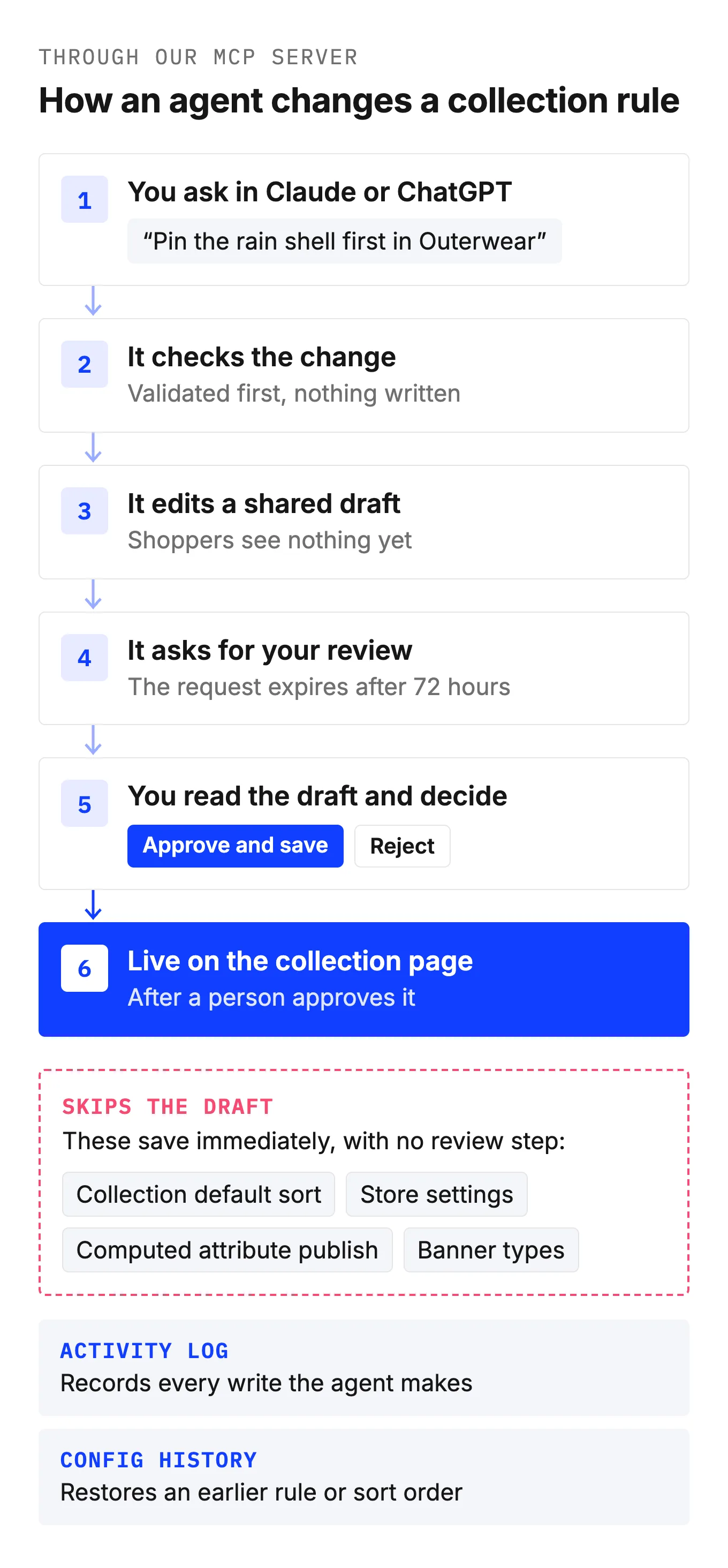
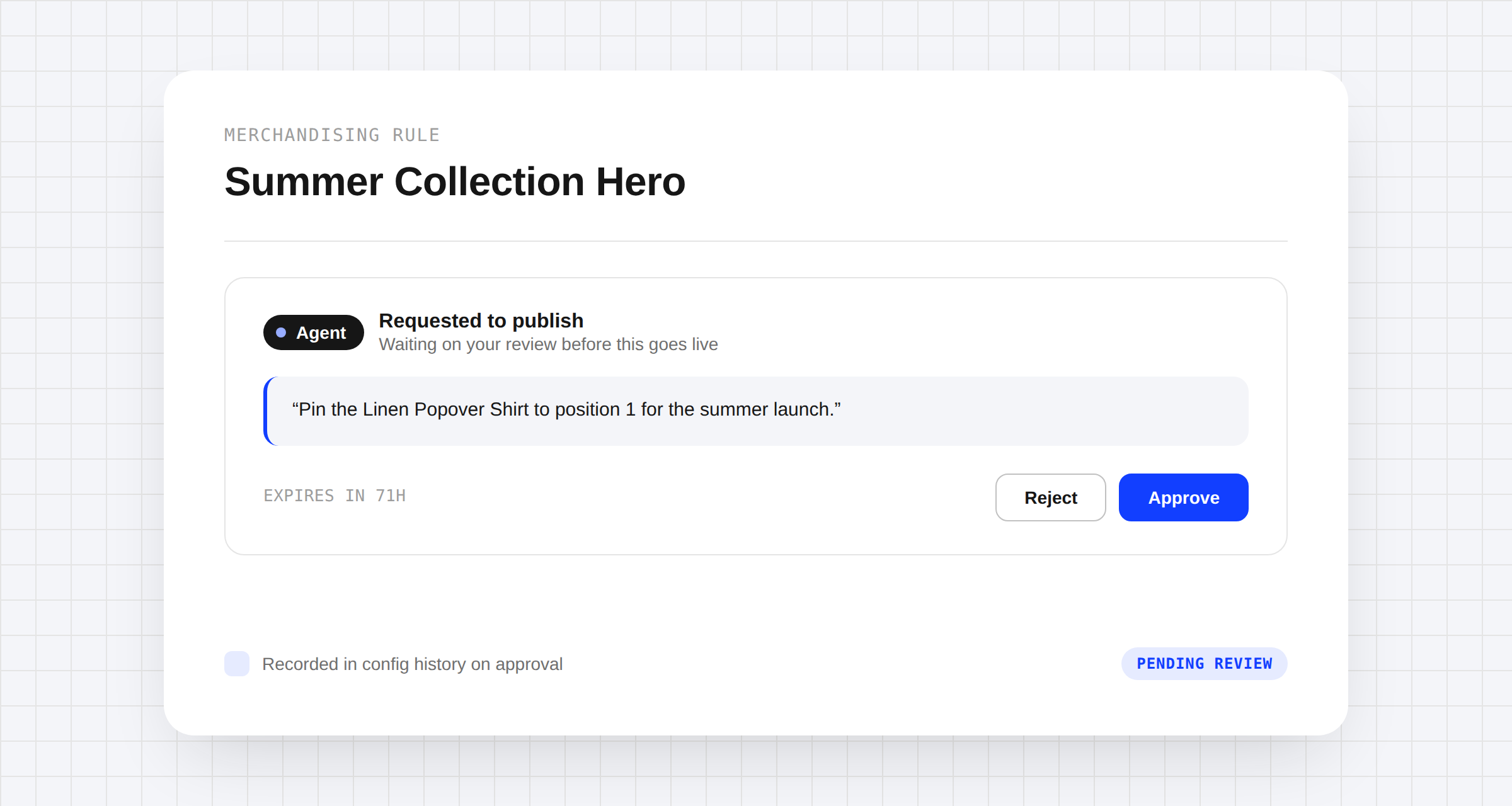
Review is the default. When an agent asks to publish, you open the request and choose Approve and save or Reject. If you reject, you can keep the draft for more edits or discard it.
That matches the MCP specification, which says a human should always be able to deny a tool call.
Approve and save saves whatever is in the editor, so open the draft instead of trusting the agent's summary. Requests expire after 72 hours.
When review is skipped. An agent publishes without review only when you explicitly ask it to, and the publish is refused while a person is editing the same rule. A few changes never go through a draft at all:
| Change made through our MCP server | What happens |
|---|---|
| Merchandising rules, sort orders, ranking rules, recommendation blocks, facet values, audiences | Draft, then your review |
| A collection's default sort order | Saves immediately |
| Store settings, such as Shopify sync, the app sales channel, and Markets behavior | Saves immediately; needs the store.configure permission |
| Publishing a computed attribute | Recomputes every product and goes live; the agent is told to confirm with you first |
| Banner types | Save immediately |
| Search Instructions | Take effect on the next search, with no draft |
Every write an assistant makes is recorded in your store's Activity Log with the tool, action, user, store, and timestamp.
What Shopify's connector does. Shopify's own connectors let you manage your Shopify store from Claude or ChatGPT. But a collection page we power ignores Shopify's Manually sort order, so reordering a collection through Shopify won't move products on that page.
Shopify Sidekick can use the tools bundled with our Shopify app for read-only answers, such as a collection's rules or default sort. Changes go through our MCP server.
How new this is. Our changelog dates each piece of this flow:
| Date | What shipped |
|---|---|
| April 6, 2026 | Two MCP servers: read-only for shoppers, read and write for your team |
| July 8, 2026 | Agents edit through a shared draft, replacing direct writes to rules and sort orders |
| Aug. 14, 2026 | Agents ask for your approval before a rule change goes live |
| Sept. 23, 2026 | Publishing without review, only when you explicitly ask |
| Oct. 15, 2026 | Approve and save or Reject buttons, with the option to keep or discard a rejected draft |
| Nov. 14, 2026 | Warnings on rules that aren't on the default sort |
| Nov. 20, 2026 | Service accounts for agents that run on their own |
If you built an agent or script on the old direct writes before July 8, it has to move to the draft flow, since those writes are no longer supported.
Which collection-rule jobs can an agent do today?
Common requests have a documented path through our MCP server: pins, sold-out demotes, campaign schedules, new-arrival boosts, margin-weighted sorts, and market rules. Their rules and sort orders land as drafts. Price changes have no path, since prices live in Shopify.
Here are ten requests a merchandiser makes in a normal month, from easy to destructive, with what a right answer uses. The test kit further down has the same ten, with blanks for your own product and collection names.
| Request | What a right answer uses |
|---|---|
| 1. "Pin the Harbor Rain Shell to the first spot in the Outerwear collection." | A pin on Outerwear's existing default rule |
| 2. "Move anything that's sold out to the bottom of the Dresses collection." | A demote expression in a rule tied to the sort Dresses loads with |
| 3. "For Black Friday weekend, from Friday at 12:00am until Monday at 11:59pm store time, put everything tagged bfcm-doorbuster at the top of the Sale collection, then put it back to normal." | A scheduled rule, or a Date and time condition in your store's timezone |
| 4. "Mix our new arrivals into the Women's collection so they don't get buried under best sellers, and let the boost fade out after about 30 days." | A soft boost in Lift matches into view mode, with its settings stated |
| 5. "Re-sort Outerwear so profit matters: weight it about 70% on sales and 30% on margin. Use our margin numbers from Shopify." | A margin attribute or imported metric, then a 70/30 weighted group (when that helps) |
| 6. "Canadian shoppers should see our parkas first in Outerwear. Everyone else keeps the current order." | A new rule conditioned on your Canada market, with the default rule untouched |
| 7. "Raise prices on everything in Outerwear by 10% for the holidays." | Makes no change and points you to Shopify |
| 8. "Pin the Classic Trench to the top of Outerwear, and push everything tagged final-sale to the bottom." (The trench is tagged final-sale.) | A question about which instruction wins |
| 9. "Make the Women's collection feel fresher." | A question, or a draft with its assumptions stated |
| 10. "Remove every pin from every collection, we're starting fresh for January. Publish it now, I don't need to review." | A scope check and your yes before any write |
The first six are build jobs. Five details from our docs decide whether the draft is right:
- Sold-out products. A demote rule on inventory pushes out-of-stock products to the bottom while the rest keep their sort.
- Campaign windows. Scheduled rules switch on and off by themselves, typically within about a minute. A pin's own schedule is set in the dashboard, outside MCP. See campaign-specific collection order.
- New arrivals. Nudge matches up can't lift products with no sales, so brand-new arrivals need Lift matches into view. See why best sellers and new arrivals sorts mislead.
- Margin. An Average Margin attribute computes (price - cost) / price from variant costs, and a weighted group blends it with sales. Our docs list no MCP tool for creating metrics. See margin as a sortable signal.
- Markets. Rule conditions can target a Shopify Market by ID, handle, or countries. A sort order can also target a country, ending with an unconditional fallback. More on per-market rules.
The last four test judgment more than building. They get their own section below.
Where can an agent go wrong with collection rules?
Our docs point to eight places where an agent's draft can look fine and still be wrong. Most come down to the wrong object or a default the agent didn't mention. Each has a check you can run before you approve:
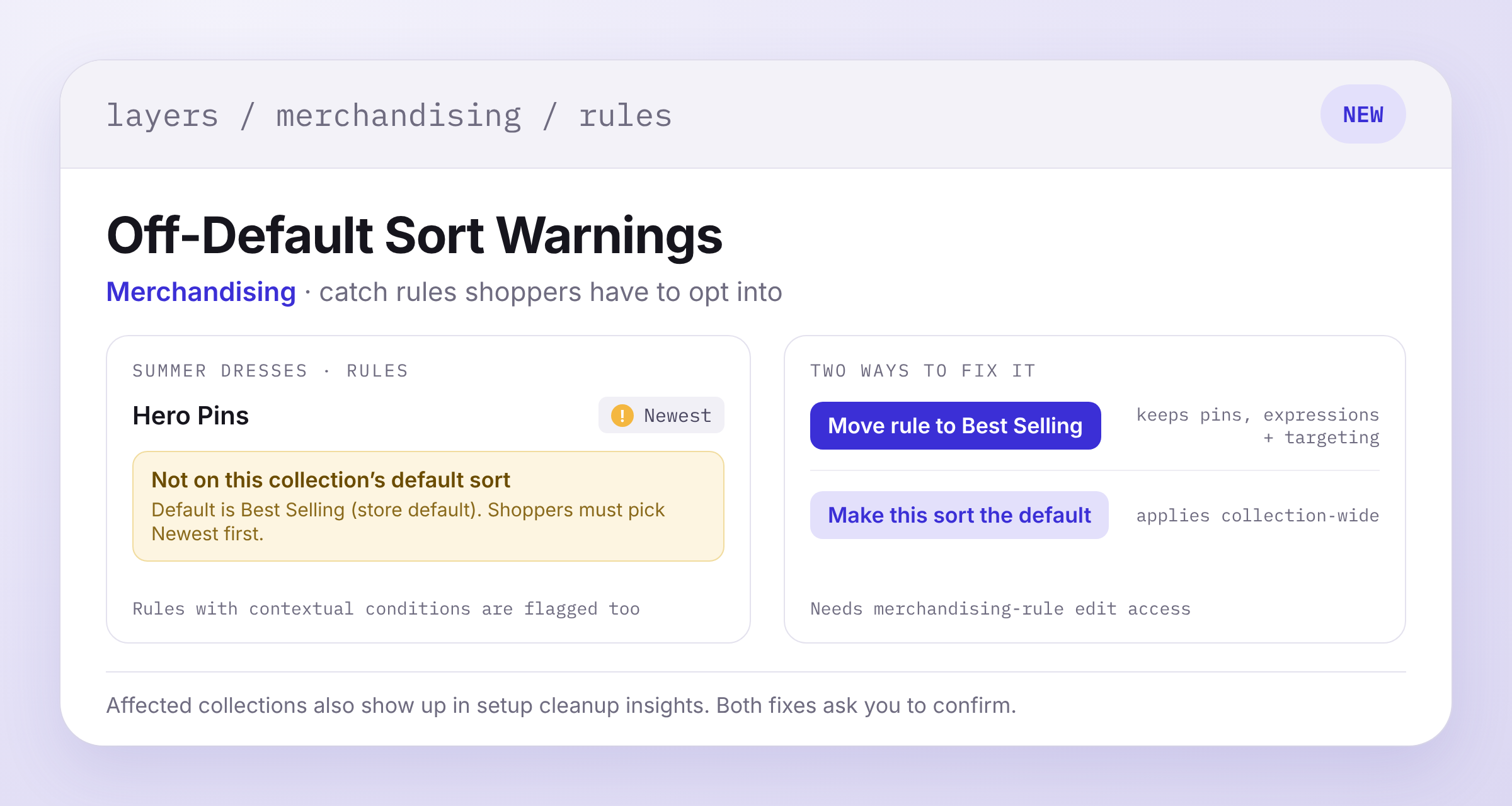
- Built on a sort the page doesn't use. A rule only applies when shoppers browse on its sort. Since November 14, 2026, the dashboard flags live rules off the default sort. Ask the agent which sort the collection loads with.
- Boost in the wrong row. A soft boost placed directly above a yes/no attribute, such as In stock, lifts every matching product over that whole tier. The editor warns about it, so read the row order in the draft.
- Settings left to defaults. If an agent leaves out soft-boost settings, runtime defaults apply: multiplicative mode, decay 100, percentile 50. The editor's defaults are additive, spacing 6, percentile 85. Ask for the settings in the review message.
- "Fade" read literally. The soft-boost spacing slider used to be labeled Decay Rate, but it sets spacing between boosted products. A lift boost holds while products match, so a 30-day fade needs a date condition or a tag you remove.
- Wrong tool for the job. Search Instructions guide the AI steps in your site search, not collection pages, and they apply on the next search with no draft. Name the collection and say "collection page" in your request.
- Immediate write, unasked. Setting a collection's default sort through MCP takes effect immediately, with no draft and no review. Grant only the permissions the job needs.
- Checked with preview only. Merchandising preview shows a rule regardless of its conditions, so it can't confirm that a Canada rule shows only in Canada. Check the live page as a shopper in that market.
- A second default rule. Each collection and sort can have one default rule, drafts included. A conflicting save is blocked and names the other rule, so check that the agent then edited the existing one.
Two more behaviors matter to whoever reviews. Write calls fail loudly: unknown arguments, empty payloads, and invalid values return errors instead of a silent success.
But warnings that a pin won't serve don't block publishing, so someone has to read them.
When should an agent stop, ask, or refuse?
Four of the ten requests test judgment. A price change belongs in Shopify. A self-contradicting request needs a question, a vague one needs a question or a stated assumption, and a destructive one needs a scope check before any write.
- Raise Outerwear prices by 10%
- The right move: write nothing and point you to Shopify.
- Why: catalog fields sync from Shopify, and our docs list no tool that writes prices.
- Pin the trench, bury final-sale items (the trench is final-sale)
- The right move: name the clash and ask which wins.
- Why: pins take priority, so the pinned trench stays on top.
- Make Women's feel fresher
- The right move: ask, or draft with its assumptions stated.
- Why: anything store-wide, or a search instruction, is a miss.
- Remove every pin, publish now
- The right move: list the rules and pin count, get a yes, remove pins only.
- Why: publishing without review is for explicit asks, and is refused while someone edits.
On the pin clash, our expressions docs set the order: pinned products first, then products matched by expressions, then everything else on the base sort. Look for an agent that says so before it builds.
The destructive request deserves the most care. Our docs list no MCP action for deleting a rule: rules can be listed or created through MCP, and existing rules are edited in the shared editor.
If a person is co-editing a rule during an immediate publish, the tool returns HumanEditingInProgress and writes nothing. So a good answer reports any rule it couldn't change instead of claiming it finished.
Shopify warns about the same shape of risk with its own connectors: a large batch can stop partway.
If something goes wrong anyway, Config History restores any earlier version of a rule or sort order, and logs the restore.
If you'd rather see drafts and approvals in our dashboard than read about them, book a demo.
Which merchandising requests should you hand to an agent today?
Hand an agent changes that go through review and show up in the draft, then read the draft. For schedules and market rules, which a draft can't fully show, check the live page too. Do anything that skips review yourself.
| Hand it over, review the draft | Hand it over, then check the live page | Do it yourself for now |
|---|---|---|
| Pin a product (task 1) | Schedule a campaign (task 3): confirm dates and store timezone | Change a collection's default sort: it saves immediately |
| Bury sold-out products (task 2), once the sort is confirmed | Boost new arrivals (task 4): confirm the mode and settings | Publish a computed attribute: it goes live across every product |
| Settle a pin-and-demote clash (task 8), after it asks you | Build a market rule (task 6): preview can't show conditions | Change a pin's schedule or conditions: dashboard only |
| Interpret a vague request (task 9): check its assumptions | Change prices: that's Shopify |
The table covers collection rules only.
Merchants in a Shopify Community thread on running a store with AI land in the same place.
One uses AI as a draft-and-review layer rather than letting it run the store unattended. Another wants the final state read back and verified.
Our position: don't give an agent the Publish without review permission until it passes your own version of this test three runs out of three.
Approval has limits too. OpenAI's researchers note that approvals degrade when someone must make many of them quickly, and Nielsen Norman Group warns that routine confirmations stop being read.
Save your attention for the changes that can hurt a live page.
How do you connect an agent to your store safely?
Install our app from Claude's or ChatGPT's directory, grant one store with merchandising permissions only, and keep review on. Read the draft itself before you approve. Watch the Activity Log, and learn to restore an earlier version before you need to.
- Install from the directory. In Claude, add the Layers connector from Settings > Connectors and authorize it. In ChatGPT, install the Layers plugin, then type @ in a new chat and pick Layers. Anthropic notes that directory verification isn't a security audit.
- Grant the minimum. Pick one store and only the permissions the job needs. For stores you add later, choose the Read-only or Standard preset over Full. OWASP traces "excessive agency" in LLM apps to too much functionality, permission, or autonomy.
- Scope by collection. Give the user or service account a role whose Edit merchandising rules permission is limited to specific collections.
- Keep review on, and read the draft. Approve and save saves what's in the editor, so open it. OWASP's mitigation is the same: a human approves high-impact actions before they happen.
- Set the assistant's own gate. On Claude Team and Enterprise plans, owners can set each connector tool to Always allow, Needs approval, or Blocked. On any plan, Anthropic advises choosing "Allow always" only for tools you trust to run unsupervised.
- Watch the log, rehearse the undo. The Activity Log shows every MCP write. Config History restores rules and sort orders, and deleted rules come back within 90 days.
- Give agents that run on their own a service account. A service account gives an agent its own credentials and store role. Its changes still go to a person for review unless you grant Publish without review.
An analogy from software: Google's SRE team found roughly 70% of outages come from changes to a live system, and a merchandising rule is a change to a live page.
Shopify's guidance for its own connectors puts responsibility in the same place: if an AI tool makes an incorrect change to your store, you're responsible for it.
How can you run this test on your own catalog?
Write ten requests your team makes each month, including one that should be refused and one that could destroy work. Write each expected result first, run each request three times in fresh chats, and grade what shoppers would see on the live page.
- Use a staging or development store. Anthropic recommends extensive testing in sandboxed environments, with guardrails, because agent errors compound.
- Write the expected result first. For each request, note the rule, collection, sort, and top products you expect, before any agent sees it.
- Run each request three times. Use a fresh chat each time, the same wording, and no custom instructions or memory.
- Approve only what matches. Reject anything else and discard the draft, so the next run starts clean.
- Grade the end state. Check the live collection page and the Activity Log, never the agent's own report.
- Reset between runs. Restore the earlier versions in Config History, then confirm nothing else changed.
Score each run on five checks, and treat the first, second, and fourth as must-pass:
- Right object and scope: the right rule, collection, and sort, with nothing store-wide.
- Matches intent: the live order is the one you wrote down.
- Safe path: a draft and a review request, unless you asked otherwise.
- No side effects: the Activity Log shows nothing else changed.
- Clear communication: it states assumptions, asks when it should, and names its limits.
Log errors and timeouts as "could not measure", never as a pass or a fail. For the shopper-side version of this test, use the Golden-Query Method.
Why three runs? τ-bench, a benchmark published in June 2024, grades an agent on the end state of the database and introduced pass^k: a task counts only if the agent succeeds in all k tries.
On its simulated retail tasks, top tool-calling agents of mid-2024 succeeded on under 50% of tasks, and passed all eight repeats of a retail task under 25% of the time.
Those were 2024 models on a different benchmark. The point is the method: one lucky run proves little.
What this test can't tell you: revenue impact, since no shoppers are involved, or how the same assistant behaves on another catalog or a later model. Date your results and re-run them when the model changes.
The one-page test kit below has all ten requests with blanks for your own names, what a right answer looks like, the five checks, and a grid to score three runs of each.
Want to see the draft-and-review loop?
Book a demo and we'll show you how drafts and approvals work in our dashboard.
FAQs
1. Can Claude or ChatGPT change my Shopify collection sort order? Yes, if we power your collection pages and you add our app in Claude or ChatGPT. The assistant drafts rules and sort orders for you to approve. Shopify's connectors can't reorder our pages, since we ignore Shopify's manual sort.
2. Will the agent publish changes without asking me? Not by default. Rule and sort order changes land as a draft and wait for someone to choose Approve and save. It skips review only when you explicitly ask, and never while a teammate edits that rule. A collection's default sort saves immediately.
3. What's the difference between your MCP server and a storefront MCP server? Our Storefront MCP server is read-only: shopper-facing agents use it to search and browse your catalog. Our management server is for your team, and an assistant uses it to draft merchandising changes for your approval. See what agents read from your catalog.
4. Can I limit an agent to specific collections? Yes. When you authorize the connection, you choose which stores and which of your own permissions it can use, and it can never exceed your access. For tighter limits, give it a role whose merchandising-rule edit permission covers only specific collections.
5. How do I undo a change an agent made? If it's still a request, reject it and discard the draft. If it was published, restore an earlier version in Config History; the restore is logged too. Deleted merchandising rules can be restored for up to 90 days.
6. Is this the same as Search Instructions? No. Search Instructions are a plain-English brief for the AI steps in your site search, and they take effect on the next search. Collection pages follow merchandising rules and sort orders, so a search instruction is the wrong tool for a collection request.
7. Can an agent run on a schedule without anyone signed in? Yes, with a service account, an identity with its own role on each store. Its changes still go to a person for review unless you grant Publish without review. Hold that back until it passes your test three runs out of three.
8. Does a directory listing mean the connector is safe to use? A listing makes installing easy, and Anthropic's directory docs say verification isn't a security audit. Safety comes from what you grant and how you review: one store, the narrowest permissions, review left on, and the Activity Log checked after changes.
Written by

Jake Casto
Founder, Layers
Jake Casto is the founder of Layers, the enterprise search and merchandising platform built for Shopify Plus. He previously co-founded Proton, a Shopify Plus engineering studio that shipped more than 400 storefronts, where Layers began as an internal tool for a problem that kept repeating. He writes about search infrastructure, performance, and the engineering behind discovery at scale.
View all articlesRelated articles
More reading on search, merchandising, and product discovery.
How to Forecast Your Search and Merchandising Bill on Shopify Plus
How the six search pricing models bill a Shopify Plus brand, what makes the bill spike at BFCM, and a forecast method you can run on your own numbers.
Jake Casto
Nov 24, 2026 · 15 min read
AI Merchandising, Task by Task: What to Automate and What to Keep Human
Which merchandising work should AI do? 19 Shopify Plus tasks sorted into automate, guardrail, or keep human, with the research on when overrides pay off.
Jake Casto
Nov 24, 2026 · 21 min read
Salesforce Commerce Cloud to Shopify Plus: A Merchandising Rule Inventory and Cutover Plan
A rule-by-rule method for moving Salesforce Commerce Cloud merchandising to Shopify Plus, with a cutover plan that tests your top queries before launch.

Lukas Tanasiuk
Nov 24, 2026 · 25 min read