Strikethrough Pricing in Search Results: When a Compare-at Price Helps and When it Backfires
The median store in our 32-store Shopify sample had 41% of products struck through. Which search tiles should keep that line, and which rules apply?
Key takeaways
Picture a sale-season search. A shopper types "linen shirt" into your search bar, and 9 of the first 12 tiles show a crossed-out price. Which one is the deal?
Plenty of stores are close to that page. The week before Black Friday, 14 of the 32 Shopify stores we sampled had over half their sampled products struck through.
A crossed-out price is a strong cue. Experiments show it shifts what buyers think a product is worth, and a 1998 review calls comparative price advertising "a powerful advertising tool."
Yet catalog and grocery data show the cue weakens as more products carry it.
We don't have conversion data of our own on strikethrough in search. So this guide leans on the published studies and our catalog data, and it ends with a holdout test you can run.
What is a strikethrough price on Shopify, and where does it show in search?
On Shopify, a strikethrough appears when a variant's compare-at price is higher than its price, and your theme decides where it shows.
In Shopify's Dawn theme, search result cards cross out the compare-at and add a Sale badge. Predictive search can show the price, but not the badge.
Shopify's own rule is short. Set the compare-at field to the original price, and make sure it's higher than the price, or the sale price won't display.
Everything after that is the theme's call. Shopify says your theme controls whether and where sale prices appear, for example with a badge showing a message or percentage off on listing pages.
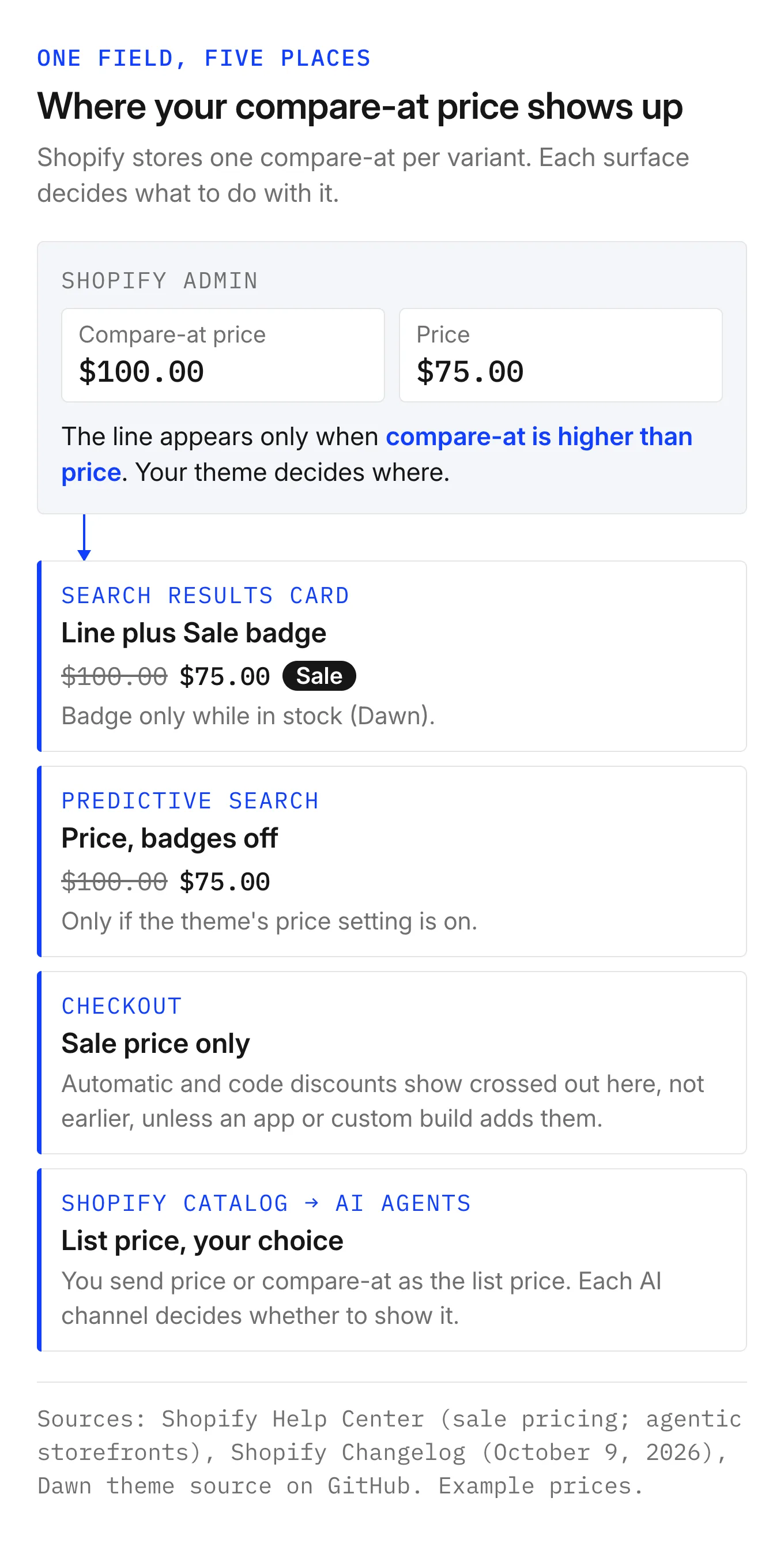
Shopify publishes the source of its Dawn theme, and it shows how literal the rule is. These two lines decide whether a search result card gets a line and a badge:
{%- comment -%} snippets/price.liquid, line 48 {%- endcomment -%}
{%- if compare_at_price > price and product.quantity_price_breaks_configured? != true %} price--on-sale{% endif -%}

{%- comment -%} snippets/card-product.liquid, line 139 {%- endcomment -%}
{%- elsif card_product.compare_at_price > card_product.price and card_product.available -%}
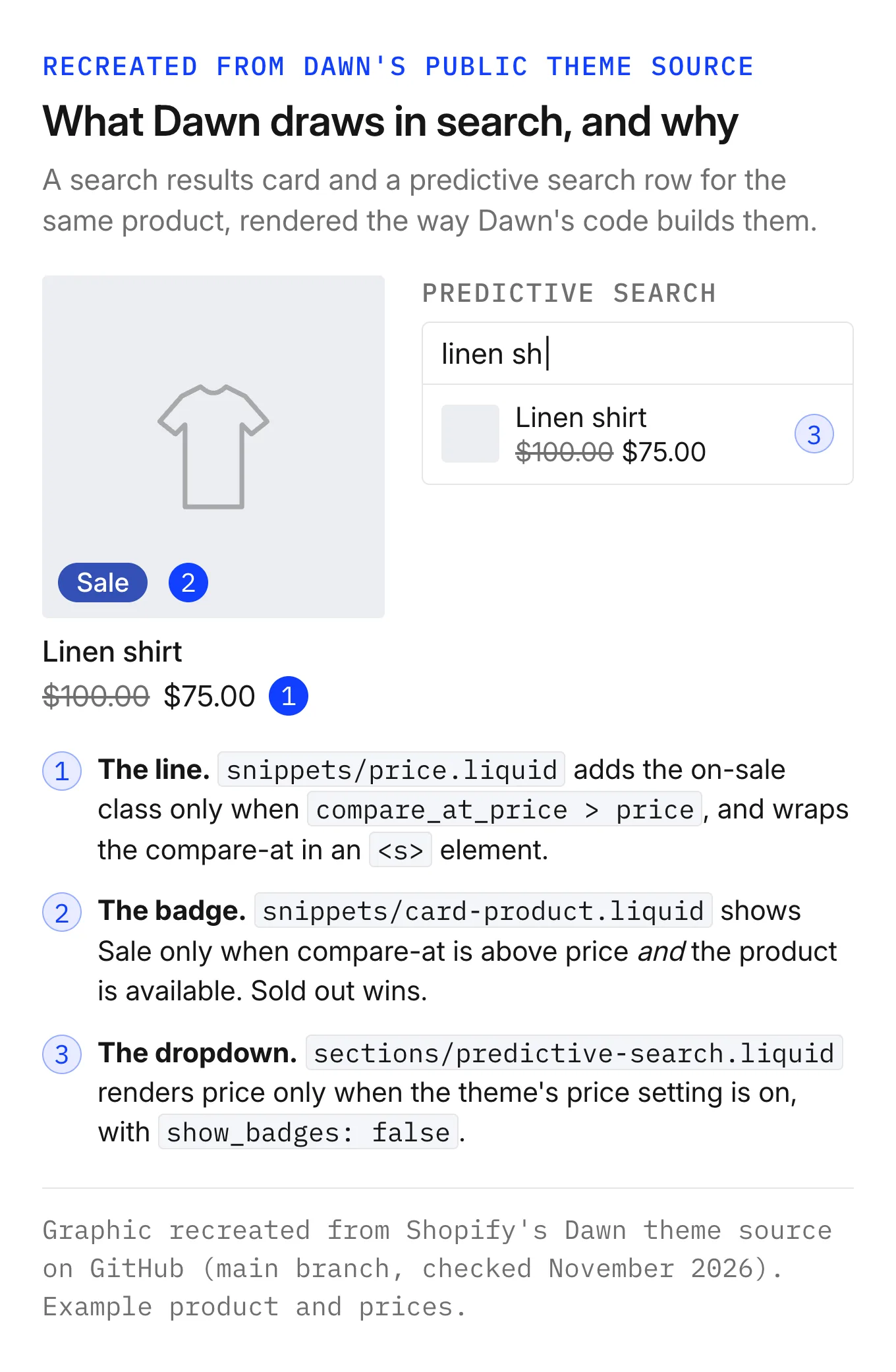
That's the whole rule. A compare-at above the price turns on the sale styling, and the price snippet wraps the compare-at in an <s> element, which is the line itself.
The product card adds the Sale badge only when the compare-at is above the price and the product is available. A sold-out product gets the Sold out badge instead.
Predictive search behaves differently. Dawn's predictive search renders a price only when the theme's price setting is on, and it calls the price snippet with show_badges: false.
So the dropdown can show your sale price with no badge, or no price at all. If you've never looked, audit what your autocomplete shows.
Filtering has a gap too. Shopify's Search and Discovery standard filters cover availability, category, price, product type, tags, and vendor. None of them reads compare-at, so that list has no "on sale" filter.
Our filtering and faceting guide covers the wider setup.
The tile itself is small. Baymard's testing found price is one of five attributes shoppers need on a list item before they'll click it.
The thumbnail is another, so what a search result tile shows deserves the same care as the price line.
Why does a crossed-out price change what shoppers think?
The crossed-out price becomes the reference point. Experiments show it shifts what buyers think a product normally costs, and that sense of a good deal carries through to purchase intent.
A 20-article meta-analysis adds a limit: the regular price helps large deals, not small plausible ones.
Four findings explain how it works and where it stops:
- It resets what the product seems worth. In two experiments, Grewal, Monroe, and Krishnan (1998, Journal of Marketing) found buyers' internal reference prices moved with both the advertised selling price and the advertised reference price.
- The good-deal feeling drives intent. The same study found the selling price changed perceived value through "transaction value," the sense of getting a good deal, and that feeling fed purchase and search intentions.
- It pays off on big deals. Krishna, Briesch, Lehmann, and Yuan (2002, Journal of Retailing) pooled 20 published articles. The regular price "enhances the offer value of large plausible deal and implausible deals, but not of small plausible deals."
- It's easy to abuse. Compeau and Grewal's 1998 review concluded that comparative price advertising "is a powerful advertising tool, with a strong opportunity for deception, that requires careful management and monitoring."
UX research points the same way on the page. NN/g says the original price shown beside a discount anchors the user's sense of the item's value.
Baymard says shoppers browsing a product list should be able to spot the discounted price instantly. It recommends a strikethrough on the original price or a larger, bold sale price.
Baymard's testing also found that showing both the amount off and the percent off works best. If only one fits, it points to Jonah Berger's "rule of 100": show whichever number looks bigger.
- Anderson and Simester (2001)
- Method: catalog order data, a catalog field test, surveys, and grocery scan data
- Finding: sale signs lift demand less when more items carry them
- What it means for a search tile: ranking decides how many lined tiles share page one
- Grewal, Monroe, and Krishnan (1998)
- Method: two experiments
- Finding: advertised reference prices shift what buyers think a product normally costs
- What it means for a search tile: the crossed-out number frames every tile it sits on
- Compeau and Grewal (1998)
- Method: meta-analytic review
- Finding: "A powerful advertising tool, with a strong opportunity for deception"
- What it means for a search tile: a compare-at you can't defend is a liability
- Krishna, Briesch, Lehmann, and Yuan (2002)
- Method: meta-analysis of 20 published articles
- Finding: the regular price helps large deals, not small plausible ones
- What it means for a search tile: a shallow discount gains little from the line
These are lab experiments, catalog tests, and literature reviews. None of them measured a search results page, and we haven't either.
What happens when most of your search results are on sale?
The signal weakens. In catalog and grocery data, Anderson and Simester found sale signs lift demand less when more items carry them, partly because shoppers trust them less.
Category sales peaked when some products had signs, but not all.
Many stores are well past "some." In our sample of 32 hand-picked Shopify stores, captured November 22, 2026, 14 had over half the sampled catalog struck through.
The study is Anderson and Simester's 2001 paper in Marketing Science. In their words, "sale signs are less effective at increasing demand when more items have them."
Their second finding: "total category sales are maximized when some but not all products have sale signs."
Their explanation is credibility. The weaker effect is "in part due to reduced credibility when they are used on more products," according to the paper's abstract.
The study didn't look at ecommerce search. Its evidence came from four places:
- Customer orders for the same items across three sequential issues of a women's clothing catalog
- A field test that mailed different versions of that catalog to randomly selected customers
- Survey responses to catalog stimuli
- Grocery scan data for frozen juice, toothpaste, and canned tuna, where adding sale signs when many items already had them cut total category demand in all three
We apply it to search by analogy, because a results page puts many priced products in front of the shopper at once, as a catalog page does.
Our numbers come from public product data for those 32 stores, captured the week before Black Friday. "Struck through" means compare-at above price, the same test Dawn uses.
In that sample:
- The median store had 41.1% of its sampled products struck through. The middle half of stores ran from 13.0% to 75.1%.
- 14 of 32 stores were above 50%, 8 were above 75%, and 6 were above 90%. Two stores had none.
- Pooled, 5,266 of 10,072 products (52.3%) carried a strikethrough. We read up to 500 products per store.
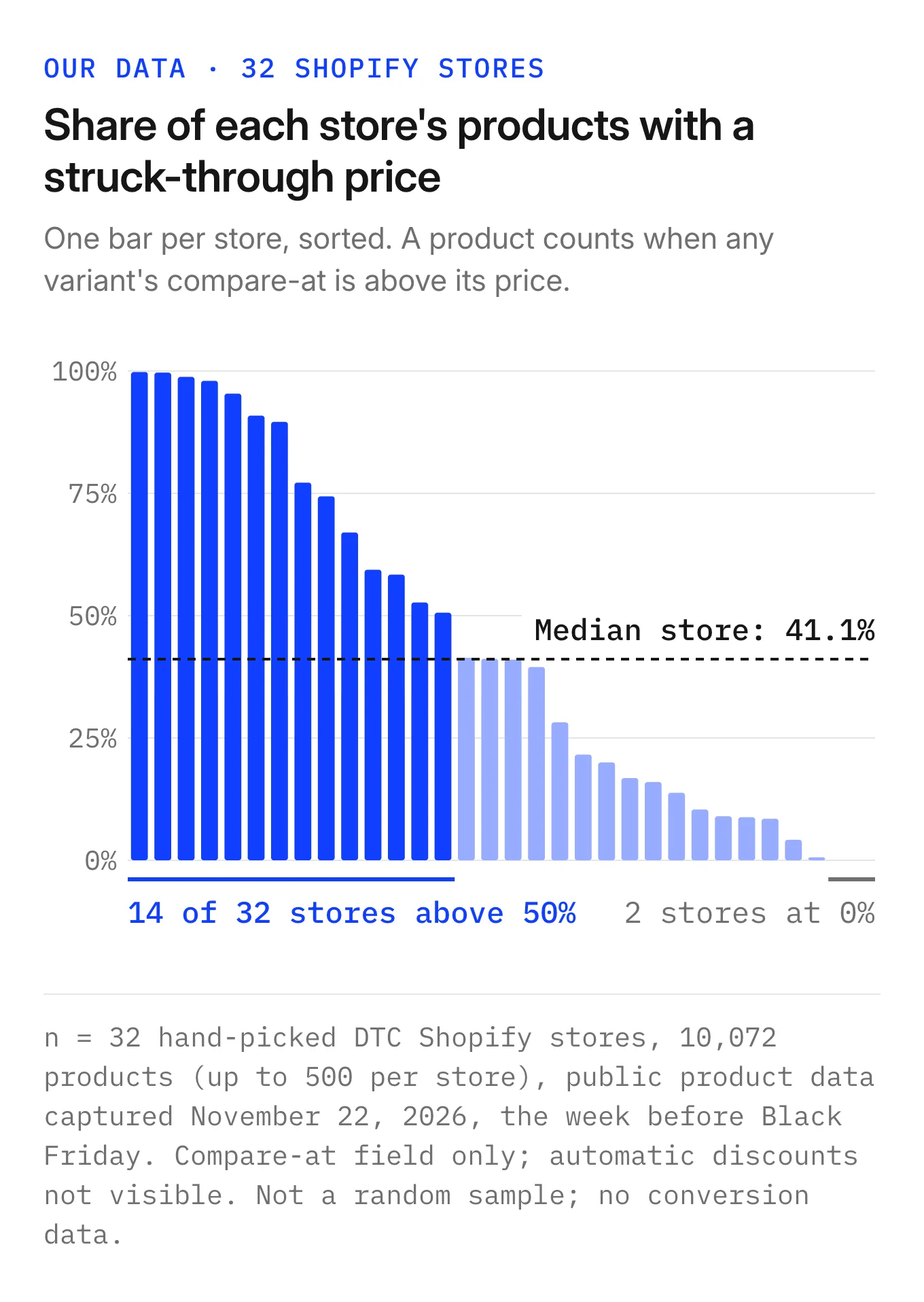
Read the November 22 snapshot with its limits:
- It's a small, hand-picked sample of well-known DTC brands, not a random one and not Plus-only.
- It's one snapshot before Black Friday, which likely runs higher than a typical month. It can't tell how long any price has been "on sale."
- It reads the compare-at field only, so automatic discounts and codes don't show.
- It has no conversion data.
On a search page, the dilution happens per query. Picture a 24-tile page one drawn evenly from the catalog.
At the median store in our sample, about 10 tiles would carry a line. At the 75th-percentile store, about 18 would.
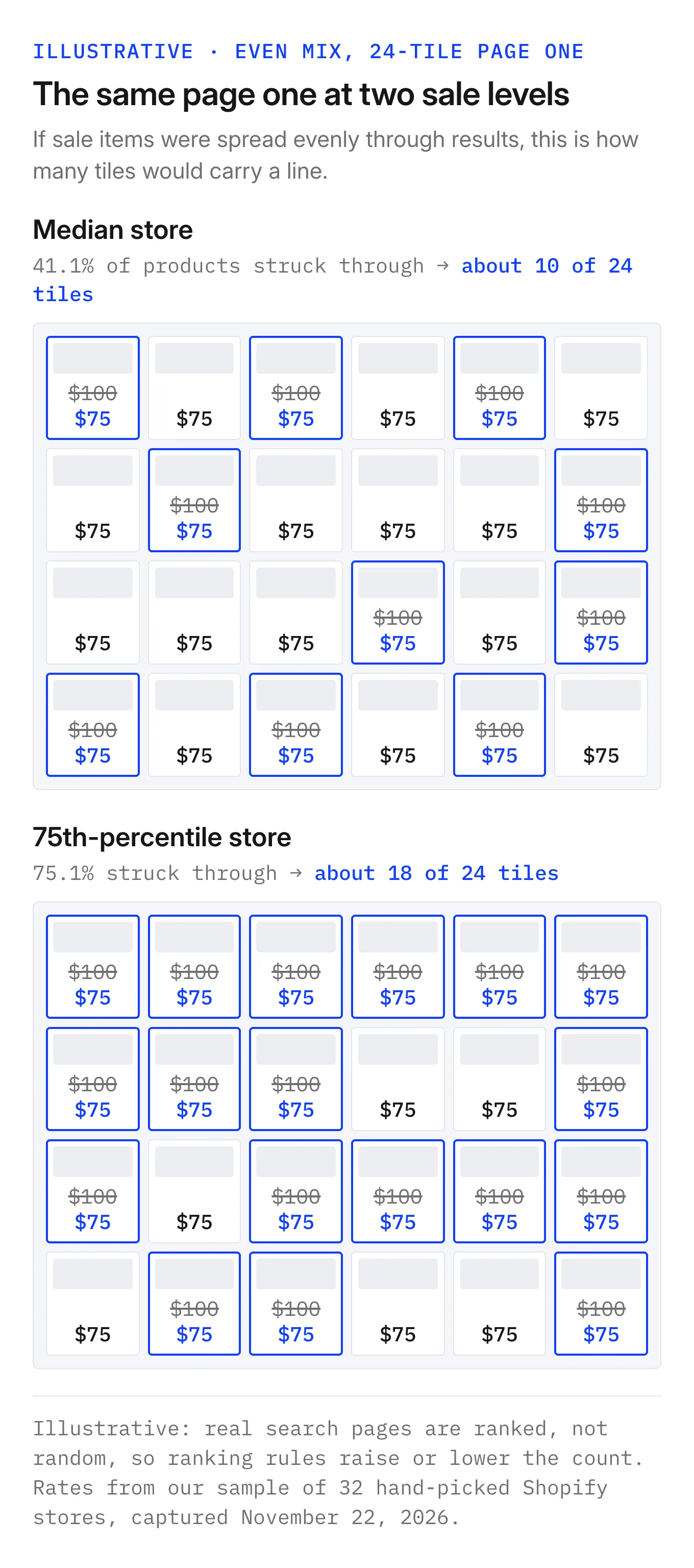
That grid is illustrative. Real pages are ranked, so your ranking rules set the actual count, and custom ranking that surfaces your deepest discounts can push it well past the catalog average.
Which products should carry the strikethrough in search?
Give the strikethrough to tiles that pass four checks: a real former price, a discount deep enough to matter, few other lines on the page, and stock the shopper can buy.
When a shopper searches for sale items, rank those items first.
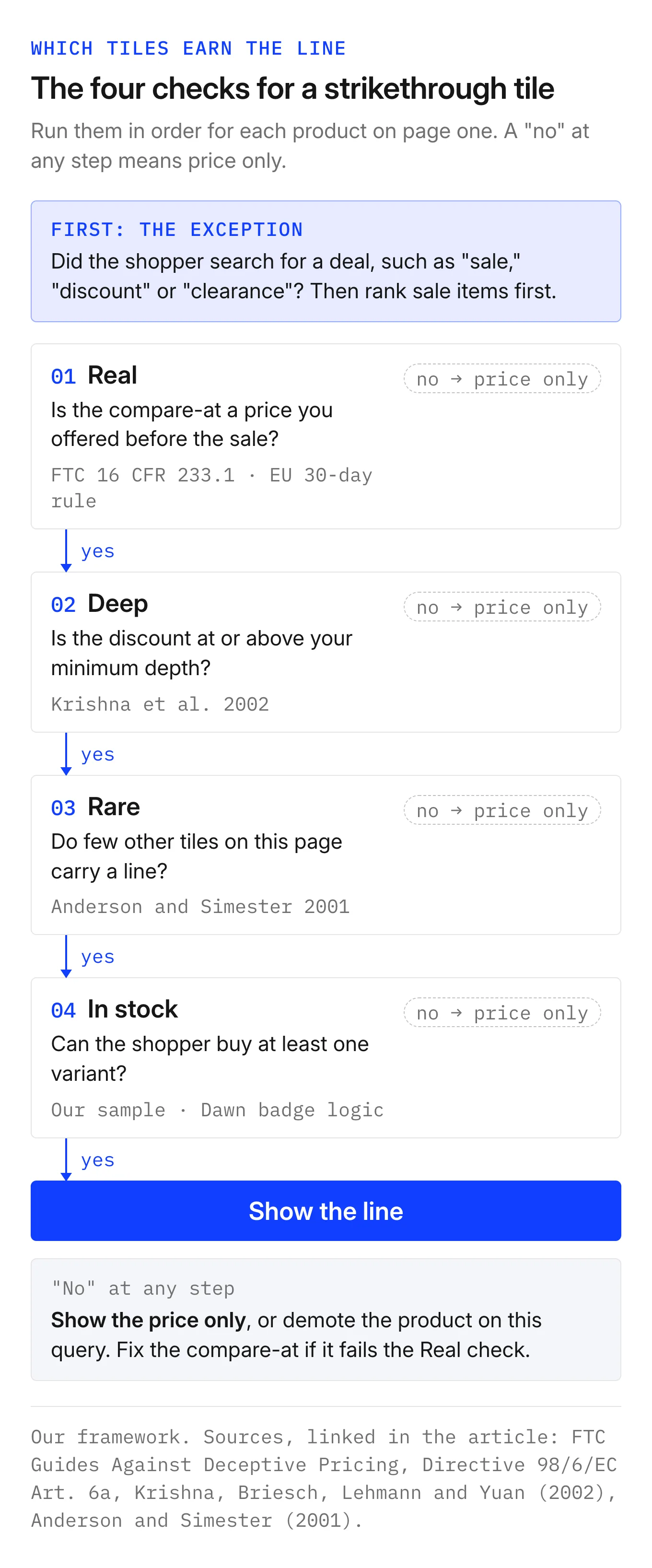
Real: is the compare-at a price you offered?
The FTC's Guides Against Deceptive Pricing set the bar.
A former price counts when it's "the actual, bona fide price at which the article was offered to the public on a regular basis for a reasonably substantial period of time."
The same text describes the opposite case, where "an artificial, inflated price was established for the purpose of enabling the subsequent offer of a large reduction."
That's the compare-at to rule out: one that was never a real former price.
In EU markets, the reference is the lowest price you applied in at least the 30 days before the reduction.
Our 32-store snapshot can't test this check, because one day's data can't tell how long a price has been "on sale." That takes your own price history.
Deep: is the discount big enough to matter?
Krishna and colleagues found the regular price adds value to large deals and not to small plausible ones. They recommend announcing the regular price for high-value deals only.
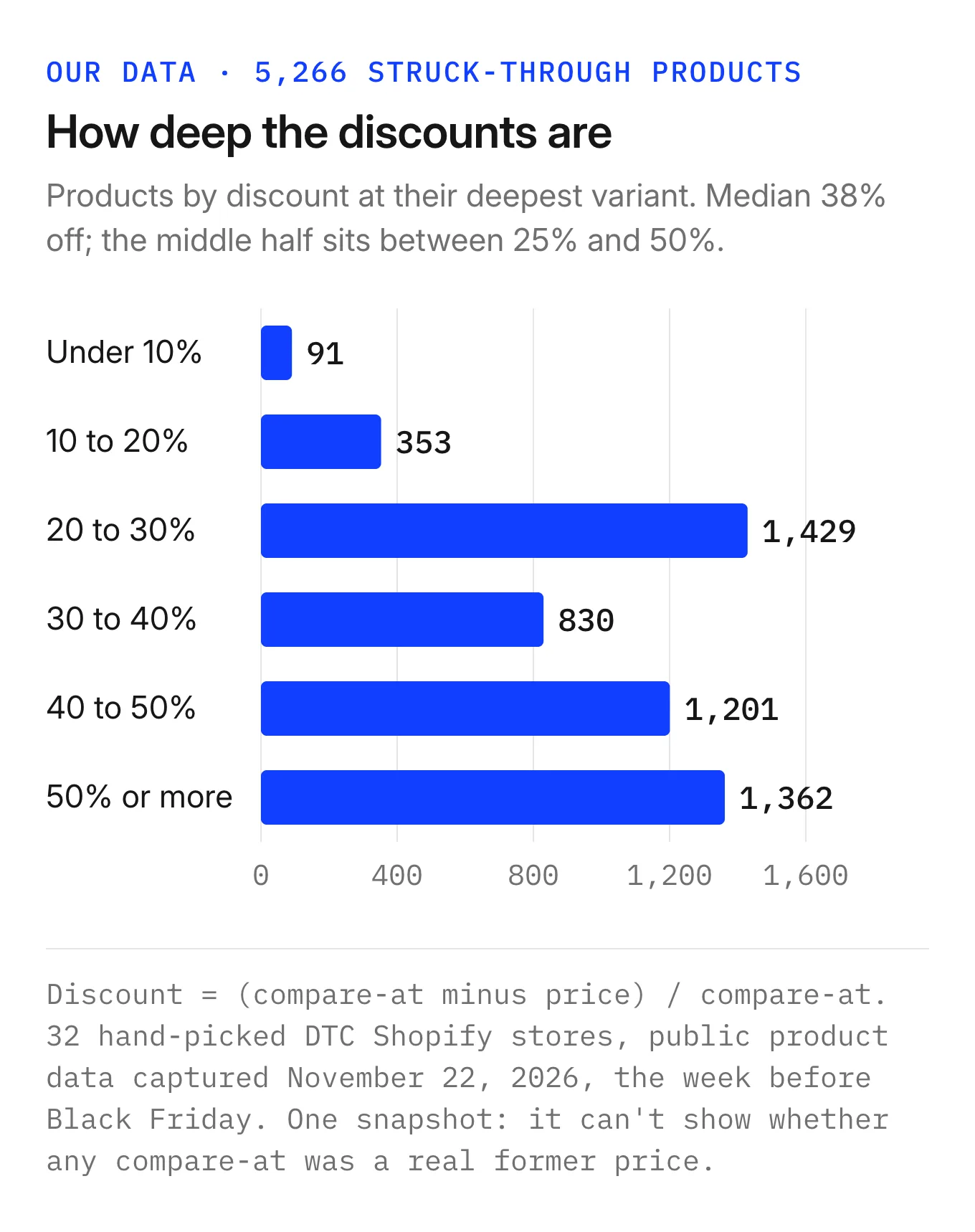
In our 32-store sample, the median struck-through product was 38% off at its deepest variant. The middle half sat between 25% and 50% off.
The full spread across 5,266 struck-through products:
- Under 10% off: 91 products
- 10% to 20% off: 353
- 20% to 30% off: 1,429
- 30% to 40% off: 830
- 40% to 50% off: 1,201
- 50% off or more: 1,362
We won't set a threshold for you. Pick your minimum depth and hide the line below it. Our Discount Percentage recipe returns a number you can key that badge rule to.
Rare: how many tiles on this page already have one?
This is the Anderson and Simester check. Count the struck-through tiles on page one for your top 20 queries; the worksheet below has a grid for it.
If most tiles on a page carry a line, start with the shallow discounts: demote them, or show their price without the line.
In stock: can the shopper buy it?
In the same sample, 861 of 5,266 struck-through products (16.4%) had every variant sold out.
Dawn already swaps the Sale badge for Sold out on those cards. Your ranking should also keep sold-out sale items off page one.
Collection pages need the same call.
The exception: the shopper asked for a deal
When the query is "sale," "discount," or "clearance," sale items should lead. Discount-intent searches come up on our calls, and the last section shows how we set this up.
If one of those searches returns nothing at all, you're looking at a zero-result problem as well as a display one.
The one-page Strikethrough Audit for Shopify Search has eight checks to run on your catalog and a page-one grid for your top 20 queries.
Why do some sale prices never show a strikethrough in search?
Usually, the promotion never touched the compare-at field. Shopify crosses out automatic and code discounts only at checkout, unless an app or custom build shows them earlier.
A compare-at equal to the price draws no line, and a market's fixed price overrides compare-at.
- The promotion is an automatic or code discount
- What the shopper sees in search: full price on the tile; the saving appears at checkout
- Where to fix it: a discount app or custom build that shows savings before checkout
- The compare-at equals the price
- What the shopper sees in search: a plain price, no line
- Where to fix it: set the compare-at to the real former price, or clear it
- The market has a fixed price
- What the shopper sees in search: that market's fixed price; the admin compare-at is ignored
- Where to fix it: import fixed sale prices for the market by CSV
- Predictive search has its price setting off
- What the shopper sees in search: no price in the dropdown
- Where to fix it: the predictive search price option in your theme settings
Shopify spells out the first one.
To show crossed-out discount savings on product and collection pages, "you need to use a third-party discount app, or hire a Shopify partner to build a custom solution for you."
Automatic discounts and discount codes always show a crossed-out price at checkout. Before checkout, the tile shows whatever the price fields say.
Equal values are common. In our 32-store sample, 5,436 of 45,030 variants with a compare-at value (12.1%) had it set equal to or below the price.
They turned up in 15 of 32 stores, and 2 stores held 71.1% of them.
On the tile, that's harmless, because the theme draws no line. It bites when a search rule treats "compare-at is filled" as "on sale," which catches every one of those variants.
Mixed variants are rare. In the same sample, only 104 of 4,084 multi-variant sale products (2.5%) discounted some variants and not others.
Promotions the price fields never see also come up on our calls.
Search can only rank and display the prices it can read. A discount that lives outside price and compare-at stays invisible to search until it's modeled as data.
What are the rules on crossed-out former prices?
The details differ by country, but the shared test is that the crossed-out price must be one you offered before the sale.
The FTC asks for a bona fide price offered for a reasonably substantial period, and the EU for the lowest price of the previous 30 days.
This is a summary of the texts as of November 23, 2026, not legal advice. Check your setup with counsel.
- US
- Text: FTC Guides, 16 CFR 233.1
- The test, quoted: "the actual, bona fide price at which the article was offered to the public on a regular basis for a reasonably substantial period of time"
- What to check in Shopify: how long each compare-at was the live price before the sale
- EU
- Text: Directive 98/6/EC, Article 6a, inserted by Directive (EU) 2019/2161
- The test, quoted: "the lowest price applied by the trader during a period of time not shorter than 30 days prior to the application of the price reduction"
- What to check in Shopify: each EU market's compare-at against that market's 30-day price history
- UK
- Text: CMA guidance, CMA207
- The test, quoted: false or misleading information about "the existence of a specific price advantage"
- What to check in Shopify: whether each "was" price shown to UK shoppers is true
- Canada
- Text: Competition Act, section 74.01
- The test, quoted: sold "a substantial volume of the product at that price or a higher price within a reasonable period of time," or offered it "in good faith for a substantial period of time"
- What to check in Shopify: sales volume or offer period at each compare-at
US. The FTC text adds that a former price isn't fictitious only because nothing sold at it.
It must still be a price the product "was openly and actively offered for sale" at, for a reasonably substantial period.
EU. Article 6a says any announced price reduction must show the prior price the trader applied before the reduction. Member States had to apply it from 28 May 2022.
UK. The Digital Markets, Competition and Consumers Act 2024 rules apply to practices from 6 April 2025. They treat misleading price-advantage claims as a misleading action.
The CMA's CMA207 guidance replaced the older OFT1008 guidance the same day.
Canada. Section 74.01(3) covers a seller's own regular price. Section 74.01(2) covers an ordinary price claimed for the market as a whole, judged on what suppliers in general sold or offered.
Shopify Markets. A shopper in an EU market sees that market's price and compare-at, and Shopify fixed prices override what you set in admin.
So the 30-day rule applies to the compare-at each EU market shows, as well as your base price. Here's what Shopify Markets changes in search.
Do AI shopping agents show your strikethrough prices?
They can now. Since October 9, 2026, Shopify shares compare-at prices with AI shopping agents through Shopify Catalog.
You choose whether Catalog sends your price or your compare-at as the list price, and each AI channel, such as ChatGPT or Microsoft Copilot, decides whether to show it.
Shopify's changelog entry says agents can now "see when a product is marked down."
Its agentic storefronts help page adds that agents "might use the list price to advertise strikethrough pricing for products that are on sale."
Shopify's sale pricing page confirms the split: you pick the list price, and each AI channel decides whether to display it.
So the four checks apply beyond your storefront. A compare-at that fails the Real check can travel into an agent's answer, on a surface where you don't control the tile.
Start by checking which value your Catalog sends today. Then compare it with the fields AI agents read and how agents query your store. Before you change anything, test it in an agent yourself.
How should your search handle sale items and "sale" searches?
Turn compare-at and price into a discount-depth number, per market. Rank sale items first when the query asks for them, and decide separately what happens in every other search.
The theme draws the line. Your search and merchandising rules decide which lined tiles reach page one.
Compute discount depth once
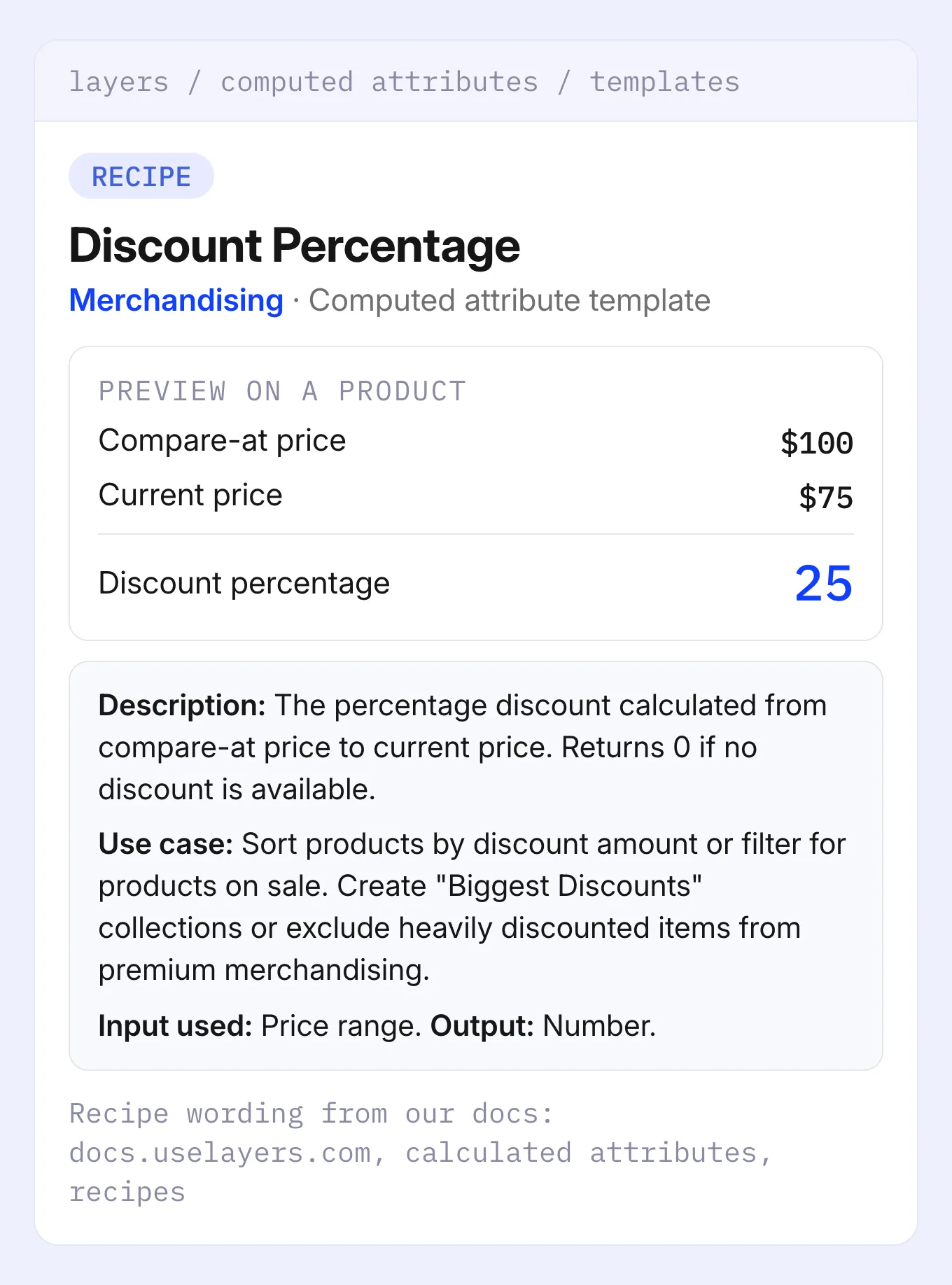
Our Discount Percentage recipe returns "the percentage discount calculated from compare-at price to current price," and it "returns 0 if no discount is available."
A product with a $100 compare-at and a $75 price returns 25.
The docs list sorting by discount and filtering for sale items among its uses. Like any computed attribute, it can drive badges, filters, sorting, and merchandising rules.
Key your sale rules to "discount above 0," not "compare-at is set," even though our own priority rule example keys on compare-at being set.
In our 32-store sample, 12.1% of compare-at values weren't discounts.
Answer "sale" in the query
Request transforms match the search query with operators such as contains, equals, or starts with. A matching transform can add a filter group or override the sort.
An example setup for discount-intent searches:
- Match. The query contains "sale."
- Filter. Add a filter group for Discount Percentage above 0.
- Sort. Sort by Discount Percentage, descending, which is the documented sale-items-first pattern.
Our price attribute class handles price sensitivity in query intent and price-aware sorting for price-related queries. We don't claim it catches the word "sale" on its own; the transform does that.
Decide: promote or demote in normal searches
Outside sale queries, it's your call. Our priority rule examples include a soft demotion that lowers clearance items in search while keeping the best matches in place when they're highly relevant.
For collections, a Demote expression moves final-sale or clearance products to the bottom without removing them.
If sale items float to the top of best-seller sorts in your store, or you'd rather sort by margin instead, those guides go further.
Keep the badge honest
Our product card controller exposes price, compareAtPrice, and isOnSale for the selected variant. Drive the badge from the same depth number your rules use, so the ranking and the tile agree.
Promotions that aren't in compare-at
Through our discount entitlements partnership with Abra Promotions, dynamic discounts apply inside search and browse results. Sorting by price and filtering by price range then use the discounted price.
When an entitlement lowers a price, we set compare-at to the higher of the existing compare-at and the pre-discount price. That way the storefront can render the line without extra bookkeeping.
Markets
With Shopify Markets, we store price and compare-at per market and country, in that country's own currency.
If a foreign-currency price has no compare-at, we leave it empty instead of filling it from the base currency, so a tile never shows two currencies side by side.
How do you test whether strikethrough helps your search?
Run a holdout. Split searching sessions in two, keep prices identical, and in one half show the strikethrough only on tiles that pass the four checks.
Measure search-to-purchase conversion, with revenue per searching session and full-price share as guardrails. We haven't run this test ourselves yet.
- Pick the store and window. You need four or more weeks of even search traffic and a stable markdown set, with no new promotion starting mid-test.
- Split 50/50 by session with a theme flag. It's a display-only change, so the flag lives in the theme and your ranking stays untouched.
- Control. Today's tiles, struck through wherever the compare-at is above the price.
- Variant. The line only on tiles with a real former price, a discount at or above your threshold, and stock. Fewer lines per page covers the Rare check. Same prices; display only.
- Metrics. Primary: search-to-purchase conversion per searching session. Guardrails: revenue per searching session, full-price share of search revenue, and the 30-day return rate.
- Length. Two full weeks minimum, no holiday weeks, with the minimum detectable effect written down before you start. That rules out the weeks around Black Friday.
- Publish rule. Decide up front that you'll report a flat or negative result the same way you'd report a win.
If you run it, we'd like to hear what you find.
Want to see how we key search rules to discount depth on your own catalog? Book a demo.
FAQs
1. Does strikethrough pricing increase conversions? Studies show a reference price shifts what buyers think a product is worth, which feeds purchase intent. None measured a search page, and the effect shrinks as sale cues spread. Test before assuming a lift.
2. What is a compare-at price on Shopify? It's the field that holds a product's original price. When it's higher than the price, your theme can show it crossed out beside the current price. Equal values draw no line.
3. Why isn't my compare-at price showing in search results? An equal compare-at draws no line, and predictive search may have its price setting off. Shopify also crosses out automatic and code discounts only at checkout, unless an app or custom build shows them earlier.
4. Should sale items rank higher in search? When the shopper asks for them, yes: a "sale" or "discount" search should lead with discounted items. Otherwise, it depends on your goal; a soft demotion keeps highly relevant sale items in place.
5. What counts as a fake discount? Under the FTC's pricing guides, a former price is fictitious when "an artificial, inflated price was established for the purpose of enabling the subsequent offer of a large reduction." Check your setup with counsel.
6. What is the EU 30-day rule for sale prices? Under Article 6a of Directive 98/6/EC, a price reduction must show the prior price: the lowest price applied in at least the 30 days before it. It has applied since 28 May 2022.
7. Can AI shopping agents see my compare-at price? Yes. Since October 9, 2026, Shopify shares compare-at prices with AI agents through Shopify Catalog. You choose which value Catalog sends as the list price, and each AI channel decides whether to show it.
Written by

Lukas Tanasiuk
Co-Founder and CRO, Layers
Lukas Tanasiuk is Co-Founder and CRO of Layers, the enterprise search and merchandising platform built exclusively for Shopify Plus. He has spent over a decade in Shopify ecommerce and CRO, and speaks with enterprise merchants about search and merchandising every week.
View all articlesRelated articles
More reading on search, merchandising, and product discovery.
Salesforce Commerce Cloud to Shopify Plus: A Merchandising Rule Inventory and Cutover Plan
A rule-by-rule method for moving Salesforce Commerce Cloud merchandising to Shopify Plus, with a cutover plan that tests your top queries before launch.
Lukas Tanasiuk
Nov 24, 2026 · 25 min read
How to Forecast Your Search and Merchandising Bill on Shopify Plus
How the six search pricing models bill a Shopify Plus brand, what makes the bill spike at BFCM, and a forecast method you can run on your own numbers.

Jake Casto
Nov 24, 2026 · 15 min read
What is Searchandising? The Line between Search and Merchandising
Search finds the products; searchandising picks which show first. A job-by-job map of the boundary, with what Shopify's native tools let you change today.
Jake Casto
Nov 24, 2026 · 17 min read