How to Forecast Your Search and Merchandising Bill on Shopify Plus
How the six search pricing models bill a Shopify Plus brand, what makes the bill spike at BFCM, and a forecast method you can run on your own numbers.
Key takeaways
If your search bill has ever jumped further than your sales in November, check the contract before you check your traffic. What the vendor counts decides most of the bill.
Pricing comes up constantly on our sales calls: it came up in 44 of the 148 we reviewed, and fear of overages is one of the themes we log most often.
Buyers also tell us they often can't find a vendor's pricing model on its website at all.
Below are the six pricing models in most quotes and what makes each bill jump, then a spreadsheet forecast and twelve questions every vendor should answer in writing, us included.
What are the main pricing models for ecommerce search?
Ecommerce search is priced six ways: per request, per record or SKU, per session, as a revenue share, as tiered plans with paid modules, or as a fixed price on past volume. Each counts something different.
Per request
- What counts: search API calls, sometimes every autocomplete keystroke
- What moves the bill: traffic peaks, typeahead, refinements, bots
- Who carries spike risk: you, above the allowance
- Best fit: steady traffic and a team that can tune request volume
Per record or SKU
- What counts: products, variants, or other indexed records
- What moves the bill: catalog growth, variants, new markets
- Who carries spike risk: you, as the catalog grows
- Best fit: a stable catalog
Per session
- What counts: monthly store sessions within a tier
- What moves the bill: traffic peaks, bots
- Who carries spike risk: you, at each tier boundary
- Best fit: smaller or steady stores
Share of revenue or GMV
- What counts: a percentage or tier of online revenue
- What moves the bill: revenue growth, whether or not search use grows
- Who carries spike risk: you, every time sales grow
- Best fit: stores with modest, steady revenue
Tiered plans with add-on modules
- What counts: tier caps on requests or products, plus modules bought separately
- What moves the bill: crossing a cap, adding a module
- Who carries spike risk: you, at each tier step
- Best fit: buyers who need one narrow feature
Volume-quoted fixed term
- What counts: your volume, priced up front for the term
- What moves the bill: your volume at renewal
- Who carries spike risk: the vendor, during the term
- Best fit: spiky traffic and BFCM-heavy stores
Here is what each one looks like in a real quote:
- Per request. You get a monthly request allowance, then pay per extra 1,000. Some plans also charge per extra 1,000 records, so one contract bills on two meters.
- Per record or SKU. The price follows catalog size, and definitions vary. One vendor counts active products published to the online store; another counts records, which can mean every variant.
- Per session. Some search apps on Shopify set tiers by monthly sessions, so a traffic spike can push you into the next tier.
- Share of revenue or GMV. Some app tiers are priced on online GMV. The bill grows with sales, even in months when search use stays flat.
- Tiered plans with add-on modules. Some plans cap API requests and product count per tier. Pass either cap, and you move up a tier.
- Volume-quoted fixed term. The vendor prices your volume up front and holds that price for the term. This is how we price, covered in the last section.
If you're still comparing what these tools do rather than what they cost, start with how smart search apps work on Shopify.
If a quote sells merchandising as a separate module, map which jobs belong to search and which to merchandising before you price it.
What counts as a search request?
It depends on the contract. Some vendors count every autocomplete keystroke as a request; others count only submitted searches or sessions. Get the definition in writing, because it can move your bill more than the rate.
Keystroke counting is written into some pricing pages. One vendor states that in autocomplete and search-as-you-type setups, a new search request is performed on every keystroke.
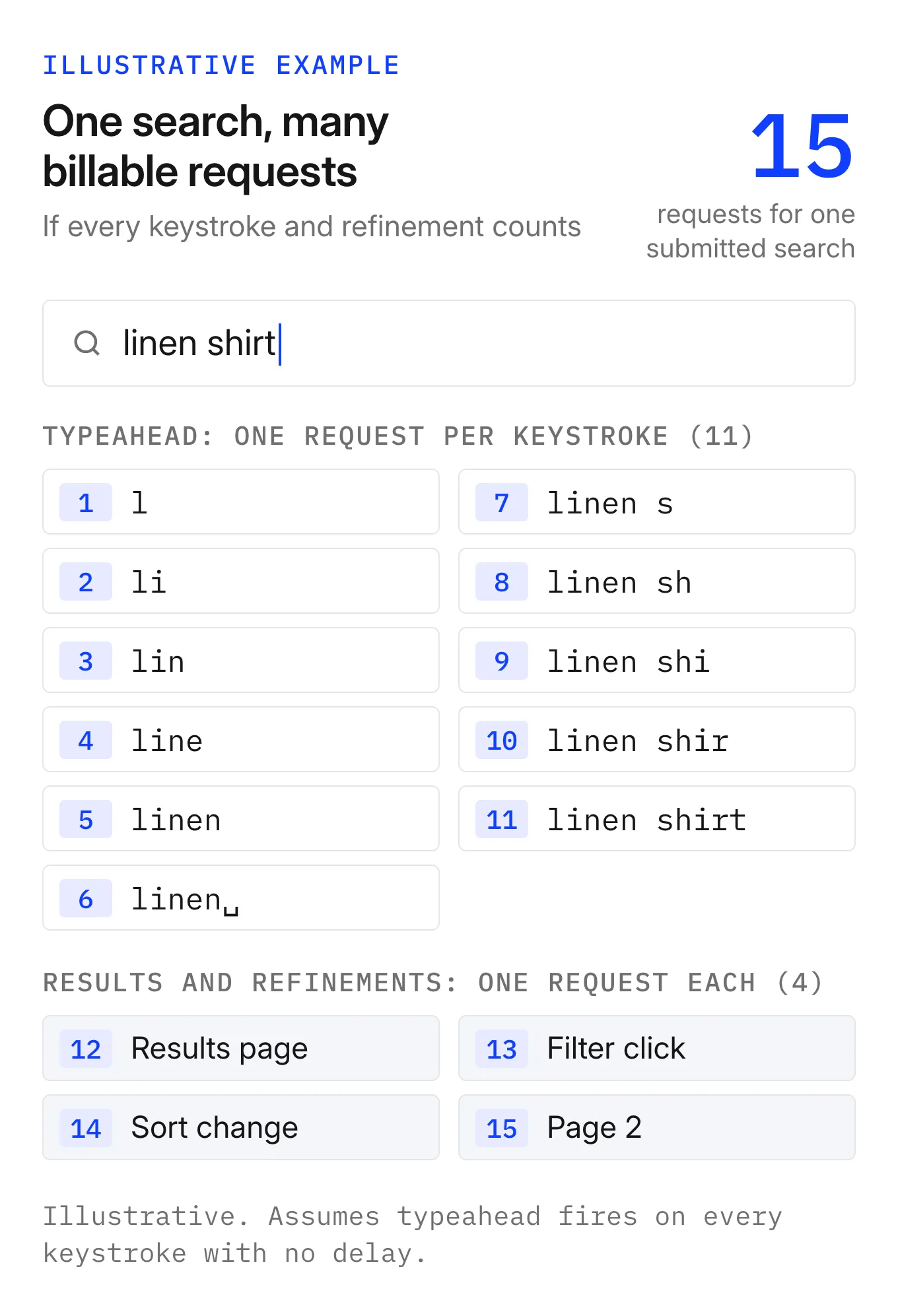
Take a shopper who types "linen shirt". That's 11 characters, including the space. If typeahead fires on every keystroke with no delay, that's up to 11 requests before the results page loads.
On a per-request meter, each action that reloads results can add one more.
In this illustration, the results page, one filter click, one sort change, and page two add one each: 15 requests for one submitted search.
The gap shrinks when typeahead waits for a pause in typing before it fires. A shopper who types the whole phrase in one go might then trigger two or three requests, not 11.
Four more things shape the count:
- Visits and searches are different units. Our metrics glossary notes that search metrics count per search, so a single visit with three searches can count three times.
- The meter sets the incentive. A merchant on one of our calls pointed out that a vendor paid per API call earns more when your site calls it more.
- Autocomplete and results can be separate systems. On many stores, your autocomplete and results are two engines, and each can send its own requests.
- Markets and languages can multiply requests. If each market or language runs on its own index, one shopper search can reach more than one.
Before you compare rates, get written answers to four questions:
- Does each typeahead keystroke count as a request?
- Do filtering and faceting requests, sort changes, and next pages count?
- Do bot and crawler requests count?
- Does one search across several markets or languages count once?
What makes a search bill jump?
Four things move most search bills: holiday peaks, catalog growth, bots, and new markets. Peaks and bots hit request and session meters, catalog growth hits record meters, and a new market can hit both.
Holiday peaks
Shopify merchants sold $14.6 billion over BFCM 2025, up 27% on 2024. Sales peaked at $5.1 million per minute at 12:01 p.m. EST on Black Friday.
At the same peak, Shopify's infrastructure handled 489 million edge requests per minute. A request or session meter counts your share of that traffic in your busiest month of the year.
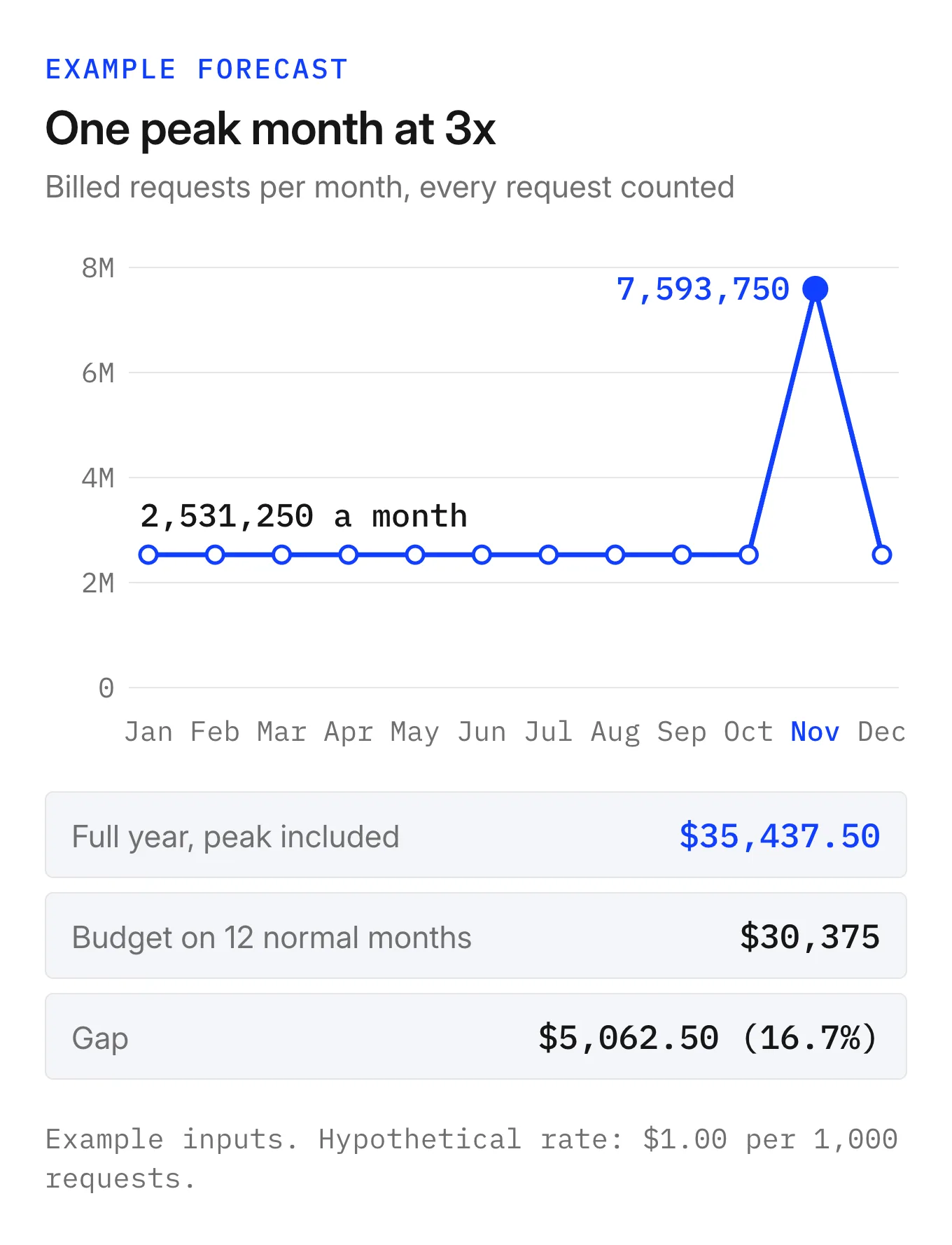
In the example forecast further down, 11 normal months run at 2,531,250 billed requests each. November runs at three times that: 7,593,750 requests.
An allowance sized on an average month runs out early in a peak month, and every request after that bills at the overage rate.
What to ask: what happens above the allowance in your peak month, and is there a cap?
Catalog growth
Record meters follow your catalog, and the definition of a record decides the count. Take an example catalog of 5,000 products with 8 variants each, sold in 3 locales:
- Counted as products: 5,000 records
- Counted as variants: 40,000 records
- Counted as variant and locale pairs: 120,000 records
- After 30% catalog growth: 156,000 variant and locale records
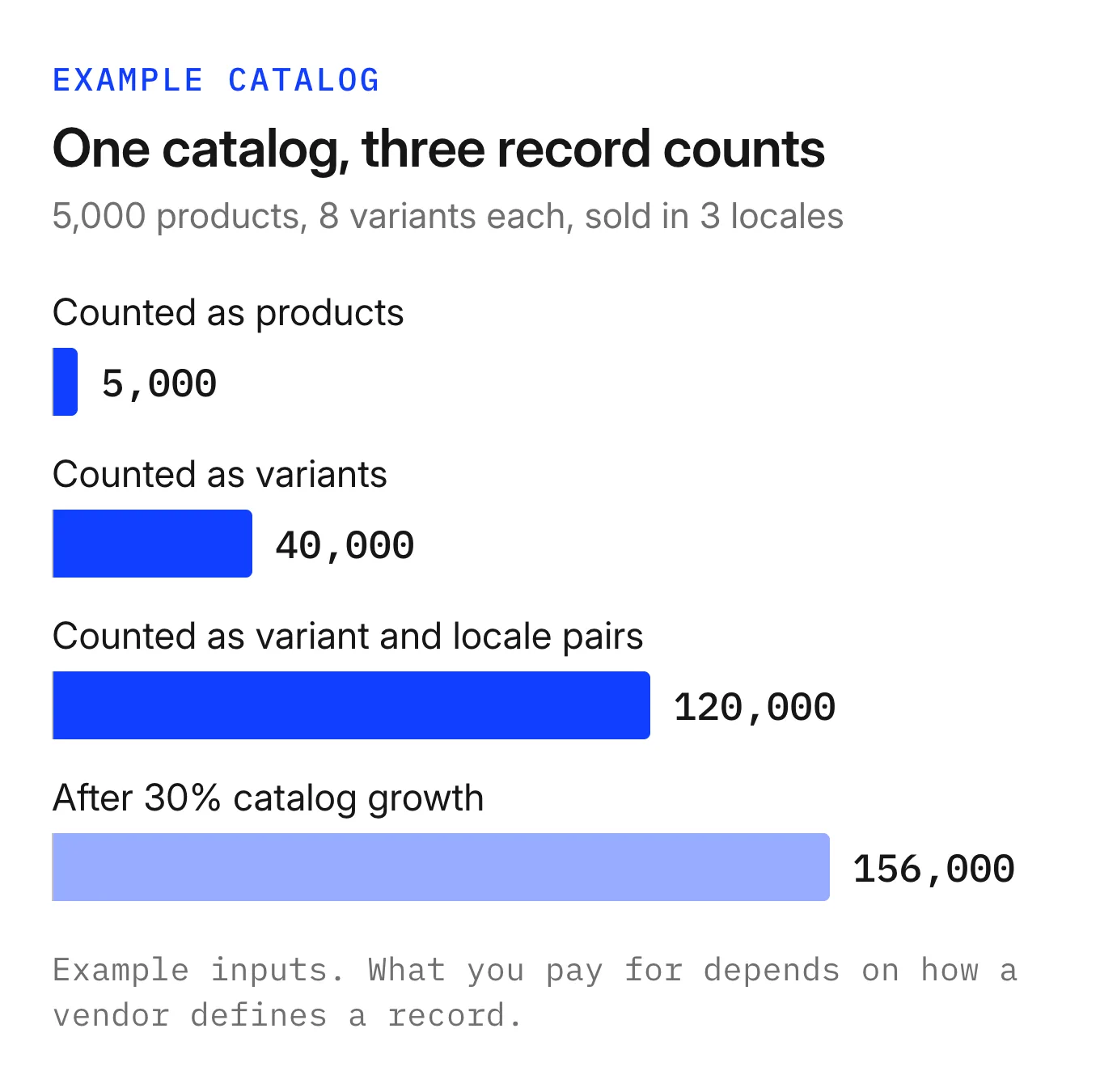
The same products produce very different bills depending on the definition. Shopify features that split or group products can change the count too; see combined listings and variant records.
What to ask: is a record a product, a variant, or a variant in each language?
Bot traffic
Automated traffic made up 51% of all web traffic in 2024, the first time in a decade it passed human traffic, according to Imperva's 2025 Bad Bot Report.
In retail, bad bots alone made up 59% of traffic.
Bots that search your store or crawl collection pages can create billable requests like any shopper. A merchant we spoke with left a previous vendor because scraping bots were billed to them as usage.
If you already run bot management in front of your storefront, ask whether the vendor counts requests before or after it filters traffic. That decides whether your bot share input is near zero or much higher.
Before you block AI crawlers to cut that share, check what blocking them changes for agentic shopping on Shopify.
What to ask: are bot and crawler requests excluded from billing, and how does the vendor identify them?
New markets
A new market usually brings a new language or currency to index. On a record meter, each locale can add records; on a request meter, the market's traffic adds requests from launch day.
For the setup side, see how Markets multiplies what you index.
What to ask: do markets or languages multiply my record count, my requests, or both?
How do you forecast your search bill?
Start with sessions, search share, and searches per session. Multiply by the requests each search creates under the vendor's definition, add bots, then the peak month. Price each quote over a full year.
The steps:
- Find your sessions and search share. On native Shopify search, use Shopify's search reports. If an app already runs your search, use its dashboard, because Shopify only reports searches its own search handles.
- Count searches per searching session. A single visit can include several searches, so count searches, not visits.
- Apply each vendor's definition. Add typeahead requests and refinement requests (filters, sorts, next pages) per search, if that vendor counts them.
- Add bots. Divide human requests by one minus your bot share.
- Apply your peak month. Multiply a normal month by last year's peak-month multiplier.
- Price the full year. Eleven normal months plus the peak month, at each quote's unit and rate.
- Run the catalog side. Count your records the way each vendor defines them.
Here are the inputs, with the example values used below:
| Input and example value | Where to find yours |
|---|---|
| Monthly sessions (S): 1,000,000 | Shopify analytics |
| Share of sessions that search (u): 15% | Search reports or your app's dashboard |
| Submitted searches per searching session (q): 1.8 | Search reports or your app's dashboard |
| Typeahead requests per submitted search (k): 5 | Vendor logs or a test session |
| Filter, sort, and page requests per search (f): 1.5 | Vendor logs or a test session |
| Bot share of requests (b): 20% | Bot management or vendor reports |
| Peak-month multiplier (m): 3 | Last November vs an average month |
| Rate per 1,000 requests (p): $1.00 (hypothetical) | Each quote |
Every example value is made up for the arithmetic. None is an industry benchmark, and the $1.00 rate is hypothetical, not any vendor's price. Replace each one with your own numbers.
billed requests per month = S × u × q × (1 + k + f) ÷ (1 - b)
full-year bill = (11 + m) × normal month bill
Worked example: same store, two definitions
The request side, per month:
- Submitted searches: 1,000,000 × 15% × 1.8 = 270,000
- Typeahead requests: 270,000 × 5 = 1,350,000
- Filter, sort, and page requests: 270,000 × 1.5 = 405,000
- Human requests, all counted: 2,025,000
- With a 20% bot share: 2,025,000 ÷ 0.8 = 2,531,250 billed requests
- Submitted searches only, with bots: 270,000 ÷ 0.8 = 337,500 billed requests
Same store, same shoppers. Counting every keystroke and refinement produces 7.5 times the billed requests of counting submitted searches only.
The dollar side, at the hypothetical $1.00 per 1,000 requests:
- Normal month, all counted: $2,531.25
- Peak month at 3x: $7,593.75
- Full year (11 normal months plus the peak): $35,437.50
- Budget built on 12 normal months: $30,375
- Gap: $5,062.50, or 16.7% of that budget
- Full year, submitted searches only: $4,725
A budget built on 12 average months misses this example by $5,062.50, and the miss lands in November.
The printable worksheet after the vendor questions below sets this example out line by line beside a blank column for your store, with the twelve questions as a checklist.
If a vendor bills through Shopify, check the capped amount: the most usage Shopify will bill in a 30-day billing cycle.
You can change it in your Shopify admin, and the app can be notified when you reach 90% of it.
A contract invoiced directly by the vendor has no Shopify capped amount. If you want a ceiling there, it has to be written into the contract.
Which pricing model fits your store?
Match the model to what you can't predict. Spiky traffic: avoid uncapped request meters. Catalog or market growth: check record definitions. Revenue outpacing search use: avoid a revenue share. Fixed terms move risk to renewal.
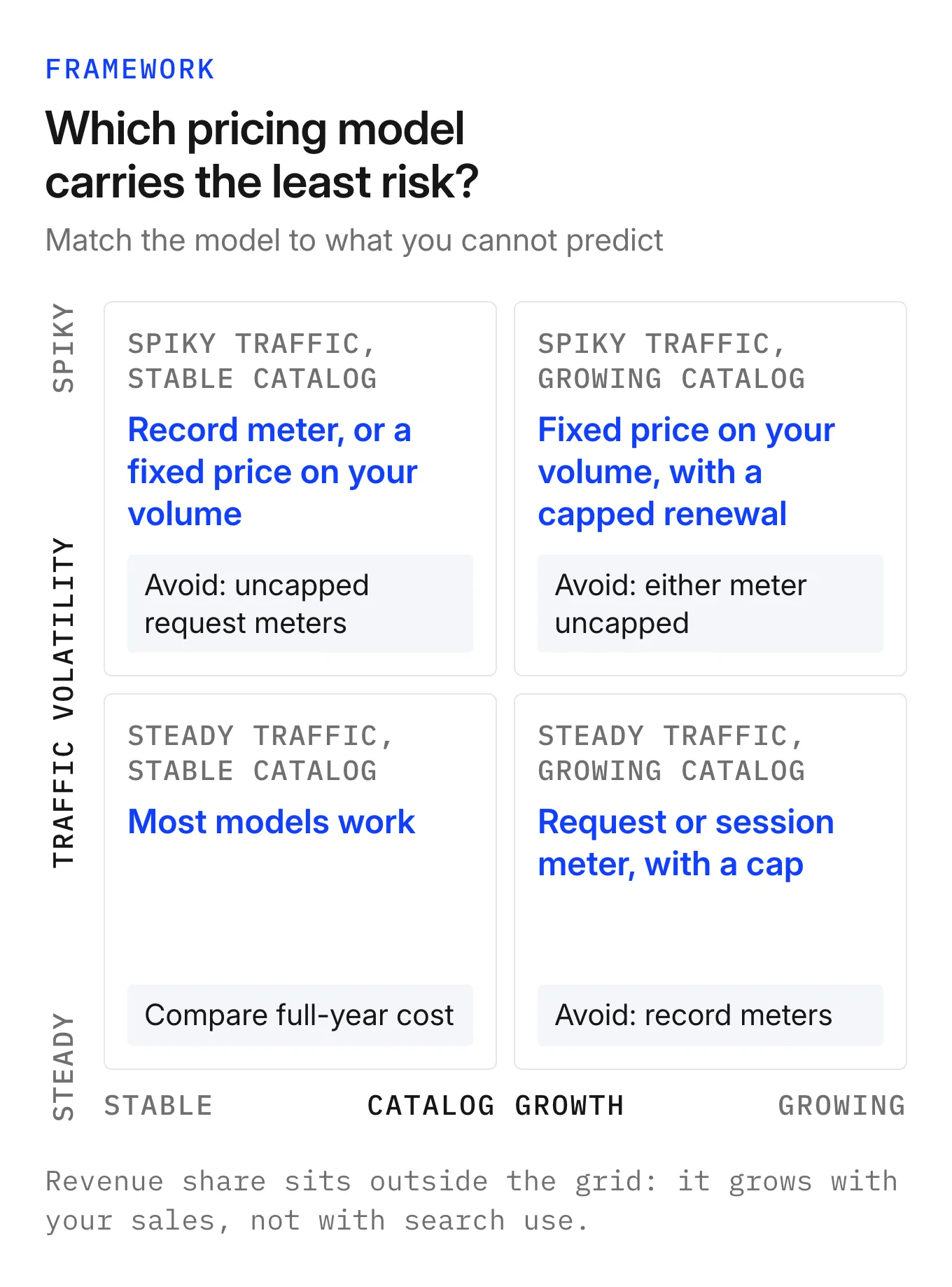
How to read the matrix:
- Steady traffic, stable catalog. Most models work. Compare full-year cost.
- Spiky traffic, stable catalog. A record meter or a fixed price on your volume. Avoid uncapped request meters.
- Steady traffic, growing catalog. A request or session meter with a cap. Avoid record meters.
- Spiky traffic, growing catalog. A fixed price on your volume with a capped renewal. Avoid both meters uncapped.
If you run BFCM promotions, you likely sit in the spiky-traffic row. Then the real choice is between a record meter and a fixed price on volume, and your catalog growth decides which.
A revenue share carries a different risk. At a hypothetical 0.5% of $40 million in online revenue, the bill is $200,000.
Grow revenue 25%, and it's $250,000, whether search drove that growth or not.
Merchants on our calls describe percentage-of-revenue pricing as a tax on growth, and the arithmetic shows why.
Fixed-term pricing moves the risk to renewal. Ask what the next price is based on and whether the increase is capped.
Cost is one side of the comparison. A low bill on search that misses products costs you in orders; see what zero-result searches cost you, and evaluate on revenue per search before you compare totals.
What should you ask a search vendor before you sign?
Ask for the counting unit in writing, then how bots and typeahead are treated, your BFCM peak, record counts across variants and markets, and the renewal basis. Run every answer through your forecast.
Send these twelve questions to every vendor, word for word:
- What exactly counts as a billable request, session, or record?
- Does each autocomplete keystroke count?
- Do filter clicks, sort changes, and next pages count?
- Are bot and crawler requests excluded, and how are bots identified?
- Is there an allowance, and what is the rate above it?
- Is there a cap, and do you alert me before I reach it?
- Do variants, markets, or languages multiply my record count?
- Are merchandising, recommendations, or visual search separate modules?
- Is any part of the price tied to revenue or GMV?
- What is the next renewal based on, and is the increase capped?
- Can I see last November's volume priced under this contract?
- Can I lock the price for the term?
Each answer feeds a line of the forecast:
- Questions 2 and 3 set your typeahead and refinement inputs.
- Question 4 sets your bot share.
- Questions 5 and 6 tell you what the peak month costs above the allowance.
- Question 7 sets your record count, and questions 10 and 12 set what year two costs.
Put the answers side by side and run each one through the same forecast. Where a vendor won't answer in writing, assume the costlier reading.
How do we price Layers?
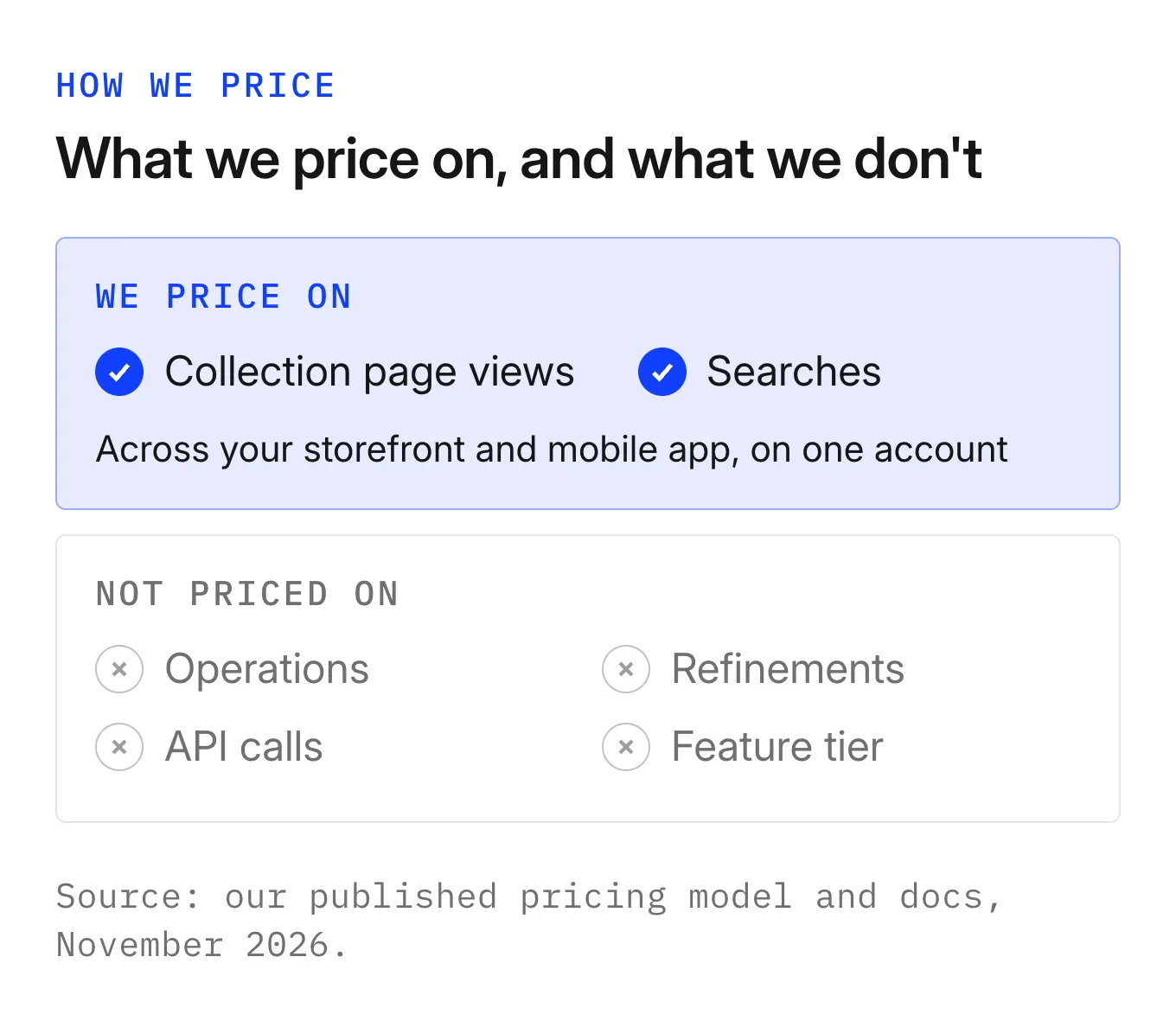
We price on collection page views and searches across your storefront and mobile app, not API calls, refinements, or feature tier. The price locks for up to a year with no overage risk.
We sell search and merchandising for Shopify Plus, and the model has four parts:
- What we count: collection page views and searches, across your storefront and your mobile app on the same account.
- What we don't count: operations, refinements, API calls, or feature tier. There are no extra charges for features that should be included.
- Price lock: up to one year, with no overage risk. Renewals are capped at 10%.
- Billing: the recurring charge shows on the Billing page in your dashboard. Plan changes go through Shopify or your account manager.
We won't hide the tradeoff: our unit still follows your traffic. Collection page views and searches rise at BFCM like any other shopper metric.
What changes is who carries the spike. With the price locked, a peak month inside the term costs you no overage.
Hold us to the same twelve questions you send everyone else. Send us your last 12 months of searches and collection page views, and we'll price them in writing.
FAQs
1. How is ecommerce site search usually priced? Most vendors use one of six units: requests, records or SKUs, sessions, a revenue share, tiered plans with paid modules, or a fixed price on past volume. Ask which unit applies to each product.
2. Do autocomplete keystrokes count as search requests? On some contracts, yes. Some vendors fire a new request on every keystroke in search-as-you-type, so one query can create several billable requests. Ask whether typeahead counts, and whether a delay reduces it.
3. Do bots count toward my search bill? They can. Imperva found automated traffic was 51% of all web traffic in 2024. Ask each vendor whether bot and crawler requests are excluded from billing, and how they identify them.
4. How do I estimate my search bill for Black Friday? Take last November's request count, apply the vendor's counting unit and rate, and add overage charges above your allowance. Budget the full year with that peak month in it, not 12 average months.
5. What is a capped amount on a Shopify app bill? For apps billed through Shopify, the capped amount is the most usage Shopify will bill in a 30-day cycle; you can change it in your Shopify admin. Directly invoiced contracts have no such cap.
6. Is per-search or fixed-price search pricing better for Shopify? Neither wins on price alone. Per-search pricing suits steady traffic you can model. A fixed price on your volume suits stores with a sharp BFCM peak, because the vendor carries the spike during the term.
7. Why did my search bill go up when sales barely moved? Your bill follows the vendor's counting unit, not your revenue. Peak traffic, typeahead keystrokes, bots, catalog growth, or a new market can raise requests or records while sales stay flat. Check which input moved first.
8. How does Layers price search and merchandising? We price on collection page views and searches across your storefront and mobile app, not on operations, refinements, or API calls. You can lock the price for up to a year with no overage risk.
Written by

Jake Casto
Founder, Layers
Jake Casto is the founder of Layers, the enterprise search and merchandising platform built for Shopify Plus. He previously co-founded Proton, a Shopify Plus engineering studio that shipped more than 400 storefronts, where Layers began as an internal tool for a problem that kept repeating. He writes about search infrastructure, performance, and the engineering behind discovery at scale.
View all articlesRelated articles
More reading on search, merchandising, and product discovery.
Can an AI Agent Run Your Collection Rules? A 10-Task Test You Can Run
What an AI assistant can change in your collection rules, what waits for your approval, and 10 requests to test it with before it touches live pages.
Jake Casto
Nov 24, 2026 · 18 min read
Salesforce Commerce Cloud to Shopify Plus: A Merchandising Rule Inventory and Cutover Plan
A rule-by-rule method for moving Salesforce Commerce Cloud merchandising to Shopify Plus, with a cutover plan that tests your top queries before launch.

Lukas Tanasiuk
Nov 24, 2026 · 25 min read
Strikethrough Pricing in Search Results: When a Compare-at Price Helps and When it Backfires
The median store in our 32-store Shopify sample had 41% of products struck through. Which search tiles should keep that line, and which rules apply?
Lukas Tanasiuk
Nov 24, 2026 · 20 min read