Salesforce Commerce Cloud to Shopify Plus: A Merchandising Rule Inventory and Cutover Plan
A rule-by-rule method for moving Salesforce Commerce Cloud merchandising to Shopify Plus, with a cutover plan that tests your top queries before launch.
Key takeaways
Your product catalog will reach Shopify Plus through a CSV file or a migration app.
Your Salesforce sorting rules, dynamic attributes, search dictionaries, and campaign slots won't, because Shopify Plus has a full native equivalent for only 3 of the 17 Salesforce merchandising concepts we mapped.
Rainbow Shops, a value fashion retailer with about 1,000 stores, moved from Salesforce Commerce Cloud to Shopify to simplify its stack. The move worked operationally, and it "exposed a major merchandising gap."
Rainbow's VP of eCommerce and Digital, David Cost, put the fix plainly: "Layers has given us back the abilities that we had in Salesforce."
Salesforce Commerce Cloud, or SFCC, is the platform Trailhead now calls Agentforce Commerce for B2C.
This guide covers the merchandising side of leaving it, from a rule inventory built on SFCC's own exports to a week-by-week cutover you can test.
For the feature-level view first, read how Salesforce and our merchandising compare, feature by feature.
Why is a replatform riskier for merchandising than switching search apps?
Switching search apps on Shopify leaves your collections and URLs where they are, and Shopify keeps its search history. A replatform from Salesforce Commerce Cloud starts all of that from zero.
Only 3 of the 17 Salesforce merchandising concepts we mapped have a full Shopify Plus native equivalent, so every rule needs an owner and a decision.
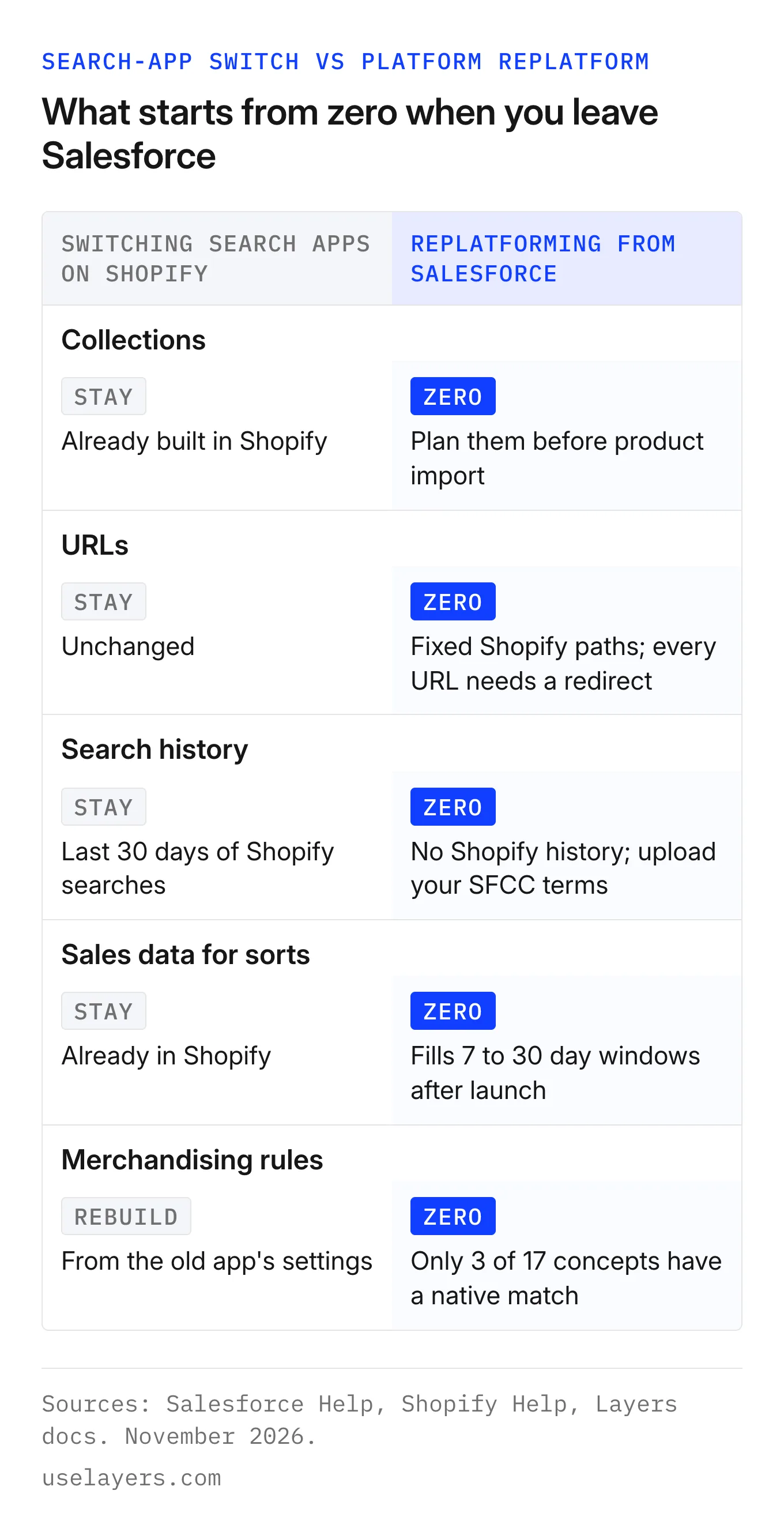
Five things change at once when you leave Salesforce.
- Your collections don't exist yet. In SFCC, a product is visible only through category assignment. Shopify's Plus launch checklist says to plan collections before you import products, within Shopify's collection limits.
- Shopify has no search history for you. On install, we seed search from your last 30 days of Shopify search terms, or from product types and titles when there are none. Shopify's own Top searches list also looks back 30 days.
- Your URLs change. Shopify product and collection pages sit on fixed paths, so every SFCC category and product URL needs a mapping and a redirect.
- Your rules live in objects no importer reads. Shopify's migration path covers products, customers, and historical orders. Your rules sit in their own SFCC exports. Hard-coded logic, like a product-finder quiz, can break quietly.
- Two systems change at the same time. Google's site-move guidance is to plan changes "one after the other, not everything at the same time." A replatform usually swaps the commerce platform and the search engine together.
Keep everything else, like a navigation redesign or a taxonomy rework, out of the cutover window.
Already on Shopify and only replacing a search app? That's a smaller job, and our search-app switching guides walk through it. This guide is for the platform move.
How do you inventory every merchandising rule in Salesforce Commerce Cloud?
Export the merchandising objects from Business Manager before anything changes: sorting rules and dynamic attributes, boost and bury rules, search dictionaries and redirects, keyword groups, content slot configurations, and campaigns.
Then join each rule to evidence of use from your On-Site Search reports, and give every rule an owner and a disposition.
1. Export the objects. Each rule family has its own export, and some families need two.
- Sorting rules, dynamic attributes, storefront sorting options: sort.xsd
- Boost and bury rules: sort.xsd, with the sorting rules
- Synonyms, hypernyms, stop words, search redirects, suggestions, searchable attributes: Search object (search2.xsd)
- Keyword groups and their sorting-rule assignments: Two separate ImpEx modules
- Content slot configurations: Content slot export
- Campaigns and promotions: promotion.xsd
- URL redirects, URL-mapping rules, static mappings, hostname aliases: URL redirect features
- Agentic Commerce Search merchandising rules, if enabled: Map rule by rule
Category Position values are set per product on the catalog's category assignment page. Capture them by hand for your top categories.
2. Pull evidence of use. SFCC's On-Site Search analytics report search volume, failed searches, revenue per search, and top phrases, and the dashboard lists phrases with zero clicks. Export 60 to 90 days. Campaign schedules tell you which rules have already expired.
3. Find the rules hiding in code. Some SFCC sorting was wired by developers. Explicit sorting "requires application changes," in Salesforce's words, so part of that logic lives in your storefront code. Ask your SFCC developer for the list.
4. Fill one row per rule. One rule can live in several places, because SFCC runs a sorting rule on its own, inside a campaign, or inside an A/B test. The template columns:
- Rule ID and family: the export name and the object it came from.
- Scope and where it lives: site, category, search term, or customer group; default, campaign, or A/B test.
- Evidence of use: what fired or sold in the last 90 days (our recommended lookback).
- Revenue exposure: does it touch a top-50 collection or a top-250 query?
- Business reason, disposition, and new home: Native, Rebuild, or Retire, plus where it lands.
- Owner and parity check ID: who signs it off, and which test proves it.
5. Name an owner per family. The merchandiser takes sorting and slots. Your search owner takes dictionaries, keyword groups, and redirects; the SEO owner takes URL mappings; a developer takes the rules in code.
Here's the inventory filled in for a hypothetical apparel retailer. The rule IDs are invented, and each rule runs through the disposition rules later in this guide.
womens-default: Days Available 40% + Sales Velocity 60%- Family: Sorting rule with a dynamic attribute
- Evidence of use: Default on the top-revenue categories
- Business reason: Balance new arrivals and proven sellers
- Disposition: Rebuild
- New home: Weighted-group sort order
kw-inexpensive: price ascending for "inexpensive", "cheap"- Family: Keyword group
- Evidence of use: Terms appear in top phrases
- Business reason: Price intent
- Disposition: Retire
- New home: Price intent modifiers
syn-jumper: jumper, sweater, pullover- Family: Synonym group
- Evidence of use: Fires, but covers a language gap only
- Business reason: None beyond matching
- Disposition: Retire
- New home: Query expansion
syn-collab: a coined collaboration name- Family: Synonym group
- Evidence of use: In top phrases
- Business reason: Brand-coined term the engine can't know
- Disposition: Rebuild (keep)
- New home: Query transform
redirect-gift-card: "gift card" to the gift card page- Family: Search redirect
- Evidence of use: Fires weekly
- Business reason: Route to content
- Disposition: Rebuild
- New home: Semantic redirect
cp-holiday-hero: four hero products pinned in a holiday category- Family: Category Position
- Evidence of use: Campaign ended
- Business reason: Expired
- Disposition: Retire
- New home: None
bury-clearance: tag = clearance, site-wide- Family: Bury rule
- Evidence of use: Active
- Business reason: Protect full-price sell-through
- Disposition: Rebuild
- New home: Priority rule, demote
slot-denim-vip: Denim grid banner for a VIP customer group- Family: Slot configuration
- Evidence of use: Active
- Business reason: Loyalty
- Disposition: Rebuild
- New home: Conditional banner with a customer condition
campaign-spring-drop: sorting rule plus three slots, scheduled- Family: Campaign
- Evidence of use: Scheduled
- Business reason: Launch
- Disposition: Rebuild
- New home: Scheduled merchandising rule in the store time zone
legacy-static-mappings: static mappings from the platform before SFCC- Family: URL mapping
- Evidence of use: Old URLs still earn links
- Business reason: SEO equity
- Disposition: Native
- New home: Shopify URL redirect, one hop
einstein-predictive-sort: Einstein Predictive Sort as a sorting attribute- Family: Predictive sort
- Evidence of use: On
- Business reason: Personalization
- Disposition: Retire, then test a replacement
- New home: Segmented sorting plus a sort experiment (in beta)
The template below puts these 11 rules, blank rows for yours, the 17-concept scorecard, and the launch gates on one page. It links to a spreadsheet version with every column.
How do Salesforce category sorting rules map to Shopify Plus collections?
Shopify Plus gives each collection one sort from a fixed menu, such as Most relevant, best selling, price, or manual.
Salesforce sorting rules stack several attributes, blend them through dynamic attributes, inherit down the category tree, and swap inside campaigns. Most of that ordering logic needs a rebuild in a merchandising layer.
Of the 17 Salesforce merchandising concepts we rated against Shopify Plus documentation in November 2026, 3 have a full native equivalent, 8 are partly covered, and 6 have no native feature.
Collection membership, refinements, and URL redirects carry over natively. Sorting logic mostly does not.
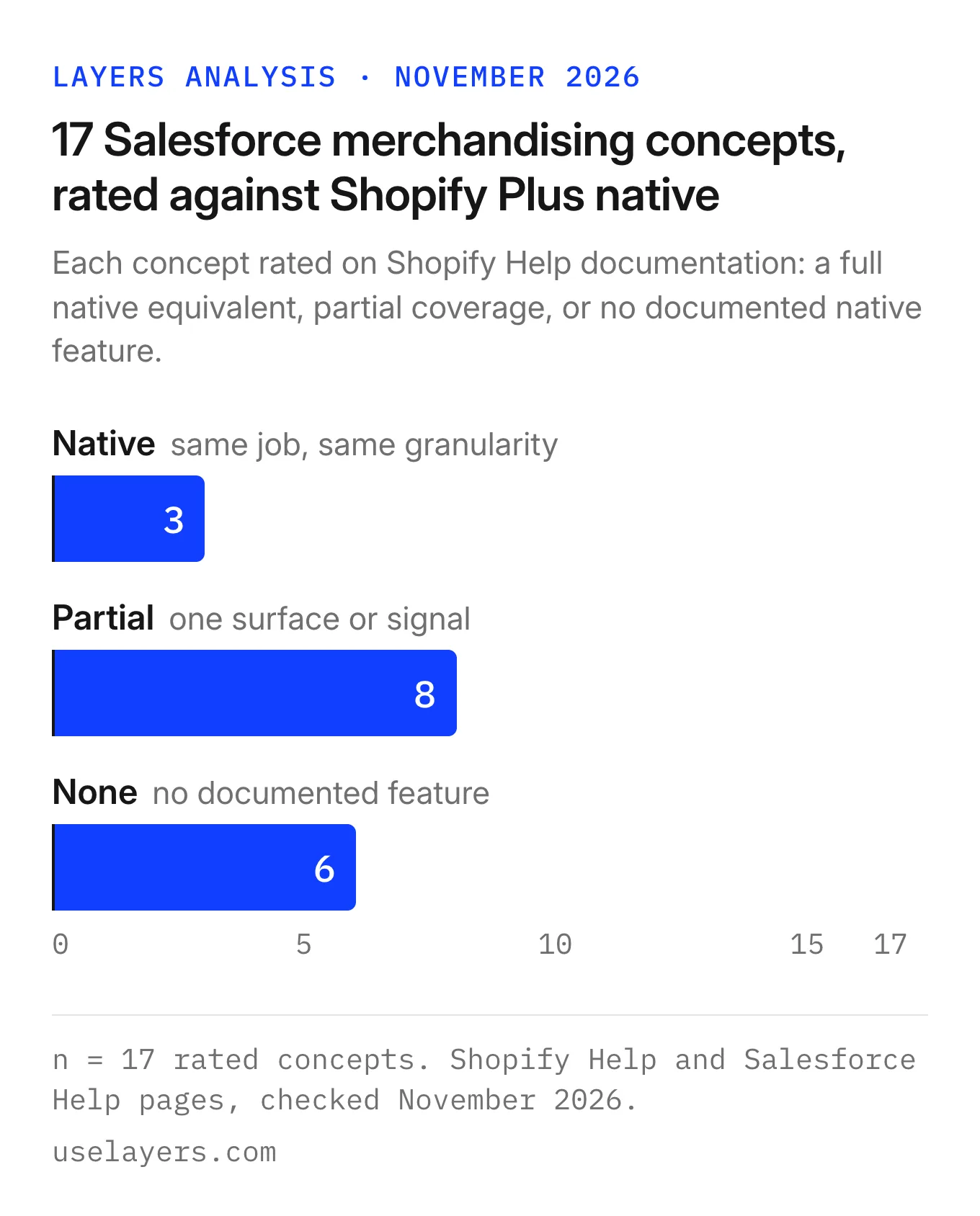
The rating rules are simple, so you can disagree concept by concept:
- Native: Shopify Plus documents a feature that does the same job at comparable granularity.
- Partial: it covers one surface, one signal, or only the whole collection.
- None: we found no documented native feature on the Shopify pages we checked. An app or custom theme code may still fill the gap.
Start with the browse side of the map.
- Category default sorting rule, inherited down the tree
- Shopify Plus native: One sort per collection from a fixed menu; new collections default to Most relevant
- Rating: Partial
- Our equivalent: Store default sort order plus per-collection defaults
- Default disposition: Rebuild
- Layered multi-attribute rule with tie-breaks
- Shopify Plus native: One sort key per collection
- Rating: None
- Our equivalent: Sort orders that combine attributes, priority rules, weighted groups, and soft boost
- Default disposition: Rebuild
- Dynamic attribute: weighted blend with a stale-data default
- Shopify Plus native: No weighted blends
- Rating: None
- Our equivalent: Weighted groups, such as 60% sales and 40% freshness
- Default disposition: Rebuild
- Active data: sales velocity, return rate, item age
- Shopify Plus native: Most relevant (sales performance) and all-time best selling
- Rating: Partial
- Our equivalent: Metrics and computed attributes such as Days Available
- Default disposition: Rebuild
- Category Position (explicit placement)
- Shopify Plus native: Manual sort of the whole collection
- Rating: Partial
- Our equivalent: Pins that front-pack or hold an exact slot
- Default disposition: Rebuild live ones only
- Boost and bury (term, category, site-wide)
- Shopify Plus native: Product boosts in search only, 10 terms max
- Rating: Partial
- Our equivalent: Soft boost, priority rules, ranking-rule promote and demote
- Default disposition: Rebuild
- Einstein Predictive Sort
- Shopify Plus native: Most relevant, on store-level sales performance
- Rating: Partial
- Our equivalent: Segmented sorting by visitor context
- Default disposition: Retire, then test
- Campaigns and A/B tests wrapping sorting rules
- Shopify Plus native: Launchpad schedules sales, launches, and restocks
- Rating: Partial
- Our equivalent: Rule scheduling, contextual conditions, sort experiments (in beta)
- Default disposition: Rebuild
- Content slots with time and customer-group rules
- Shopify Plus native: Theme sections and blocks; Launchpad for timing
- Rating: Partial
- Our equivalent: Banner slots inside merchandising rules, desktop and mobile
- Default disposition: Native for pages, rebuild in the grid
- Product-to-category assignment
- Shopify Plus native: Manual and automated collections, within limits
- Rating: Native
- Our equivalent: Collection sources publish metric-based conditions into native collections
- Default disposition: Native
- Search refinements and buckets
- Shopify Plus native: Filters with value grouping; 25 per store, hidden above 5,000 products
- Rating: Native
- Our equivalent: Facet grouping, sorting, and hiding
- Default disposition: Native, rebuild if limits bite
- Availability ranking
- Shopify Plus native: Search setting shows, hides, or places sold-out products last
- Rating: Partial
- Our equivalent: Priority rules and sell-out pin deletion
- Default disposition: Rebuild
- URL redirects, aliases, static mappings
- Shopify Plus native: URL redirects with CSV import, 20,000,000 on Plus
- Rating: Native
- Our equivalent: Not a merchandising job
- Default disposition: Native
- Storefront sorting options, up to 100
- Rating: Not rated
- Our equivalent: Sort orders sync to Shopify as metaobjects
- Default disposition: Rebuild the ones shoppers use
- Product sets
- Rating: Not rated
- Our equivalent: Product sequences
- Default disposition: Rebuild
Five patterns cover most of that list.
- Dynamic attributes become weighted groups. SFCC's example blends Days Available and Sales Velocity; our docs example is 60% sales performance and 40% freshness. Rebuild the stale-data default as an explicit fallback, and see our custom ranking guide for margin and sell-through blends.
- Active data becomes metrics. As of November 2026, both LayersQL metrics and imported ShopifyQL metrics load into sort orders, and imported metrics refresh hourly, daily, or weekly. Days Available is a default computed attribute, our version of SFCC's item age.
- Category Position becomes pins, and only the live ones. Shopify's manual sort is all or nothing for a collection. Pins can front-pack the top of a grid or hold an exact slot, and pinned products can remove themselves when they sell out.
- Campaign wrappers become schedules plus conditions. Rules publish on time windows, usually within about a minute, and you can schedule in the store's time zone. Customer groups and source codes map to conditions on geography, market, customer attributes, and UTM parameters.
- Category assignment mostly stays native. Use Shopify collections, and use collection sources when membership depends on a metric threshold. Check final membership in Shopify, because other collection conditions can change it.
Two boundaries stay with Shopify. Launchpad remains the home for price events, and discount logic belongs to Shopify discounts and Functions.
Shopify's price sort uses base prices, not Market or B2B catalog prices, which matters if you ran SFCC multi-site or B2B price books. We scope search, browse, and blocks to a Shopify B2B catalog.
Our guides to multi-market merchandising and B2B search go further, and filtering and faceting on Shopify Plus covers the refinements entry.
Why rebuild ordering at all? David Cost's answer: "I think the order you display products on a collection page can have an enormous impact on your conversion rate."
Rainbow built a "What's Hot" sort from 7-day, style-level sales data, so collection pages reorder daily and "reflect what people are buying in a fairly short time."
Rainbow saw a 30% increase in conversion rate after launching with us.
What happens to your Salesforce search dictionaries and search redirects?
Most of them have no native home on Shopify Plus. Search and Discovery offers four search controls, none of them synonyms or search-term redirects, and merchants report the Synonyms feature was retired in September 2026.
Retire the language-gap synonyms, and rebuild only the redirects and brand-coined terms that encode a decision.
Shopify's Search and Discovery help lists those four controls: preview, result types, product boosts, and combined-listing display. Merchants on the Shopify Community report the Synonyms feature disappeared around mid-September 2026 with no changelog entry.
Shopify's semantic understanding is always on in online store search. Our synonym list guide shows which old entries still need a rule.
- Synonyms, hypernyms, negative synonyms
- Shopify Plus native: No manual synonym control (retired, per merchant reports)
- Rating: None
- Our equivalent: Automatic query expansion; query replacement for the few terms you keep
- Default disposition: Retire most
- Stop words, common phrases, compound words, stemming exceptions
- Shopify Plus native: Not configurable in Search and Discovery
- Rating: None
- Our equivalent: Query interpretation and typo tolerance
- Default disposition: Retire
- Keyword groups: a sorting rule per search term
- Shopify Plus native: No term-specific sorting
- Rating: None
- Our equivalent: Ranking rules with a sort action, matched exact, contains, or semantic
- Default disposition: Rebuild or retire
- Search redirects: up to 1,500 per site, four match types
- Shopify Plus native: No search-term redirect
- Rating: None
- Our equivalent: Semantic redirects for text search and autocomplete
- Default disposition: Rebuild fewer
- Einstein Search Dictionaries suggestions
- Rating: Not rated
- Our equivalent: Not needed
- Default disposition: Retire with the dictionaries
Credit where it's due: SFCC's search tooling is deep. Redirects alone support exact, phrase, broad, and negative matching. The question after the move is which of those entries still encode a decision.
What replaces synonyms? Query expansion adds synonyms and related terms on its own, so "sneakers" can also find "athletic shoes" and "trainers." Keep brand-coined terms as a query replacement you own; typo correction leaves brand names and SKUs alone.
What replaces search redirects? A semantic redirect routes a query by intent, so one redirect covers many phrasings. It fires on text search and autocomplete, not on collection browsing, so collection-level redirects stay in Shopify's URL redirects.
Three more calls to make on the search side.
- Retire the long synonym entries first. SFCC never searches a synonym with more than four terms, so those entries never fired. Our guide on how to retire a synonym list safely has the shadow-run sequence.
- Keyword groups mostly retire. Salesforce's own example sorts "inexpensive" by price, which is what our price intent modifiers do without a rule. Rebuild the term rules that encode a business decision as ranking rules, which apply to text search only.
- Read negative synonyms carefully. An exclusion like "jeans, -skirts" encodes a decision. Rebuild it as a ranking-rule demote or a filter after you check it still matters.
After cutover, watch your zero-result searches daily for the first weeks. If a retired entry still mattered, that's where it shows up.
Which Salesforce rules should you rebuild, and which should you retire?
Rebuild a rule when it encodes a business decision the search engine can't infer, like margin protection or a launch, and it touches a top-revenue collection or query.
Retire it when nothing has used it in the last 90 days or when the engine already does its job. Collection membership and URL redirects stay native in Shopify.
The 90-day window is our recommendation, and these are the disposition rules we use.
- Native (Shopify Plus covers it)
- Use when: Shopify documents the same job at the fidelity you need
- Typical SFCC objects: Category membership, refinements, URL redirects, promotions and discounts
- Rebuild (merchandising layer)
- Use when: The rule encodes a decision and touches top-revenue collections or queries
- Typical SFCC objects: Dynamic attributes on top categories, live Category Positions, bury rules protecting full price, scheduled campaigns, content-routing redirects, brand-coined terms
- Retire
- Use when: No evidence of use in 90 days, the engine does the job, or the rule never fired
- Typical SFCC objects: Language-gap synonyms, stop words, stemming exceptions, synonym entries longer than four terms, expired campaign placements, price keyword groups
Don't migrate the synonym table. Port the few entries that encode a decision, and let query expansion take the rest.
Retiring is safe when you can roll back.
Config History records every change to rules and sort orders and can restore a prior version, so a retired rule that turns out to matter comes back from history instead of from scratch.
Legacy SKUs you keep for SEO need a home too. Hidden content rules keep them published in Shopify and out of search, collections, and blocks.
Expect some of your rules to land in the Retire column; the evidence column decides how many. If a rule protects margin, our guide to sort by margin shows how that logic rebuilds.
What does a week-by-week cutover plan look like for merchandising?
Start eight weeks before launch. Export and baseline in weeks 8 and 7, design collections and seed search in week 6, and rebuild browse and search rules in weeks 5 and 4.
Run parity tests in weeks 3 and 1. After launch, measure for four weeks and keep every redirect live for at least a year.
The eight-week shape is our recommendation. Compress it if your rule count is small, but keep the gates.
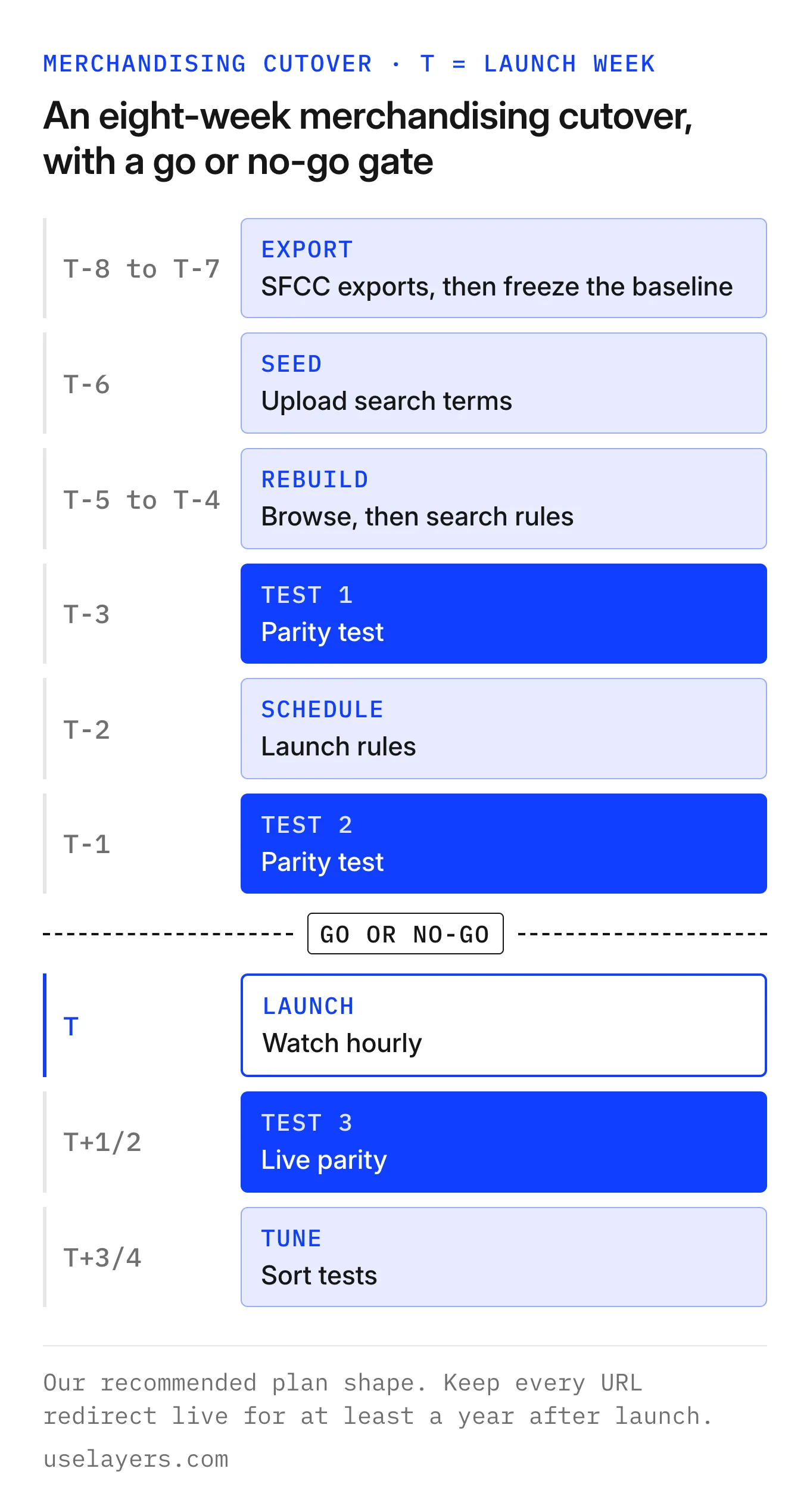
T is launch week.
- Week T-8
- Merchandising and search: Run the SFCC exports; capture Category Positions on top categories
- Platform and SEO: Start the URL inventory, including legacy mappings SFCC still serves
- Gate: All exports archived
- Week T-7
- Merchandising and search: Freeze the baseline: top 250 queries, top 50 revenue queries with must-show products, top 50 collections
- Platform and SEO: Plan Shopify collections before product import
- Gate: Baseline file signed off
- Week T-6
- Merchandising and search: Install, sync the catalog, upload SFCC search terms as JSONL, run the baseline evaluation
- Platform and SEO: Check collection limits against your design
- Gate: Seeded terms imported
- Week T-5
- Merchandising and search: Rebuild browse: sort orders, weighted groups, pins, sequences, collection sources, banners
- Platform and SEO: Map old URLs to new
- Gate: Previews annotated and reviewed
- Week T-4
- Merchandising and search: Rebuild search: ranking rules, semantic redirects, kept query transforms; retire dictionaries
- Platform and SEO: Flatten legacy redirect chains to one hop
- Gate: Rule list matches inventory dispositions
- Week T-3
- Merchandising and search: Parity test 1 on the draft theme; fix gaps
- Platform and SEO: Stage the redirect CSV
- Gate: No new zero-result queries in the top 250
- Week T-2
- Merchandising and search: Pre-merchandise launch products; schedule launch-window rules in the store time zone
- Platform and SEO: Launchpad events for price changes
- Gate: Launch rules show as Scheduled
- Week T-1
- Merchandising and search: Parity test 2; go or no-go
- Platform and SEO: Lower DNS TTL to 300 about a week out; plan the delta migration
- Gate: Gates met
- Week T
- Merchandising and search: Watch zero-result queries and top collections hourly
- Platform and SEO: DNS cutover; redirects live; 404 monitoring
- Gate: Rollback path confirmed
- Week T+1 to T+2
- Merchandising and search: Post-launch parity on live; read search in our analytics, not Shopify's reports
- Platform and SEO: Monitor indexing of new URLs
- Gate: Must-show recall holds
- Week T+3 to T+4
- Merchandising and search: Test contested rules with sort experiments (in beta); switch sales-based sorts on as windows fill
- Platform and SEO: Keep redirects; update internal links
- Gate: Experiment readouts
The DNS and delta-migration steps come from Shopify's Plus launch checklist.
Two cold starts hit a store that's new to Shopify.
- The search cold start. With no Shopify search history, upload your SFCC terms as JSONL lines with
search_query,searches, andday. Terms searched fewer than three times are dropped, and the baseline evaluation runs on the top 250 seeded queries. - The sales cold start. Our sales metrics use 7- to 30-day windows, our Best Selling sort ranks on the last 7 days, and Shopify orders import once a day. Our suggested sort order (in beta) retries two weeks later without enough purchase history.
So lead the first weeks with attribute-led sorts, such as Days Available and inventory, plus pins. Then move weighted groups onto sales metrics as the windows fill.
Pre-merchandise your launch products. You can merchandise products before they publish, so launch-day positions are set in advance. Teams on our calls value this, because Shopify has no staging environment.
Pick the launch date with Google's advice in mind: move during a recurring traffic dip, which usually rules out the holiday peak.
Planning the move? Book a demo and we'll walk your inventory and show you where each rule lands.
How do you prove search and collections didn't lose revenue at cutover?
Freeze a baseline on Salesforce before anything changes: your top 250 queries with must-show products marked for the top 50, plus your top 50 collections.
Rerun the same list on the Shopify draft theme and again after launch, on the same surface each time, and gate the launch on zero-result regressions and must-show recall.
Both halves need the test. In Baymard's testing, roughly half of shoppers turn to search first and the other half use the main navigation. A parity test that only covers search misses half the risk.
- Baseline on SFCC. Export top phrases, revenue per search, and zero-click phrases from the On-Site Search dashboard. Have merchandisers mark one to five must-show products for each of the top 50 revenue queries.
- Seed and test on the draft theme. Upload the terms, then run Test text search and the baseline evaluation. Preview collections with annotations that show which rule placed each product.
- Score the checks in the list below. Collection membership will differ by design, so read the deltas instead of chasing zero.
- Mark failures honestly. A request that times out is unknown, not a pass and not a zero.
- Measure after launch in the right place. Shopify's search reports drop to zero once search runs through us; our analytics carry search revenue, and money metrics trail Shopify by up to a day.
- Settle disputes with experiments. Sort-order experiments split traffic between a control and challengers. They're in beta as of November 2026.
- Zero-result count
- What you compare: Top 250 queries, SFCC vs Shopify draft
- Our launch gate: No new zero-result queries
- Must-show recall
- What you compare: Must-show products in the top 12, top 50 revenue queries
- Our launch gate: At or above the SFCC baseline
- Redirect parity
- What you compare: Queries where an SFCC redirect fired
- Our launch gate: Every expected redirect lands
- Pinned-slot fidelity
- What you compare: Hero products on the top 50 collections
- Our launch gate: Pins hold their slots
- Sold-out share
- What you compare: Sold-out products in the top 12 or 24
- Our launch gate: No higher than the baseline
- Collection membership
- What you compare: Product counts on the top 50 collections
- Our launch gate: Every delta explained
Run every comparison on the same surface. Predictive search and submitted search are two different engines, so compare submitted results with submitted results. For building and freezing the query set itself, use the golden-query method.
One caution: changing a collection's default sort order from the collection page in our dashboard saves immediately. Use the rule editor's preview for tests. It runs on the live storefront and expires after an hour.
How do you protect SEO and paid landing pages when the URLs change?
Map every old URL to its new Shopify URL before launch and redirect it with a permanent 301 in one hop. Keep the redirects for at least a year.
Shopify Plus holds up to 20,000,000 redirects, but it only redirects URLs that return a 404, and product and collection pages sit on Shopify's fixed paths.
Shopify's checklist explains the stakes: without 301s, old links become 404s that "negatively impact search results." Work through this list in order.
- Map, redirect, then monitor. That's Google's site-move sequence, with permanent server-side redirects.
- Flatten to one hop. Google says to keep chains to "ideally no more than 3." SFCC may still serve redirects from the platform before it, through hostname aliases, URL-mapping rules, and static mappings, so fold those into the Shopify map.
- Don't drop legacy mappings early. Salesforce itself warns that removing mappings prematurely loses traffic.
- No homepage dumping. Google warns that bulk redirects to the homepage can be treated as soft 404s.
- Use Shopify's import. Redirects import by CSV from a sample template, up to 20,000,000 on Plus, and they only fire on broken URLs. Shopify's page says two different things about market subfolders, so test each subfolder.
Expect a dip and a recovery window. Google says medium sites take a few weeks or more for new URLs to replace old ones in results, and larger sites take longer.
A study of 892 domain migrations sets the outer bound: estimated organic traffic took 523 days on average to return, and 17% hadn't recovered after 1,000 days.
Those were domain changes measured with third-party traffic estimates, not platform replatforms. Read the numbers as a ceiling on the risk.
Paid landing pages need their own map. SFCC source-code landing logic maps to dynamic linking, which pins the products from your ad to the top of the landing collection on page 1.
Dynamic linking runs ahead of merchandising rules and the base sort. Our guide to collection pages for paid traffic covers the setup.
When is Shopify Plus native enough, and when do you need a merchandising layer?
Native is enough when your top collections run well on Shopify's Most relevant or best-selling sort and your search needs no term-specific rules.
Add a merchandising layer when your Salesforce rules encoded decisions Shopify can't express, such as blended sorts or scheduled campaign swaps on top collections, or when your dictionaries and redirects carried real revenue.
Native Shopify Plus handles a lot on its own:
- Collection membership with conditions, up to 5,000 automated collections.
- Filters with value grouping.
- 20,000,000 URL redirects on Plus.
- Semantic understanding on by default, and Launchpad for timed price events.
Where native stops:
- One sort key per collection.
- Product boosts that work in search only, with a 10-term cap.
- No manual synonym control since the September retirement merchants reported.
- A price sort that ignores Market and B2B catalog prices.
All-time best selling has its own trap for new arrivals, covered in why all-time best sellers mislead.
If your inventory lands mostly in the Rebuild column, that's the job our merchandising and search do on Shopify Plus.
As David Cost put it after Rainbow's move: "The combination of Shopify and Layers gives us everything we used to have in Salesforce."
Where to start this week
Run the exports first. Everything else in this guide depends on knowing what you have, and the exports are the fullest record you'll get of the rules your team built in Business Manager.
Then pick your top 50 collections and top 250 queries and freeze the baseline. That list becomes both your parity test and your launch gate.
If you want a second pair of eyes, book a demo and bring the inventory. We'll show you where each rule lands on Shopify Plus.
FAQs
1. Can you export sorting rules from Salesforce Commerce Cloud?
Yes. Business Manager exports sorting rules, dynamic attributes, boost and bury rules, and storefront sorting options as XML in sort.xsd. Shopify Plus has no sorting-rule object to load them into, so treat the export as your rule inventory and rebuild from it.
2. Does Shopify Plus have search synonyms and search redirects?
Not natively, as of November 2026. Neither appears among Search and Discovery's four search controls, and merchants report the Synonyms feature was retired in mid-September 2026. We use query expansion for language gaps and semantic redirects to route searches by intent.
3. What replaces Einstein Predictive Sort after the move?
Shopify defaults new collections to Most relevant, which ranks on store-level sales performance. For sorting by visitor context, such as country or marketing channel, use our segmented sorting. Test either against your SFCC baseline with a sort-order experiment, which is in beta.
4. How many URL redirects can a Shopify Plus store have?
Up to 20,000,000 on Plus, compared with 100,000 on other plans. Shopify only redirects URLs that return a 404, so a redirect from a page that still loads won't fire. Google recommends keeping redirects for at least a year.
5. Why do Shopify's search reports drop to zero after you switch search?
Shopify's search reports only count searches its own search handles, so once your theme sends search to us, they fall to zero or near it. Search volume, revenue, and per-term results live in our analytics; Shopify's sales reports are unaffected.
6. How long before sales-based sorts work on a new Shopify store?
Plan on a few weeks. Our sales metrics use 7- to 30-day windows, and Shopify orders import once a day. Start with attribute-led sorts like days since launch and inventory, plus pins. Move blended sorts onto sales metrics as the windows fill.
7. Should you migrate your Salesforce synonym list?
Mostly no. Query expansion handles everyday language gaps, and Salesforce never searches a synonym longer than four terms, so those entries never fired. Keep the ones that encode a decision, like a coined collaboration name, and rebuild them as query replacements or ranking rules.
Written by

Lukas Tanasiuk
Co-Founder and CRO, Layers
Lukas Tanasiuk is Co-Founder and CRO of Layers, the enterprise search and merchandising platform built exclusively for Shopify Plus. He has spent over a decade in Shopify ecommerce and CRO, and speaks with enterprise merchants about search and merchandising every week.
View all articlesRelated articles
More reading on search, merchandising, and product discovery.
How to Forecast Your Search and Merchandising Bill on Shopify Plus
How the six search pricing models bill a Shopify Plus brand, what makes the bill spike at BFCM, and a forecast method you can run on your own numbers.

Jake Casto
Nov 24, 2026 · 15 min read
Strikethrough Pricing in Search Results: When a Compare-at Price Helps and When it Backfires
The median store in our 32-store Shopify sample had 41% of products struck through. Which search tiles should keep that line, and which rules apply?
Lukas Tanasiuk
Nov 24, 2026 · 20 min read
Can an AI Agent Run Your Collection Rules? A 10-Task Test You Can Run
What an AI assistant can change in your collection rules, what waits for your approval, and 10 requests to test it with before it touches live pages.
Jake Casto
Nov 24, 2026 · 18 min read