Shopify Recommended Products: Hand-Picked, Rule-Based, or Algorithmic?
Hand-picked, rule-based, or algorithmic? On 31 Shopify stores, 9% of sampled product pages had hand-picked add-ons. Here's what each setup costs weekly.
Key takeaways
A merchant with more than 20,000 unique products summed up the problem on the Shopify Community: Search and Discovery "expects me to manually specify all the recommended products, which is just not possible for the size of our inventory."
Shopify's automatic list doesn't solve it. Its help center says you can't edit the recommendations it generates; you can only add your own, by hand.
It's a common complaint. Merchants brought up recommendation blocks on 28 of the 107 sales and onboarding calls we analyzed from January to August 2026.
So we compared the three setups stores run, mapped what each one breaks on, built a weekly cost model you can rerun with your own numbers, and checked what Shopify's own recommendations return on 31 live stores.
What are the three ways to set up product recommendations on Shopify?
Merchants run three setups. Hand-picked lists name the products for each page, as in Shopify's Search and Discovery app. Rule-based blocks compute picks from tags, collections, or metafields. Algorithmic blocks compute picks from data, like Shopify's auto-generated related products.
- Hand-picked. In Search and Discovery, you can pick up to 10 complementary and up to 10 related products per product. Picks live in standard metafields, so you can bulk edit them or set them from other apps.
- Rule-based. Your theme or an app builds the list from rules: same collection, matching tags or metafields, in stock, best selling first. Shopify's 2019 partner guide to tag-based related products names two costs: no recommendation analytics, and a performance hit from searching all products.
- Algorithmic. Shopify's generated related products draw on purchase history (which needs prior sales), product descriptions (English storefronts only), and related collections when neither is available. You can't edit them, hiding them is a per-product setting, and Shopify says they change frequently.
Shopify's theme docs split recommendations into two intents. Related products are substitutes for a "You might also like" row. Complementary products are add-ons for a "Pair it with" row. In Shopify's words, "Only related recommendations are auto-generated by Shopify."
Baymard's 2014 research draws the same line between alternative and supplementary suggestions, and shoppers need both. A pan page should offer the lid that fits and a couple of other pans.
Upkeep and blind spots of the three setups
| Setup | Upkeep | Blind spot |
|---|---|---|
| Hand-picked | You, per page | Unpicked pages |
| Rule-based | You, per rule | Tag drift |
| Algorithmic | The engine | Margin, launches |
A store can end up running a mix without planning one. Shopify lets you show manual picks "ahead" of generated ones, so a single product page can carry both. This guide is about choosing that mix on purpose.
If you're comparing vendors rather than setups, start with our guide to comparing personalization platforms.
What does each recommendation setup break on?
Each setup fails in a predictable place. Hand-picked lists break on volume, as sell-outs leave gaps and launches start with no list. Rules break on data hygiene. Algorithms break on launches with no history and on goals the data never sees, like margin.
Five failure modes cover most of it:
- Stock-outs. Shopify only shows a recommended product that isn't sold out, and complementary picks need inventory above 0. A sold-out pick leaves an empty slot, and many themes hide a section that gets too few products. One merchant described having to "constantly keep an eye on these to remove out of stock products" (Shopify Community).
- New arrivals. Hand-picking means "new edits with each new product," as another merchant put it. Shopify's purchase-history strategy "needs previous sales," so a launch starts on descriptions and collections. It's the same cold-start gap that keeps new arrivals from climbing a best-seller sort.
- Seasonality. Hand-picked lists need rebuilding at every seasonal reset. Behavioral data looks backward: our own interaction strategies use 30- or 90-day windows, so a season turn shows up late. Rules can follow a season tag, if your catalog has one.
- Margin. The items most relevant to a shopper "are not necessarily the ones that maximize" the retailer's profit, as Jannach and Adomavicius put it. Co-purchase data has no margin field, so on native Shopify only hand-picking steers toward margin. The same tension drives ranking collections by margin instead of clicks.
- Catalog size and popularity. In a field experiment across 82,290 products and 1,138,238 users at a top North American retailer, traditional collaborative filters decreased aggregate sales diversity. An earlier field experiment found one widely used algorithm had no impact on sales volume.
Where each recommendation setup breaks
- Stock-outs
- Hand-picked: slot goes empty until someone swaps it
- Rule-based: fine if the rule filters stock
- Algorithmic: sold-out products are skipped
- New arrivals
- Hand-picked: no list until someone builds one
- Rule-based: picked up only if tagged correctly
- Algorithmic: no purchase history yet
- Seasonality
- Hand-picked: rebuild at every reset
- Rule-based: works if season tags exist
- Algorithmic: lags by its lookback window
- Margin
- Hand-picked: steerable, one product at a time
- Rule-based: steerable with sort rules
- Algorithmic: can't see margin
- Catalog size
- Hand-picked: hours grow with the catalog
- Rule-based: hours grow with tags and rules
- Algorithmic: concentrates on best sellers
Margin is the failure mode we'd look at first. If you want sort logic that weighs profit, see our guide to sorting products by margin.
How many hours a week does each setup cost to maintain?
It depends on catalog size and churn, so we built a model you can rerun. With our default assumptions, a 2,000-product catalog needs about 9.5 hours a week hand-picked, 1.9 with rules, 0.7 with a pure algorithm, and 1.4 for a layered mix.
Every time input below is our assumption, not a measurement. Time yourself and swap in your own numbers.
Default inputs (our assumptions):
- 2,000 active products, with 20 new products and 30 sell-outs a week
- 4 recommendation slots per product page (Shopify's own example request asks for 4; themes vary)
- 4 minutes to build a full list, and 1 minute to swap one product in one list
- Each new product added to 3 existing lists; 4 seasonal resets a year, with half of all lists rebuilt at each
- Rule-based: 12 rules reviewed for 5 minutes each, 2 minutes of tag cleanup per new product, 15 minutes to rewrite a rule at a reset, and 10 misfires fixed by hand each week
- Algorithmic: 25 top product pages spot-checked for 1 minute each, plus 15 minutes on exclusions such as gift cards and shipping protection
- Layered: hand-pick 5% of the catalog, keep 6 guardrail rules, and run the same spot checks and exclusions
The weekly math at those defaults:
- Hand-picked: 80 minutes building lists for new products, 60 adding them to existing lists, 120 refilling slots emptied by sell-outs, and about 308 on seasonal rebuilds. Total: about 9.5 hours.
- Rule-based: 60 minutes reviewing rules, 40 on tags, about 7 rewriting rules at resets, and 10 on misfires. Total: about 1.9 hours.
- Algorithmic: 25 minutes of spot checks and 15 on exclusions. Total: about 0.7 hours.
- Layered: about 15 minutes rebuilding hero lists, 30 reviewing 6 guardrail rules, 25 on spot checks, and 15 on exclusions. Sold-out picks get skipped and backfilled, so there are no slot swaps. Total: about 1.4 hours.
The slot count needs no time assumption: with every product curated and 4 slots a page, each sell-out empties about 4 slots, so 30 sell-outs a week leave about 120 slots to refill.
Run at three catalog sizes, the model gives these weekly hours. New products and sell-outs scale with the catalog: 5 new and 8 sold out a week at 500 products, and 100 and 150 at 10,000.
| Setup | 500 | 2,000 | 10,000 |
|---|---|---|---|
| Hand-picked | 2.4 h | 9.5 h | 47.3 h |
| Rule-based | 1.4 h | 1.9 h | 4.6 h |
| Algorithmic | 0.7 h | 0.7 h | 0.7 h |
| Layered | 1.2 h | 1.4 h | 2.4 h |
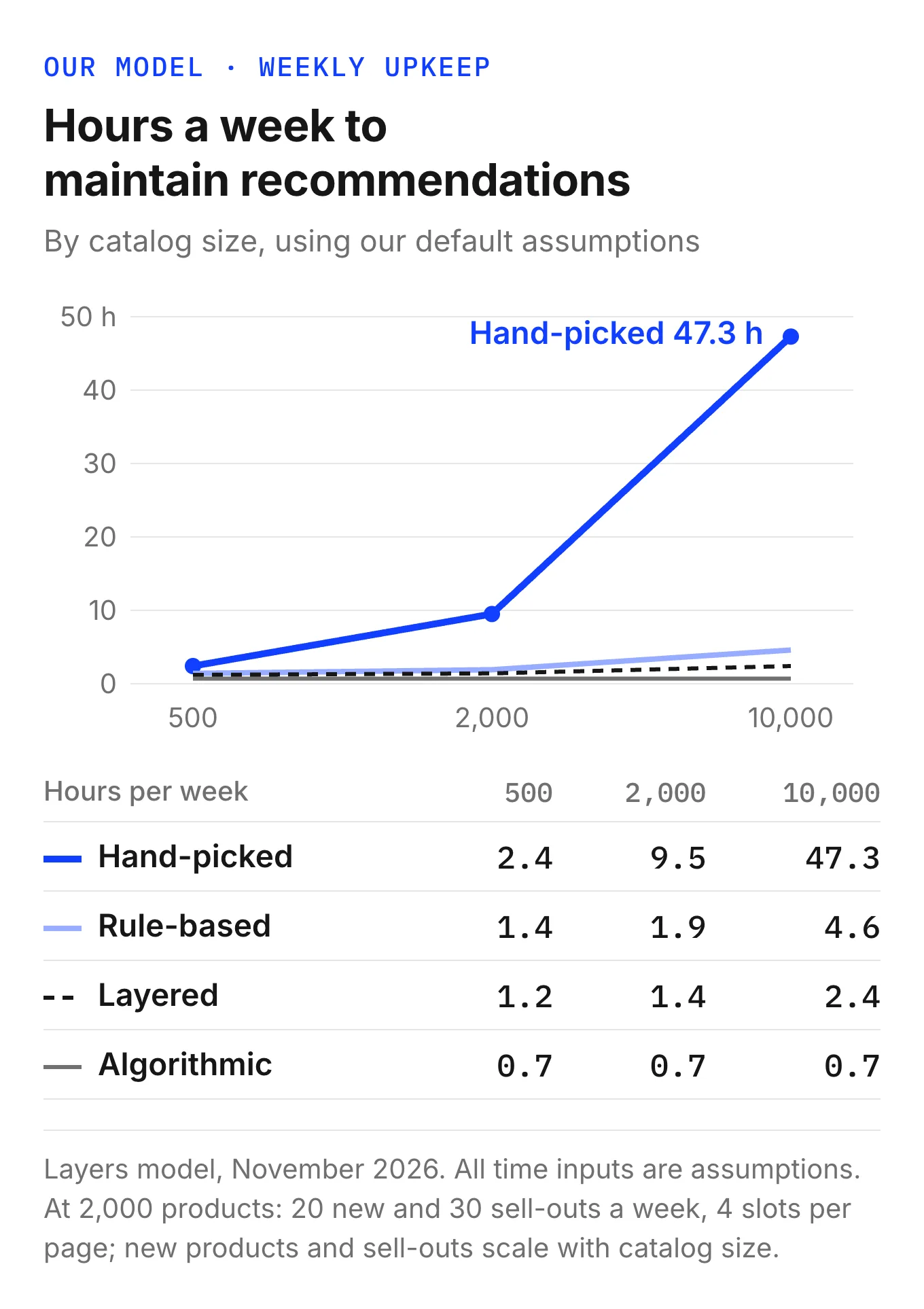
At 10,000 products, hand-picking passes a full-time week. The algorithmic line stays flat at 0.7 hours because its cost moves out of your calendar and into the blind spots from the last section.
The layered setup costs more hours than a pure algorithm, and at 500 products, hand-picking is still manageable. This is a planning model, so time a week of your own list work before you trust our defaults.
What did we find when we checked Shopify's recommendations on live stores?
On 31 Shopify stores we checked in November 2026, only 45 of 496 sampled product pages (9%) had hand-picked complementary picks. None of 4,837 generated related slots showed a sold-out product, and new products leaned on description matching over purchase data.
On November 22 and 23, 2026, we queried Shopify's documented public recommendations endpoint on 31 Shopify brand stores, 16 products each, for both intents.
We sent one request at a time, about one every 1.7 seconds, and reported every failed request as a failure, never as an empty result.
The limits: it's a convenience sample of 31 brands with 16 products each, the endpoint shows what Shopify would serve rather than what each theme renders, and the label meanings below are our inference.
Six findings came back:
- Hand-picked add-ons are rare. Only 5 of 31 stores had complementary picks on any sampled page, and 26 had none. Because Shopify never generates complementary products, each of those 45 pages was set up by someone.
- Shopify's sold-out rule held. None of 4,837 related slots, and no complementary slot, pointed to a product with no available variant. Credit to Shopify: the display rule worked on every slot we saw.
- Most generated picks come from descriptions. Shopify's tracking parameter labels on related slots read e5_desc 49%, jac 36%, collection_fallback 12%, and pinned 2.5%. We read those as description similarity, co-purchase, the related-collections fallback, and merchant picks.
- New products lean on text. On the 88 sampled product pages created in the last 30 days, co-purchase filled 25% of related slots, against 39% on the 408 older pages. Description matching and collection fallback filled the gap.
- A few products take a lot of slots. In the median store, the 10% most-recommended products filled 23% of related slots, the kind of concentration the field experiment above describes.
- Publish dates mislead. On 29 of 31 stores, older products carried a recent publish date, so "published in the last 30 days" is a poor signal for "new."
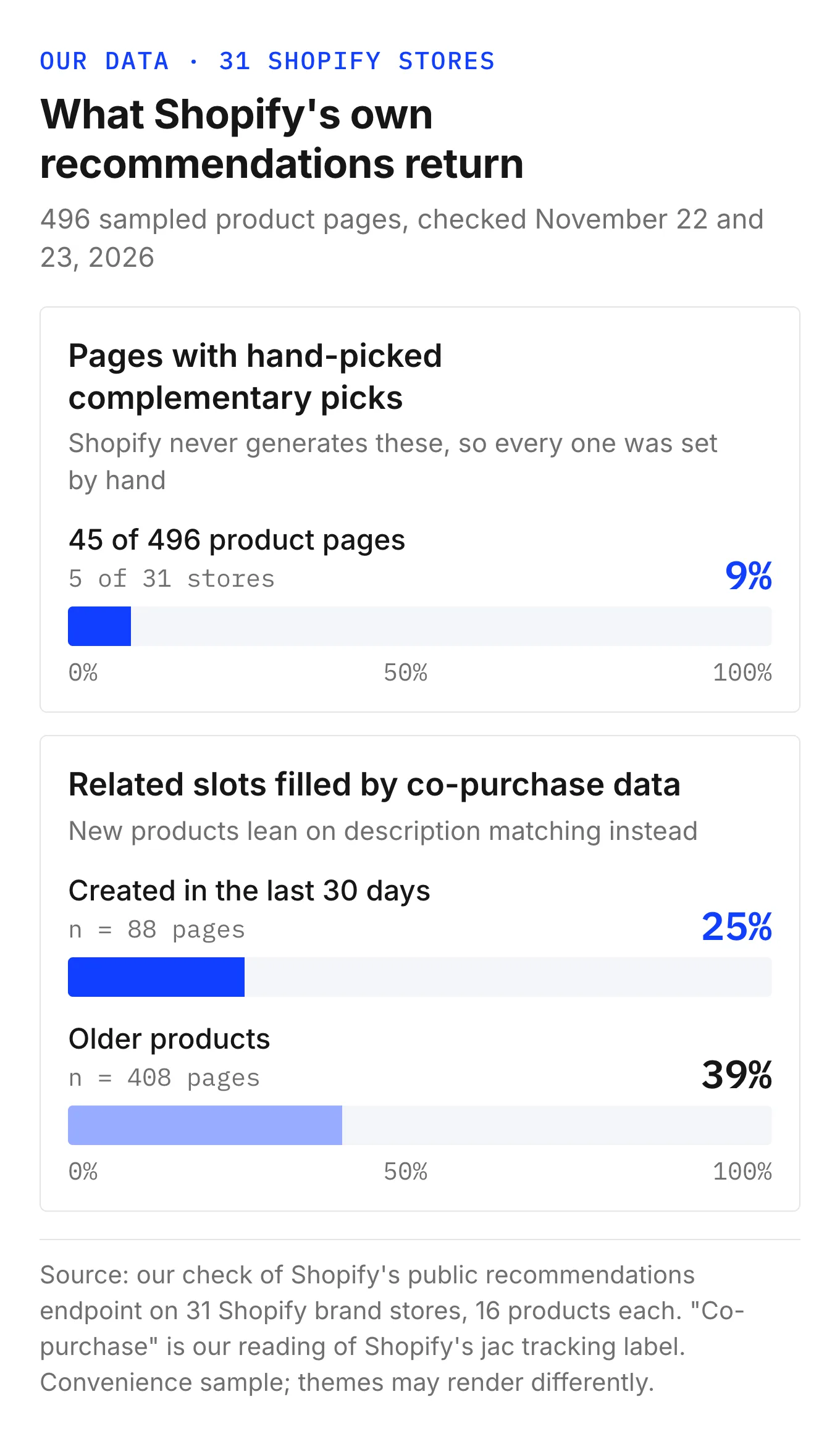
The 9% is the clearest read. Complementary picks are the one part of Shopify's system that is always hand-picked, and 451 of the 496 pages we sampled had none.
What does a layered recommendation setup look like?
Let an algorithm fill every slot by default, then add controls where a wrong pick costs money. Hand-pick lists that need judgment, and add rules that keep picks in stock and in season. A fallback chain keeps blocks from rendering half empty.
These are the steps we'd take with our recommendation blocks. You can apply the same logic with any tool that has these controls.
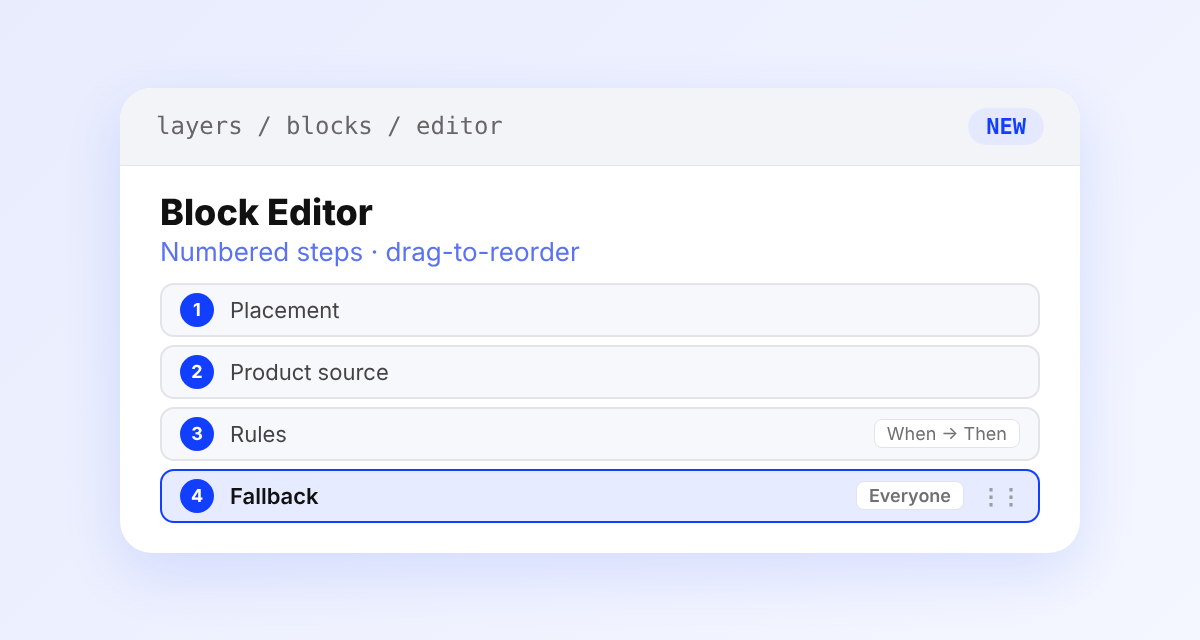
Product illustration of our block editor, from our October 2026 changelog.
- Pick a strategy per placement. Our blocks run on product, collection, cart, home, search, 404, and landing pages, plus blog articles, and each one picks its own strategy. On search pages, a block can serve as a recovery rail on a zero-result search. Behavioral strategies rank by lift, weight recent events more, and discount thin evidence.
- Handle cold start on purpose. With little history, interaction blocks fill from the product's category, ranked below its own results (you can switch that off per block). Similar Products indexes images, titles, descriptions, and attributes, so a new product gets visual similarity results in real time. Anchor constraints stop drift, because "a black dress can pull in brown boots."
- Hand-pick only where a pairing needs judgment. Manual picks can differ per anchor product. If you already author pairings in Shopify reference metafields, the metafield reference strategy reads them at request time, so there's no second list to maintain. Picks that are deleted, unpublished, outside the market, or out of stock are left out rather than shown.
- Write rules as guardrails. Block rules pair a condition with one action: filter, promote, demote, hide the block, change strategy, or override safeguards. One rule can keep picks in the anchor's season tag, and demote can push clearance to the end of the row without removing it. If you run merchandising rules on collections, the logic will feel familiar.
- Exclude what never belongs. The hide out of stock safeguard drops unavailable products before pagination. A hidden content rule keeps shipping protection, gift cards, and samples out of every block. An opt-in diversity cap limits how many products from one family, such as colorways of the same style, appear near the top.
- Chain fallbacks so nothing renders half empty. Set a minimum; when a block returns fewer products, its fallback chain runs, and each fallback can replace the results or fill the remaining slots. Our documented pattern runs interaction first, then similarity, then a manual collection that "always has products." Fallback trees can also set different fallbacks by market.
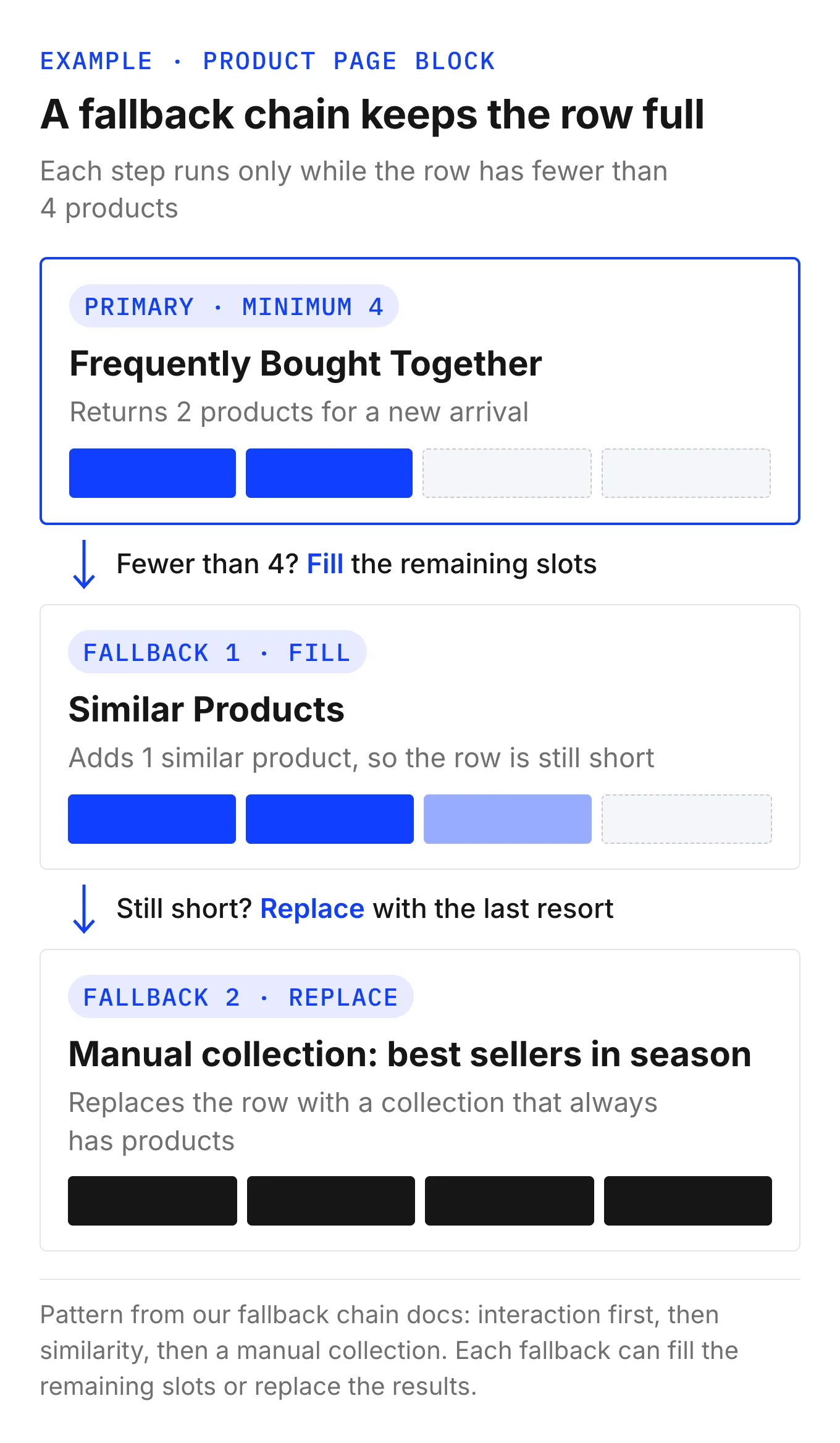
In the example above, Frequently Bought Together has a minimum of 4 but returns 2 products for a new arrival. Similar Products adds 1, so the manual "best sellers in season" collection replaces the row.
Before you publish, Live Preview runs the configuration against your live catalog without saving. While interaction data is still computing, a published block shows a Publishing badge and serves its fallback chain.
On the cart, Free Shipping Picks recommends products priced to close the gap to your free-shipping threshold. With $20 to go, picks land between $20 and $30 by default.
On Shopify alone, the closest version of this is showing manual picks "ahead" of generated ones. Shopify recommends that mix, because generated picks adjust to product and customer changes and cover for custom picks that sell out or get unpublished.
The Recommendation Block Planner puts the maintenance model and a block-planning grid on one page. Fill in your own catalog numbers to get your weekly hours, then plan each block's strategy, minimum, two fallbacks, guardrail rules, and holdout.
Want to see a block fall back from purchase data to similar products to an in-season collection on your own catalog? Book a demo.
How do you know if a recommendation block is working?
Use a holdout, not the block's own report. Click attribution credits shoppers who would have bought anyway; one study of Amazon browsing logs estimated at least 75% of recommendation click-throughs would have happened without recommendations. Test against a fixed list in the same slot.
What the field research shows:
- Clicks overstate impact. Sharma, Hofman, and Watts used browsing logs from 2.1 million Amazon users and estimated that at least 75% of recommendation click-through activity on the products they studied would likely have happened anyway. That's click-throughs, not revenue.
- Recommendations can move sales around. In a 2026 MIS Quarterly field experiment, showing recommendations raised purchases of recommended products at the cost of other products, possibly with no short-run gain in total sales. Switching them off cut long-run sales through lower loyalty. So don't credit the block with everything, and don't rip it out after a short test.
- Honest lift numbers are modest. A randomized test at an online book retailer found recommendations raised the propensity to buy by 12.4% and basket value by 1.7% (Information Systems Research, 2022). A review of real-world deployments says direct revenue gains are more often reported between 1% and 5%.
- Treat the 35% Amazon figure as folklore. The same review traces the famous "35% of Amazon's sales" number to a 2006 statement by Amazon's CEO, as reported in online media, rather than to a published study.
- Longer rows can sell less. A field experiment with 1.6 million consumers found the chance of buying from a recommendation set first rises, then falls, as more products are shown. The setting was retargeting rather than a product page, but it's a reason to set your maximum products on purpose.
- Every built-in report is attribution. Shopify's Product recommendation conversions over time report counts sessions that clicked a recommendation, then bought in the same session. Our block performance cards blend token-attributed and modeled same-session events and show the split, and our blocks dataset credits traced orders to the block in full. Useful numbers, still attribution.
A holdout you can run on one block:
- Hold back 10 to 20% of sessions at random.
- Keep the slot, layout, and product count identical.
- Fill the control slot with a fixed list of your best sellers.
- Pick one primary metric: revenue per visitor on sessions that view a product page.
- Keep return visits in the window, because the loyalty effect shows up later.
- Set the sample size before launch, and don't stop early because a result looks good.
Our guide on how to run a holdout covers the testing detail, including when a bestseller list is the better control.
When is a hand-picked list still the right call?
Hand-pick when the pairing depends on knowledge your data lacks, like a part that must fit or a look your stylists built. Keep those lists short, give each one a fallback, and let the algorithm cover the long tail nobody will maintain.
Hand-pick these:
- Parts that must fit. A lid has to match the pan. In Baymard's 2021 benchmark, 52% of desktop sites showed cart cross-sells that were either completely irrelevant or based only on what other customers bought.
- Looks your stylists built. Keep one source of truth in a reference metafield and let the block read it, the approach behind shop-the-look for fashion.
- Launches before any sales exist. Purchase-based strategies have nothing to work with on day one.
- Small catalogs. At 500 products, our model puts hand-picking at 2.4 hours a week.
Let the algorithm handle these:
- Long-tail product pages nobody will revisit
- Anything that sells out weekly
- Any catalog where the model above passes your team's available hours
Out-of-stock product pages are a special case. Baymard's out-of-stock research recommends showing alternative products there rather than supplementary ones.
In Baymard's usability testing, 30% of users who were only told a product was out of stock were likely to abandon and look elsewhere. On collection pages, sold-out products raise a different question: whether to bury, hide, or keep them.
| If | Then |
|---|---|
| The pairing must fit, or your team styled it | Hand-pick it, and give it a fallback |
| The product launched before it has sales | Category fill or similarity, plus a fallback |
| The page sits in the long tail | Let the algorithm fill it |
| Your lists outgrow your team's hours | Layer: algorithm by default, picks and rules on top |
If your team spends more hours on recommendation lists than it can spare, we'll show you a layered block on your own catalog. Book a demo.
FAQs
1. Does Shopify have built-in product recommendations? Yes. Shopify auto-generates related products from purchase history, product descriptions (English storefronts only), and related collections. Complementary products aren't generated; you pick them in the Search and Discovery app. Your theme also needs recommendation sections on the product page.
2. Can I edit Shopify's automatic related products? No. Shopify says you can't edit generated recommendations, only add your own. You can show your picks ahead of the generated ones or show only your picks. Hiding the generated ones is a per-product setting.
3. How many recommendations can I hand-pick per product on Shopify? Up to 10 complementary and 10 related products per product in Search and Discovery. Shopify's Ajax and Storefront APIs also return at most 10 products per request.
4. What is the difference between related and complementary products? Shopify calls related products substitutes, the kind shown in a "You might also like" row. Complementary products are add-ons, shown in a "Pair it with" row. Shopify generates related products automatically; complementary ones exist only if you pick them.
5. Do Shopify product recommendations show out-of-stock products? Not normally. Shopify only displays a recommended product that isn't sold out, and complementary picks need inventory above zero. When we checked 31 live stores, none of 4,837 related slots pointed to an unavailable product.
6. Why do my Shopify recommendations change when I reload the page? Shopify says its generated recommendations change frequently, so a revisit can show different products. The Search and Discovery preview often differs from the live page for the same reason.
7. How many products should a recommendation block show? Fewer than you might think. In a field experiment with 1.6 million shoppers, the chance of buying from a recommendation set rose, then fell, as more products were added, mostly because people stopped clicking. Test a shorter row against your current one.
8. Are algorithmic recommendations better than hand-picked ones? Not by default. Algorithms cover the whole catalog for almost no upkeep, but they need purchase history and can't see margin. Hand-picked lists win where a pairing needs judgment. Our advice is to run both, on purpose.
9. What is a product recommendation engine? It's the logic that picks which products to show next to the one a shopper is viewing, using co-purchase data, product similarity, or rules you write. On Shopify, the built-in engine generates related products; apps and platforms add more strategies.
Written by

Lukas Tanasiuk
Co-Founder and CRO, Layers
Lukas Tanasiuk is Co-Founder and CRO of Layers, the enterprise search and merchandising platform built exclusively for Shopify Plus. He has spent over a decade in Shopify ecommerce and CRO, and speaks with enterprise merchants about search and merchandising every week.
View all articlesRelated articles
More reading on search, merchandising, and product discovery.
Does Ecommerce Personalization Actually Lift Revenue? An Honest Test
A balanced look at when ecommerce personalization beats a bestseller list on Shopify Plus, when it does not, and how to test the lift so you can trust it.

Jake Casto
Aug 6, 2026 · 13 min read
What is Searchandising? The Line between Search and Merchandising
Search finds the products; searchandising picks which show first. A job-by-job map of the boundary, with what Shopify's native tools let you change today.
Jake Casto
Nov 24, 2026 · 17 min read
The Complete Guide to Collection Page Merchandising on Shopify Plus
The median brand in our 18-brand benchmark publishes about 220 collections. Here is how to set the default, pins, campaigns, and proof for each one.
Lukas Tanasiuk
Nov 24, 2026 · 22 min read