The Complete Guide to Collection Page Merchandising on Shopify Plus
The median brand in our 18-brand benchmark publishes about 220 collections. Here is how to set the default, pins, campaigns, and proof for each one.
Key takeaways
We looked at 18 well-known Shopify brands in Black Friday week. The median one publishes about 220 collections, and 4 of the 18 link an empty collection from their homepages.
Every one of those collections loads in some order, and somebody has to decide what that order is. David Cost, VP of eCommerce and Digital at Rainbow Shops, put the stakes plainly:
I think the order you display products on a collection page can have an enormous impact on your conversion rate.
Shopify changed two things about collections this year. In April, it added a "most relevant" collection sort, and a Shopify staff member said new collections default to it while existing ones keep their setting.
In July, it shipped collections that mix sources: automatic conditions, hand-picked products, other collections, and app sources in one list.
This guide walks through the five decisions behind every collection page and links to the deep dive for each.
What is collection page merchandising on Shopify Plus?
Collection page merchandising is every decision that shapes what a shopper sees on a Shopify collection: which products belong, what order they load in, which rules and campaigns override that order, and what each tile shows.
The stakes sit in the top rows, because shoppers judge a whole collection by its first few products. Merchandisers know it: collection order comes up on roughly 7 in 10 of our sales calls.
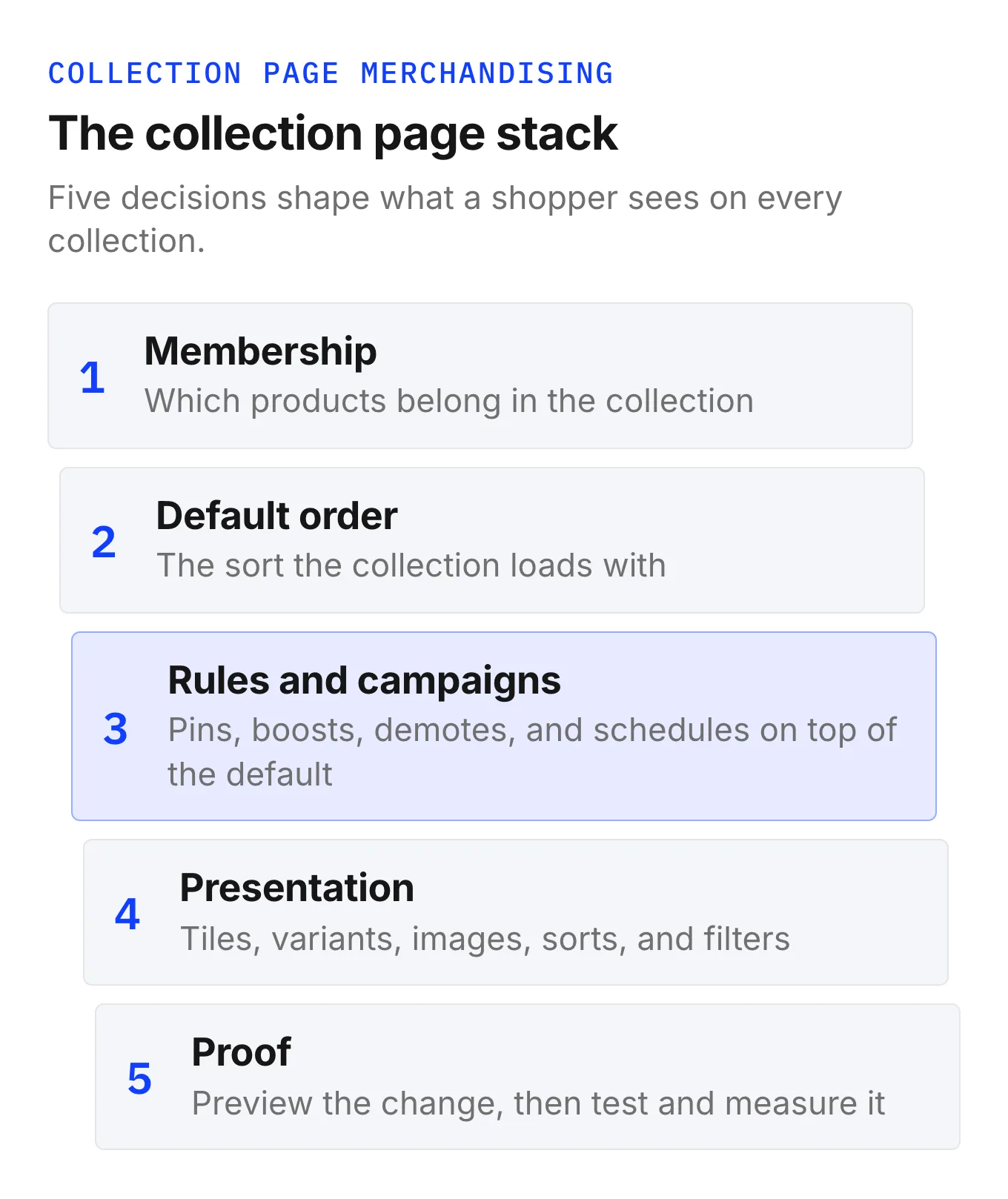
We think of it as a stack of five layers, and the rest of this guide takes them in order:
- Membership. Which products belong in the collection. Shopify's conditions, hand-picks, and mixed sources decide this.
- Default order. The sort a collection loads with before anyone touches it.
- Rules and campaigns. Pins, boosts, demotes, and scheduled campaigns layered on top of the default.
- Presentation. What the grid shows: one tile or several per product, which image, which sorts and filters.
- Proof. How you know a change made money.
Our own product splits layers two and three the same way. Sort orders are the store-wide default ranking, and merchandising rules are campaigns that layer collection-specific pins, product groups, and schedules on top.
One Shopify object, three jobs
Baymard separates three kinds of page that Shopify calls collections:
- A category page helps people find their way around the catalog.
- A product listing page is where they browse and filter.
- An editorial collection is built around a theme or a campaign.
On Shopify, one collection object does all three jobs. That's why one store-wide default can't fit every collection, and why the default-sort section further down starts from the collection's job.
What the order changes
Order is the part shoppers feel. In Baymard's usability testing, users were often misled into thinking a store's selection was much narrower than it was, based only on the default sort order.
A 2018 field experiment at Expedia, published in Marketing Science, shows the mechanism. Rankings changed which hotels people clicked into. Among the hotels they did open, rank didn't change what they booked.
That's travel, not apparel, so we use it for the mechanism and not for a lift number. What sits in the top rows decides what gets considered at all.
Most stores still fall short on product lists. Baymard's 2025 product list benchmark rates 58% of desktop and 78% of mobile ecommerce sites "poor" to "mediocre" on product list UX.
We've written separately about why sort order is a revenue lever; this guide covers everything around it.
How do Shopify brands set up their collection pages today?
We measured 18 well-known DTC brands on Shopify in Black Friday week 2026. The median brand publishes about 220 collections.
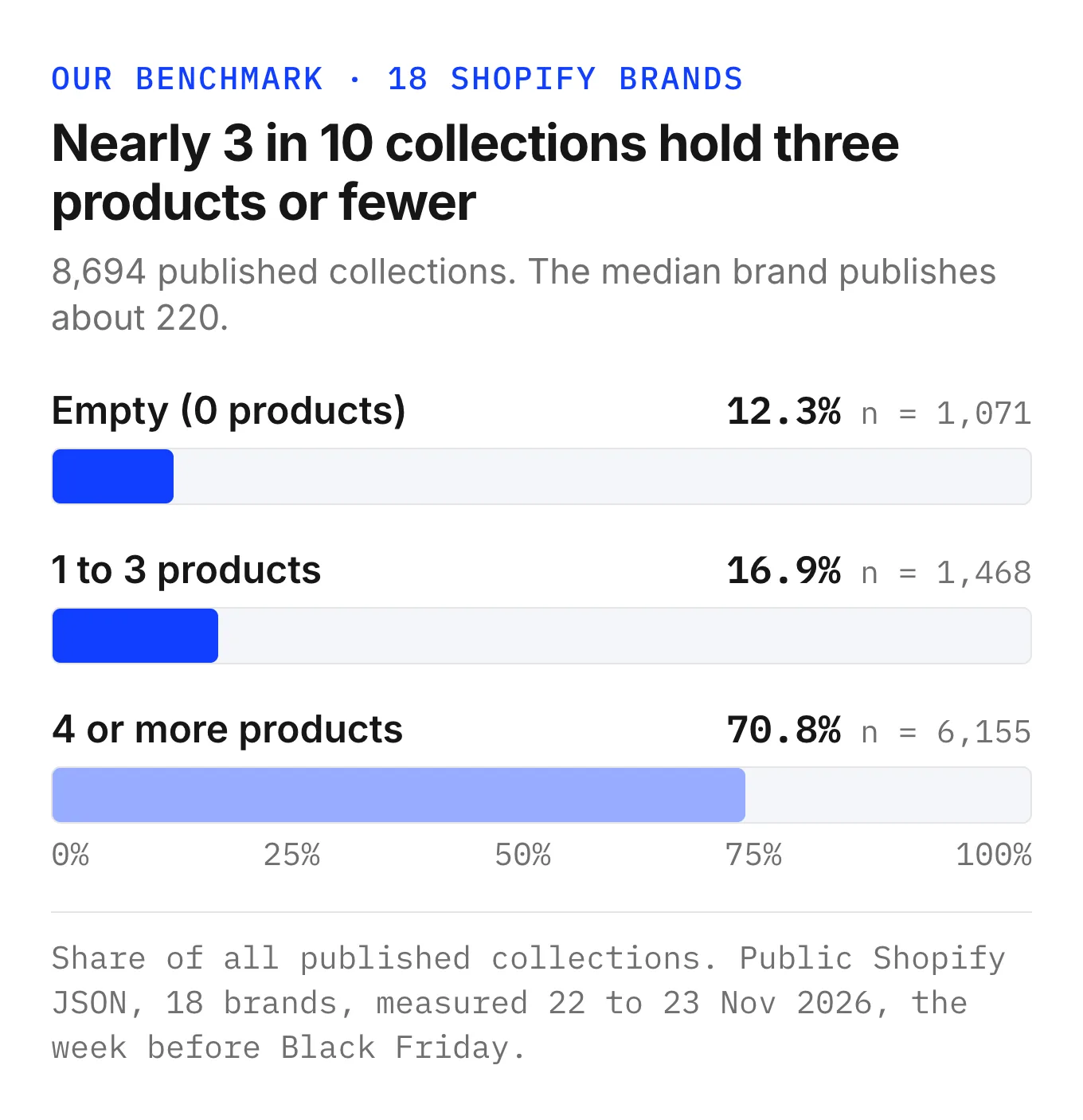
Nearly three in ten of all 8,694 collections hold three products or fewer, 16 of 18 brands have at least one empty collection, and 4 of 18 link an empty one from the homepage.
How we ran it. We wrote a list of well-known fashion, beauty, and home brands before sending a single request, and we left our own customers off it so our product couldn't shape the result.
We attempted 27 stores and kept 18: 5 fashion, 8 beauty, and 5 home.
Eight didn't serve Shopify's public product data, mostly headless builds, and Shopify rate-limited our requests on one more.
We read public data only: every published collection with its product count, plus the collections each homepage links to. We measured on 22 and 23 November 2026, the week before Black Friday, and name no store.
Here's what the 18 brands look like:
- Collections per brand: the median brand publishes about 220 (219.5). The middle half publish between 102 and 539, and 14 of 18 publish more than 100.
- Empty collections: 1,071 of 8,694 published collections (12.3%) hold no products, and 16 of 18 brands have at least one.
- Thin collections: another 1,468 (16.9%) hold one to three products. In all, 2,539 (29.2%) hold three or fewer, and 6,155 (70.8%) hold four or more.
- Duplicates: 5 of 18 brands carry collections named like Shopify duplicates ("-copy"), 183 in total.
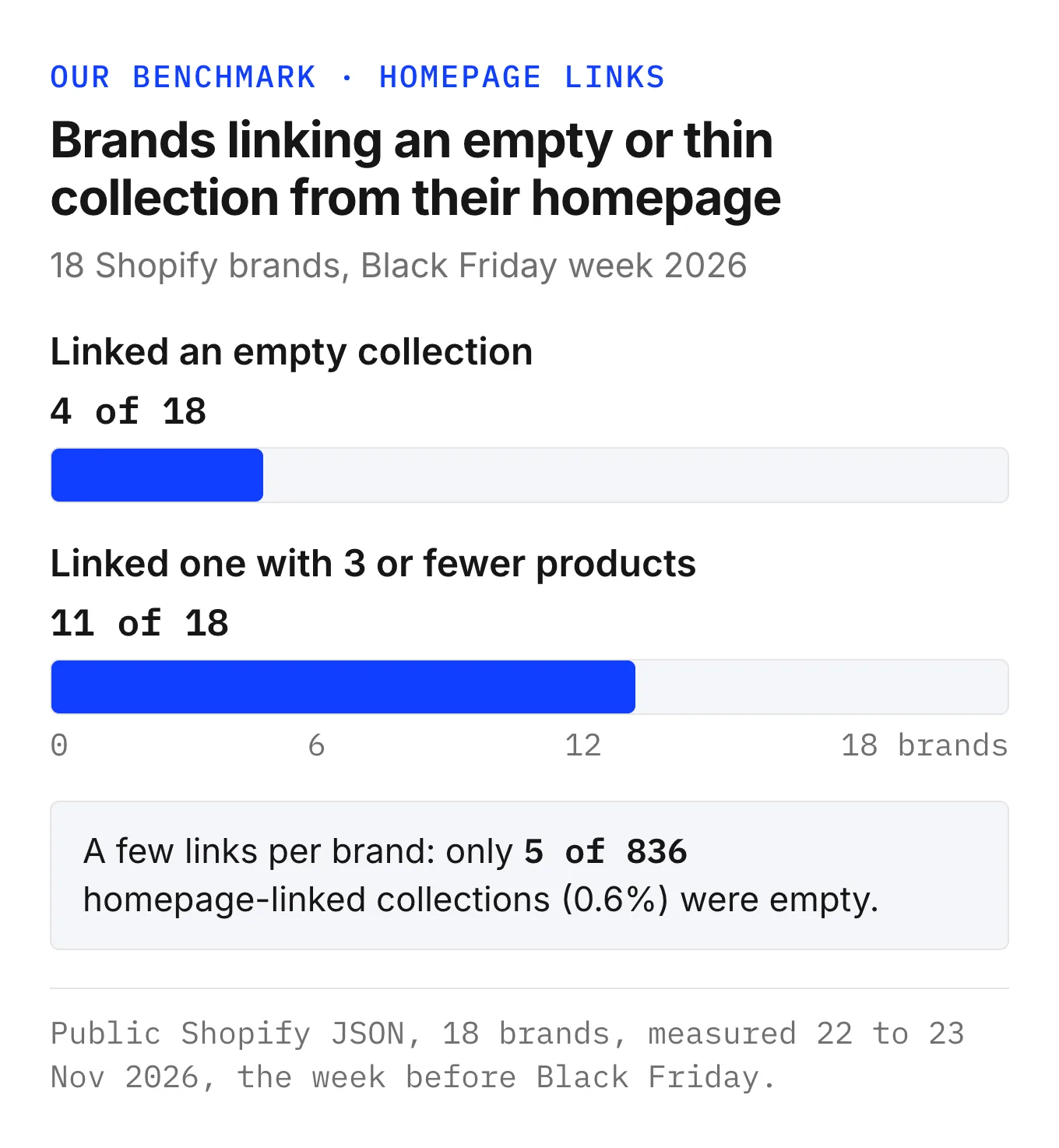
- Homepage links: 4 of 18 brands link an empty collection from their homepage, and 11 of 18 link one holding three products or fewer.
The homepage finding needs context. Of the 836 collections linked from those 18 homepages, only 5 (0.6%) are empty.
That's a few stray links per brand, but each one sends a Black Friday shopper to an empty page.
The pattern behind the numbers is ownership. At a few hundred collections, with nearly three in ten holding three products or fewer, nobody is likely checking most of them each week.
The rest of this guide is a routine for deciding what each collection is for, then checking it.
What this doesn't show. It says nothing about how these stores order their collections or what any of it costs in revenue. We pulled product order too, but couldn't verify it against the live storefronts, so it stays out.
Two more caveats. Eighteen brands is a small sample, and Black Friday week skews homepage links toward campaigns. Product counts include only products published to the online store.
Should a collection be manual, automated, or both?
Use automated conditions for any collection that should change when your catalog changes, and hand-pick only the handful of products that carry a campaign.
Since July 2026, you don't have to choose: one Shopify collection can mix both, and you set the order separately.
Shopify's own announcement describes the old tradeoff:
Previously, building a collection often meant a tradeoff: automate it with a single set of conditions or hand-pick every product, but not both. Merchants worked around this limitation by duplicating collections, editing themes, or using third-party apps.
Duplicated collections were one of those workarounds, and our benchmark still shows them: 183 collections named like Shopify duplicates, spread across 5 of the 18 brands.
The July update lets one collection combine automated conditions, hand-picked products, exclusions, other collections, and sources from apps. Shopify's enterprise post said the new experience was "rolling out now to all stores."
- Hand-picked (manual)
- Good for: drops and lookbooks where every slot is a choice
- Watch out for: goes stale as the catalog changes; every new product is added by hand
- Automated (conditions)
- Good for: any collection that should follow the catalog
- Watch out for: before July 2026, campaign heroes meant a second collection
- Multi-source (since July 2026)
- Good for: a category plus a few campaign heroes in one list
- Watch out for: order is still a separate setting
Our verdict: default to automated or multi-source, and keep fully hand-picked collections for the few pages where every slot is an editorial call.
Membership still isn't order
Shopify asks you to set a default sort on each collection, and that's a separate decision from which products get in.
The same split holds on our side. Our collection sources decide which products belong in a native Shopify collection, and they "control membership, not product order."
So build collections around where shoppers will look. NN/g's research across 49 ecommerce sites found that when users don't find what they want where they expect it, they assume the site doesn't offer it.
Put a product in every collection a shopper might look for it in. Build those collections from shopper paths, such as an occasion or a fit, and let conditions keep them filled.
Say you're building a "Wedding Guest" collection. Conditions pull in every dress tagged for the occasion. You hand-pick three hero dresses for the campaign. The order comes from your default sort, and nobody creates "wedding-guest-copy."
What should each collection show by default?
Give each kind of collection its own default. Categories need a sales-led order that still shows the range.
New arrivals should lead with recent additions, sale pages with the stock you most need to clear, and campaign pages with their few heroes. One store-wide default fits none of them well.
What Shopify gives you
Shopify gives each collection one default sort. The options are manual, best selling, alphabetical, price, and date created, in either direction where that applies, plus "most relevant."
Shopify's API reference defines best selling as products "sorted by number of sales."
Most relevant is the newest option. Shopify added it to the Admin API in April 2026, and a Shopify staff member wrote that it "sorts products by relevancy, and new collections default to this sort order."
Existing collections are unaffected, and the same staff member later said it was active on only a small percentage of stores at first. Check what yours default to.
The per-collection setting is where merchants feel it. One merchant on the Shopify Community asked: "Why can’t I set my store to default to the selection I want to use."
Another summed up the scale: "We have 100s, if not 1000s of collections."
Our benchmark lines up with that: the median brand publishes about 220 collections, and each one has its own default to set.
A default for each collection job
- Category (dresses, serums, sofas)
- Start from: best selling, blended with breadth
- Why: Baymard says best sellers "should factor into the default sort type, but they shouldn’t be the only factors"
- New arrivals
- Start from: newest first
- Why: recency is the reason the page exists
- Best sellers
- Start from: sales over a short window
- Why: it should move when demand moves
- Sale and clearance
- Start from: the stock you most need to clear, with final sale demoted
- Why: clearance pages exist to move specific stock
- Editorial or campaign
- Start from: hand-placed heroes, then your store default
- Why: the campaign is about a few products
The category default leans on two Baymard findings. Best selling belongs in the default but shouldn't be the only factor.
In testing, shoppers unfamiliar with a product domain reached for "Best-Selling" to lean on what other buyers chose.
How we handle defaults
In our Merchandising tools, you set one sort order as the store default, and any collection can override it from its collection details page. A collection's own default takes precedence over the store default.
Our built-in Best Selling sort ranks by total sales over the last 7 days. Because it uses sales across your store, collections that share many products can look alike at the top.
That's a real limitation, and it's why the rules and diversity sections below exist.
For blends, weighted groups combine several metrics into one score, written as a strategy like "60% sales, 40% new arrivals."
For new products, either set the collection default to Newest or lift new arrivals into a sales-ranked page with a soft boost.
Rainbow Shops built a "What's Hot" sort from 7-day, style-level sales, so its collection pages reorder each day. The published case study reports a 30% increase in conversion rate.
Each of these choices has its own deep dive. Start with how to pick the signal for best sellers and new arrivals.
If profit matters as much as volume, read how to add margin without burying what shoppers came for, and our custom ranking guide covers the five ranking levers and recipes.
If you want to see what a blended default looks like on your own collections, book a demo.
When should you pin, boost, or demote a product?
Pin a product when it must hold an exact slot, such as a campaign hero. Boost a group that deserves more exposure but should still compete.
Demote products that must stay without leading, such as final sale, and hide the ones that shouldn't appear at all. Everything else keeps following the default sort.
Know which rule wins
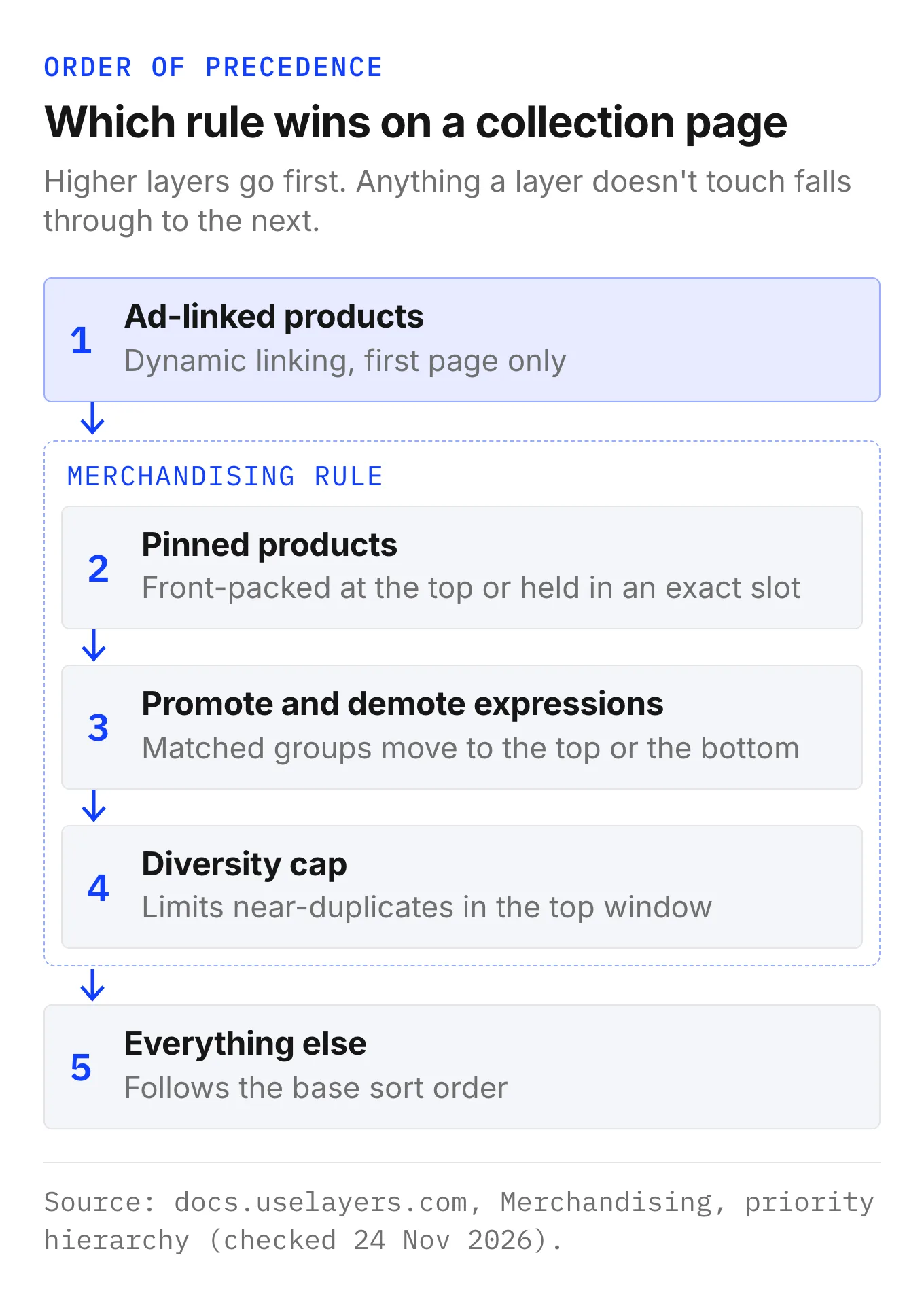
On our collection pages, the order of precedence runs from dynamic linking (first page only) to merchandising rules to the base sort order.
Inside a rule, pinned products come first, then promote and demote expressions, then the diversity cap, then everything else by the base sort.
Rules sit on top of the sort order. Anything not pinned or matched keeps following the base sort, so a rule changes only the products it names.
Pins
Pins come in two kinds, based on where you drop them. Sequential pins, the run connected to slot 1, front-pack at the top. Absolute pins hold an exact slot further down, with organic products filling in around them.
If you're curious about the engineering, here's how we keep drag-and-drop pin ordering fast.
Priority rules and soft boost
Priority rules are hard overrides. Promoted products always appear at the top, regardless of their metric values, and demoted products go to the bottom.
Soft boost is gentler. It lifts matching products only as far as a target band and interleaves them, instead of clustering them at the top. It has two modes: "Nudge matches up" and "Lift matches into view."
Demote and hide
A demote expression moves final-sale or clearance products to the bottom while keeping them in the collection, still in base-sort order.
Hidden content rules go further. The product stays published in Shopify but drops out of collection pages, search, or recommendation blocks. The docs' own example is keeping legacy SKUs out of collection pages.
The tradeoff with pins
Pins carry upkeep. You can set a rule's pins to delete themselves when a product sells out, but if that product comes back in stock, you have to re-pin it by hand.
Use pins for the few slots that can't move, and let rules handle the rest.
- Sequential pin
- What it does: front-packs chosen products at the top, in order
- Use it for: the first few slots of a campaign
- Watch out for: restocked products need re-pinning
- Absolute pin
- What it does: holds one exact slot; organic products fill around it
- Use it for: a hero in slot 5, a mid-grid feature
- Watch out for: same re-pin rule as any pin
- Priority rule (promote or demote)
- What it does: forces matches to the top or bottom, whatever their metrics
- Use it for: groups that must lead or must trail
- Watch out for: clusters the matches together
- Soft boost
- What it does: lifts matches toward a target band, interleaved
- Use it for: new arrivals and restocks
- Watch out for: lifts toward a band; doesn't fix a slot
- Demote expression
- What it does: moves matches to the bottom, still in base-sort order
- Use it for: final sale, clearance
- Watch out for: products stay in the collection, lower down
- Hidden content rule
- What it does: removes matches from collections, search, or blocks
- Use it for: legacy SKUs
- Watch out for: the product stays live in Shopify
Our custom ranking guide goes deeper on soft boost settings, and you can order a collection by traffic source when pins should change with the ad a shopper clicked.
How do you run campaigns on a collection without re-sorting it every morning?
Build the campaign as a rule that switches itself on and off. Schedule it to the promotion's dates and target it to the traffic it's for.
Because the rule sits on top of the default sort, the collection falls back to its normal order when the campaign ends, with nothing to undo.
Here's the setup, in four steps:
- Build on the sort the collection loads with. A rule only reorders a collection when the shopper browses it with the sort order the rule is tied to. Most "my rule does nothing" reports come from that mismatch.
- Add conditions. Contextual conditions read the session at request time: geography, market, customer tags, UTM parameters, arrival channel, device, and date and time. Several rules can share a collection; rules with conditions run before the catch-all.
- Schedule it. Give the rule a start date and an optional end date, and it publishes and unpublishes itself. Changes typically take effect within about a minute of the time you set.
- Preview it. You can preview a rule on your live storefront before you save or publish it. If the rule has scheduled banners, you can preview them as of their start date.
Paid traffic is a campaign too. Dynamic linking pins the products featured in your ad to the top of the landing collection, on the first page only. Our paid-traffic guide walks through the setup.
If you sell in several countries, segmented sorting ranks by the visitor's country data where it exists and falls back to the overall value where it doesn't. Our Markets guide covers per-market sort and rules.
Why does one style take over the top row, and how do you stop it?
A sales-led sort rewards whatever already sells, so one style or color family can fill the first row and hide the rest of the range.
Fix it with a cap on how many near-duplicates can sit in the top window, and group coordinating pieces on purpose.
Two mechanisms cause it:
- A sales sort has no sense of range. It ranks each product on its own sales and ignores what sits around it. Baymard found that 24% of desktop sites fail to show the breadth of their products through the default sort.
- Store-wide sales repeat across collections. Our own Best Selling sort uses store-wide sales, so a strong seller ranks near the top of every collection it's in. Collections that share products end up looking alike.
A test you can run by hand
Baymard's fix doubles as a check. Any product type that makes up more than 10% of a list should appear among its first 20 products (about the first 10 on mobile), regardless of its overall sales.
Open your highest-traffic collection, count the product types in it, and look at the first 20 tiles.
If a type that makes up a fifth of the collection isn't there, shoppers can come away thinking you carry less of it than you do.
The fix
Diversity expressions cap how many products from one family, product type, or attribute can sit in the top window of a collection. Products over the cap move to right below the window instead of dropping to the end.
The docs put the failure bluntly: without a cap, "the first page can show six near-duplicates of the same style in a row."
Sometimes you want products together. Product sequences keep matching items, like coordinating tops and bottoms, next to each other. Rainbow Shops turned its existing product tags into sequences for matching sets and lookbooks.
Our best-sellers guide covers the same problem as the product-family trap.
What should the collection grid itself show?
Show one tile per product by default, with swatches for colors, and break variants into their own tiles only on collections where the variant is the thing people shop for.
Offer the four sorts shoppers expect and the filters that match the category. Everything on the grid should help someone decide whether to click.
Tiles and variants
Baymard's 2025 benchmark says to combine product variations into one list item, and 42% of sites don't. In testing, separate variation tiles cluttered lists and made the actual range harder to see.
We build variant breakouts, which show chosen options like Color or Stone as their own tiles, so we'll be straight about that tension.
The answer is scope. Breakouts can be limited to specific collections, so use them where the variant is the product, like a stone-led jewelry collection or a "Red Edit," and keep combined tiles everywhere else.
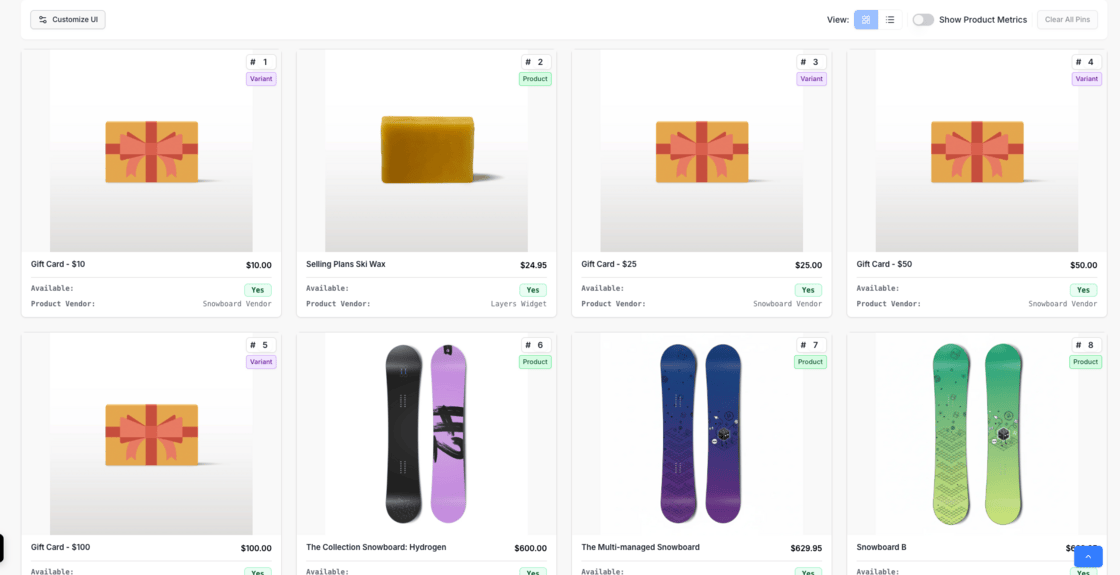
Variant breakouts on our demo store: each gift card amount gets its own tile, tagged Variant, beside regular product tiles.
Shopify now supports part of this natively. Since July 2026, you can build variant-level collections around a specific size or color, and those variants appear on collection pages and in filters.
For the full decision, see when variants should be their own tiles. For the image on each tile, here's why the wrong thumbnail costs clicks.
Campaign imagery
For pinned products, featured media lets you override which image the tile shows: a product photo, a variant image, a metafield image, or an upload. Banner slots reserve grid positions for promos, with separate desktop and mobile layouts.
Sorts and filters shoppers can use
Baymard lists four essential sort types: price, user rating, best selling, and newest. In its 2025 benchmark, 68% of desktop and 69% of mobile sites don't offer all four.
Its five essential filter types are price, user rating, color, size, and brand, and 51% of sites don't provide them all.
Filters and sorting do different jobs. Filters set hard boundaries, and sorting sets soft ones. Baymard's testing showed users need both.
Two Shopify limits are worth knowing.
Storefront filters don't display on collections with more than 5,000 products; in our benchmark, 10 of the 8,694 collections were that large, and 1 of the 18 brands linked one from its homepage.
And a filter group can show up to 100 values, so Shopify's UX guidance is to truncate the list to 10 with an option to show more. Our filter rail field guide covers grouping and labels.
A quick grid checklist:
- One tile per product, unless the variant is what people shop for
- Variant breakouts scoped to the collections that need them
- Price, user rating, best selling, and newest in the sort menu
- Price, user rating, color, size, and brand filters where they apply
- Long filter groups cut to 10 values with "show more"
- No collection over 5,000 products that depends on Shopify's storefront filters
How do you know whether a collection change worked?
Preview the change, then ship one change per collection at a time. Compare the collection's own numbers before and after, or better, split traffic between the old and new order.
Judge it on revenue per collection view and add-to-cart rate over at least two full weeks, since one busy afternoon can swing either way.
- Preview. Sort order preview annotates each product with the rules that affected its position: the rule, boost, sequence, diversity cap, or metric that placed it. You see why the grid looks the way it does before shoppers do.
- Ship one change. We recommend one change per collection at a time. Change the default and add three pins on the same day, and you won't know which one moved the number.
- Measure. The collection details page shows a collection's default sort, the rules that target it, and how it's performing for shoppers. Performance needs your click, add-to-cart, and purchase events forwarded.
- Test when you can. Sort order experiments split shopper sessions between a control and one or more challengers, then measure conversion, add-to-cart, and revenue lift. They're in beta.
- Decide. We recommend at least two full weeks before you call it, so weekly buying patterns and promo spikes even out. Our margin guide lays out a two-week before-and-after method.
One caveat on proof. Rainbow's 30% conversion lift is one customer's published result. Yours depends on your catalog and your traffic, which is why you test.
What does a weekly collection merchandising routine look like?
Spend one short session a week on your top collections by traffic. Check what each one defaults to, whether its top row still matches what you want to sell, and which pins and campaigns are live or expired.
Then look for empty or duplicated collections. Fix the biggest gap, and measure it.
Here's the list we'd run each week:
- Default sort. Does each top collection's default fit its job?
- Top-row breadth. Does every product type above 10% of the list appear in the first 20?
- Sold-out products up top. Is anything out of stock sitting in the first row?
- Expired campaigns. Is any scheduled rule still live after its promotion ended?
- Pins on restocked products. Did a pinned product sell out, lose its pin, and come back? Re-pin it by hand.
- Empty and "-copy" collections. Unpublish or merge them, and make sure your homepage doesn't link one.
- Rules on the wrong sort. Is each rule tied to the sort order the collection loads with?
- Theme overrides. Does your theme send its own default sort? If it does, the theme's sort wins over the defaults you set with us.
- Filters on big collections. Does any collection over 5,000 products rely on Shopify's storefront filters?
- One change in test. Is exactly one change per collection running as a test or a before-and-after?
When something on the list looks wrong, config history shows every change to your rules and sort orders, who made it, and when. If a change caused trouble, you can restore a previous version.
At Rainbow, the cadence is daily. When we wrote up how Rainbow rebuilt its merchandising on Shopify, David Cost described it this way:
We can dynamically change the sort order on all of our collection pages daily. So those collection pages look different every day.
If you're choosing tools to run this routine, here's what to look for in a merchandising platform for fashion.
We put this routine on one printable page, with an audit grid for 10 collections and a key to which rule wins.
Start with your three busiest collections
Pick your three highest-traffic collections and check what each one defaults to today. Run the breadth test on the first 20 tiles of each, then check whether your homepage links an empty collection.
If your catalog has outgrown hand-sorting, we'll walk through your collections with you.
FAQs
1. How many collections should a Shopify store have? There's no right number, but every collection needs a job and an owner. In our 18-brand benchmark, the median brand published about 220, and nearly three in ten collections held three products or fewer. Audit those first.
2. Should you hide sold-out products on collection pages? Usually not. Move them below in-stock products so shoppers still see the range, and hide only products that shouldn't appear at all. Our best-sellers guide explains how to demote low-availability products instead of hiding them.
3. Can one Shopify collection mix automatic and hand-picked products? Yes. Since July 2026, a Shopify collection can combine automated conditions, hand-picked products, exclusions, other collections, and app sources in one list. You still set the sort order separately.
4. What is the best default sort for a collection page? Match it to the job: categories need a sales-led order that shows the range, new arrivals need recency, and sale pages lead with stock to clear. Baymard says best selling belongs in the default but shouldn't be the only factor.
5. What is Shopify's "most relevant" collection sort? It's a sort value Shopify added in April 2026, in Admin API version 2026-07. A Shopify staff member said it sorts products by relevancy and that new collections default to it, while existing collections keep their current sort.
6. How do you know if a collection change worked? Change one thing per collection, then compare revenue per collection view and add-to-cart rate over at least two full weeks, or split traffic between the old and new order with a test.
Written by

Lukas Tanasiuk
Co-Founder and CRO, Layers
Lukas Tanasiuk is Co-Founder and CRO of Layers, the enterprise search and merchandising platform built exclusively for Shopify Plus. He has spent over a decade in Shopify ecommerce and CRO, and speaks with enterprise merchants about search and merchandising every week.
View all articlesRelated articles
More reading on search, merchandising, and product discovery.
Out-of-Stock Products Last on Shopify: The Bury, Hide, or Keep Decision
Shopify can't put sold-out products last in collections. We checked 77 collection pages from 31 brands and turned it into a bury, hide, or keep guide.
Lukas Tanasiuk
Nov 24, 2026 · 17 min read
How to Sort Products by Margin Without Sacrificing Discovery
Best-selling sort optimizes for units, not profit. Learn when margin-weighted sorting helps, when it hurts discovery, and how to find the right balance on Shopify Plus.

Jake Casto
Jul 10, 2026 · 11 min read
What is Searchandising? The Line between Search and Merchandising
Search finds the products; searchandising picks which show first. A job-by-job map of the boundary, with what Shopify's native tools let you change today.
Jake Casto
Nov 24, 2026 · 17 min read