What is Searchandising? The Line between Search and Merchandising
Search finds the products; searchandising picks which show first. A job-by-job map of the boundary, with what Shopify's native tools let you change today.
Key takeaways
A shopper types "linen shirt" into your search bar. Every result is a linen shirt, and the first four are sold out in every size but XS. Your search did its job. Your merchandising didn't.
Searchandising is the name for fixing that second problem. It's worth getting right, because roughly half of the participants in Baymard Institute's usability testing turn to search as their preferred way to find products.
Most definitions of searchandising also sweep in the first problem: finding the right products at all. Of the 15 top-ranking definitions we read in November 2026, 10 file synonym or relevance work under searchandising.
That's how teams end up writing merchandising rules to patch search, then maintaining them by hand.
What is searchandising?
Searchandising, short for search merchandising, is applying business rules to on-site search results after the engine finds the relevant products. Merchandisers promote, demote, pin, or hide products for goals like margin or a seasonal campaign.
Site search finds the right products; searchandising decides which ones shoppers see first.
Searchandising, searchandizing, and search merchandising are three spellings of one practice. Vendors use the word to sell tools, but the job is the same whether you run it in software or a spreadsheet of boosts.
You'll meet the word in two senses:
- The narrow sense is rules on top of relevance. That's the definition above, and the one this article uses.
- The wide sense also folds in synonyms, typo handling, and relevance tuning. It's the view most top-ranking definitions take.
We use the narrow sense because the two halves fail differently and get fixed by different people.
Making sure "black dress" returns black dresses is search. Showing the in-stock ones before the styles down to a single size is searchandising.
On our sales calls, almost nobody says "searchandising." Buyers ask whether they can pin a product for a search, or why search shows the wrong products. They describe the two halves without naming either.
- Searchandising means business rules on results that already match.
Where does the word searchandising come from?
Searchandising blends "search" and "merchandising," and it was in a trade-press headline by July 2006. In March 2007, an Aberdeen Group analyst wrote that the pairing had "morphed into the e-commerce lexicon."
No primary source we found settles who coined it. The dated record:
- July 14, 2006. MediaPost ran the headline "From Merchandising To Searchandising: BT at the Shopping Cart." It's the earliest dated use we found.
- March 22, 2007. In an E-Commerce Times column, John Lovett, then an Aberdeen Group analyst, wrote that search and online merchandising "morphed into the e-commerce lexicon as 'searchandising.'"
- August 2007. Entrepreneur described "a hybrid of search and merchandising that lets them tailor results to cross-sell and upsell merchandise based on specific keywords input by customers."
- November 2026. We ran every spelling through the Google Books Ngram Viewer for 1990 to 2022 and got no data back, while "merchandising" returned a full series.
Ngram only counts phrases found in at least 40 books, so an empty result means fewer than 40 books used the word in any year.
Entrepreneur's 2007 version was already the narrow sense: rules on top of search, tied to the keywords a shopper typed.
How is searchandising different from site search?
Site search is retrieval: it finds the products that match what a shopper means and ranks them by fit. Searchandising reorders that ranked list for business reasons, such as stock depth or a product launch.
Search answers "which products fit this query?" Searchandising answers "which fit should a shopper see first?"
The textbook Introduction to Information Retrieval by Manning, Raghavan, and Schütze defines the search side. Retrieval is "finding material ... that satisfies an information need from within large collections."
With large collections, an engine has to "rank-order the documents matching a query." For a store, the information need is what the shopper meant.
Our own search works that way. It combines semantic understanding, keyword relevance, engagement data, and contextual awareness to rank the most relevant products.
We go deeper on what separates AI search from keyword search and how we measure relevance.
Merchandising is a business decision about presentation. In our merchandising docs, merchandising rules "take direct control of how products appear" on collection pages. Sort orders work as "global merchandising rules," and merchandising rules work as "campaigns."
Nielsen Norman Group's search-log guidance describes "best bets (results you force to the top of search results pages)." A best bet is a searchandising rule under an older name.
- Question it answers
- Site search: Which products fit this query?
- Searchandising: Which matching products should a shopper see first?
- Who decides
- Site search: The engine: query understanding plus relevance scoring
- Searchandising: Your team, through rules on the ranked list
- Inputs
- Site search: The query, plus catalog and behavior data
- Searchandising: Margin, stock, launches, campaigns, brand priorities
- Typical controls
- Site search: Typo handling, query expansion, intent detection, relevance weights
- Searchandising: Promote, demote, pin, hide, redirect
- Failure looks like
- Site search: Zero results, or products that don't match
- Searchandising: Sold-out or off-campaign products leading a page of good matches
- Measured by
- Site search: Searches with no results, searches with no clicks
- Searchandising: What promoted and pinned positions earn: click-through, add-to-cart, and purchase rates
- Search is judged by relevance; searchandising is judged by what the business order earns.
Which jobs belong to search, which to merchandising, and where do they overlap?
Search owns the query and the match: reading what the shopper typed, then retrieving and scoring products. Merchandising owns the business order: promoting, demoting, pinning, hiding, and scheduling.
The two overlap wherever a business signal enters the ranking itself, like stock weights or redirects.
We call this the Searchandising Boundary Map. It follows a query from the search box to the results page, top to bottom, and places 10 jobs in one of three zones.
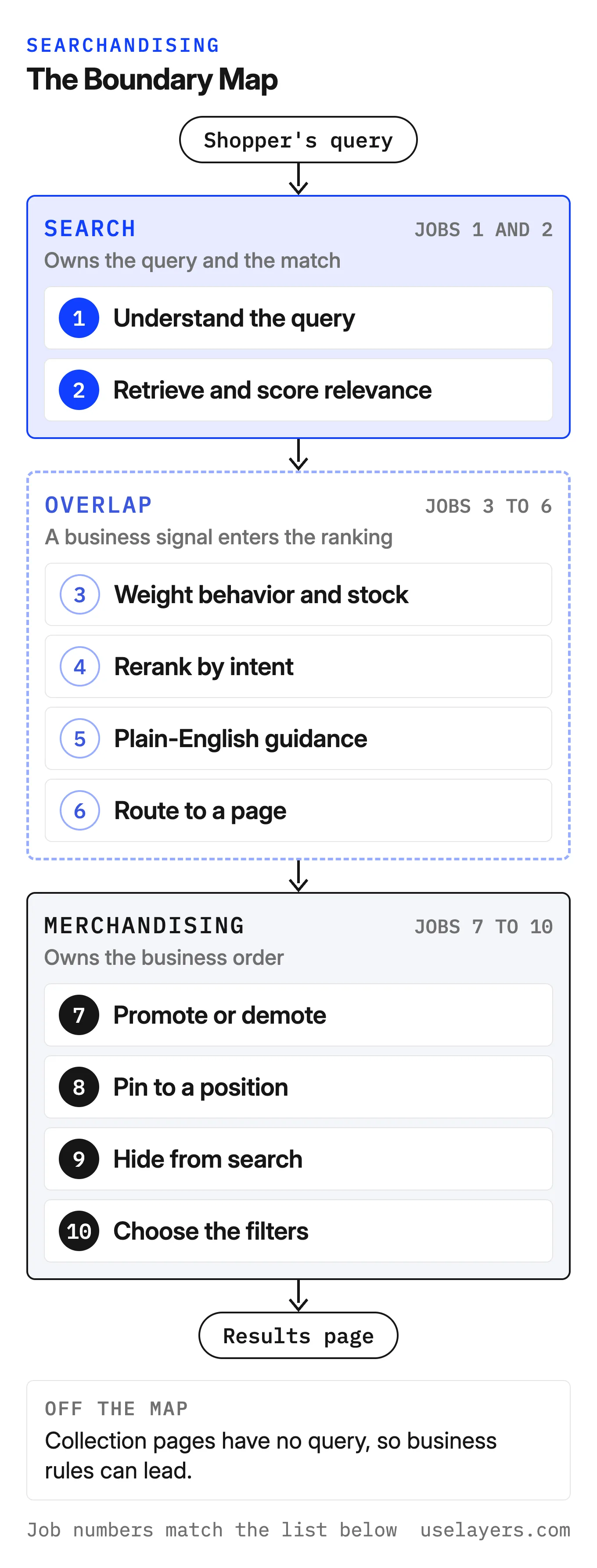
The Searchandising Boundary Map (Shopify native entries checked against Shopify Help on November 22, 2026)
Search: jobs 1 and 2
- Understand the query (typos, acronyms, synonyms)
- Shopify native: Semantic understanding is built in, with nothing to turn on; developer docs say synonyms are generated automatically
- Ours: Query interpretation, typo tolerance, and query expansion
- Retrieve candidates and score relevance
- Shopify native: Shopify runs it: "There's no setting that controls how broadly search matches"
- Ours: AI Relevance and Keyword Relevance signal groups, with weak tail results trimmed automatically
Overlap: jobs 3 to 6
- Weight behavior and stock inside the score
- Shopify native: Fully out-of-stock products go to the end by default; a Search and Discovery setting changes that
- Ours: Signal weights: each group 1% to 80%, all groups sum to 100%
- Rerank by detected intent
- Shopify native: Not documented
- Ours: Intent modifiers, plus an AI Reranking dial for broad queries only
- Give plain-English ranking guidance
- Shopify native: Not documented
- Ours: Search Instructions, attached to every AI step
- Route a query to a page instead of results
- Shopify native: Not covered on the help pages we reviewed
- Ours: Semantic redirects
Merchandising: jobs 7 to 10
- Promote or demote products for a query
- Shopify native: Product boosts: up to 10 search terms per boost, only for products available for sale
- Ours: Ranking rules: promote within a product's relevance group; demote can drop it to a lower one
- Pin products to exact positions
- Shopify native: Boosted products are listed above the usual results; no pin-to-position control documented
- Ours: Pin up to 50 products, or drag them into place in the Visual Editor
- Hide products from search only
- Shopify native: Unlisted product status keeps a product out of online store search; no search-only hide documented
- Ours: Hidden content rules per surface
- Choose which filters shoppers see
- Shopify native: Up to 25 filters per store
- Ours: You choose which attributes become filters; see filters and facets
Jobs 3 to 6 are where teams argue. Each one is a single decision that needs the engine's understanding and the business's priorities at the same time:
- Job 3: our inventory signal scores whether a product is in stock, so raising its weight moves in-stock products up without writing a rule.
- Job 4: intent modifiers change ranking "based on detected intent," while query expansion only broadens which products are considered.
- Job 5: Search Instructions carry plain-English merchandising guidance into the AI steps of the pipeline.
- Job 6: a redirect sends a support or policy query, like "returns," to a page instead of a list of products.
Collection pages sit off the map. A collection has no query, so there's no relevance to protect, and business rules can lead.
Shopify's collection sort options include best selling and manual, and ours resolve sort orders and merchandising rules in a fixed priority order.
Custom ranking for collections covers the sort mechanics.
If you sell in several markets, the merchandising jobs multiply, and per-market merchandising covers that case.
- Search: jobs 1 and 2. Overlap: jobs 3 to 6. Merchandising: jobs 7 to 10.
What rules keep merchandising from breaking relevance?
Four rules keep the jobs from colliding. Merchandise only what matches. Let a shopper's explicit request beat your defaults. Never let a rule change what the shopper typed. Blend promoted products into the main results.
- Merchandise only what already matches. Baymard's 2014 sorting research found that sorting by anything but relevance, without a narrow scope, puts "low-quality search matches at the top of the product list." Shopify's boost guidance warns that boosting many products "might cause other relevant products to display lower." Our promote rules raise products only within their relevance group.
- Let the shopper's explicit request win. Our Search Instructions "can't cancel what the shopper explicitly asks for." If your default demotes sale items, a search for "clearance dresses" still returns sale results.
- Never let a business rule change what the shopper typed. Our query interpretation step, which handles typos, redirects, and SKU lookups, "ignores merchandising guidance." Search Instructions do reach query expansion and intent detection, but only as defaults a shopper's explicit request overrides.
- Blend promoted products into the main list. NN/g advises against splitting manual picks into a separate "best bets" box, because users often ignore them "like they ignore pay-per-click ads on web search engines." It recommends one integrated list.
Rule 1 is the easiest to break by accident, because a boost looks harmless one query at a time. Our ranking rules docs show how each action behaves against relevance.
Is it a search problem or a merchandising problem?
If the product a shopper wants is missing, or buried under items that don't match, you have a search problem: fix understanding or relevance.
If every result matches but the order is commercially wrong, like sold-out styles first, you have a merchandising problem: change a rule.
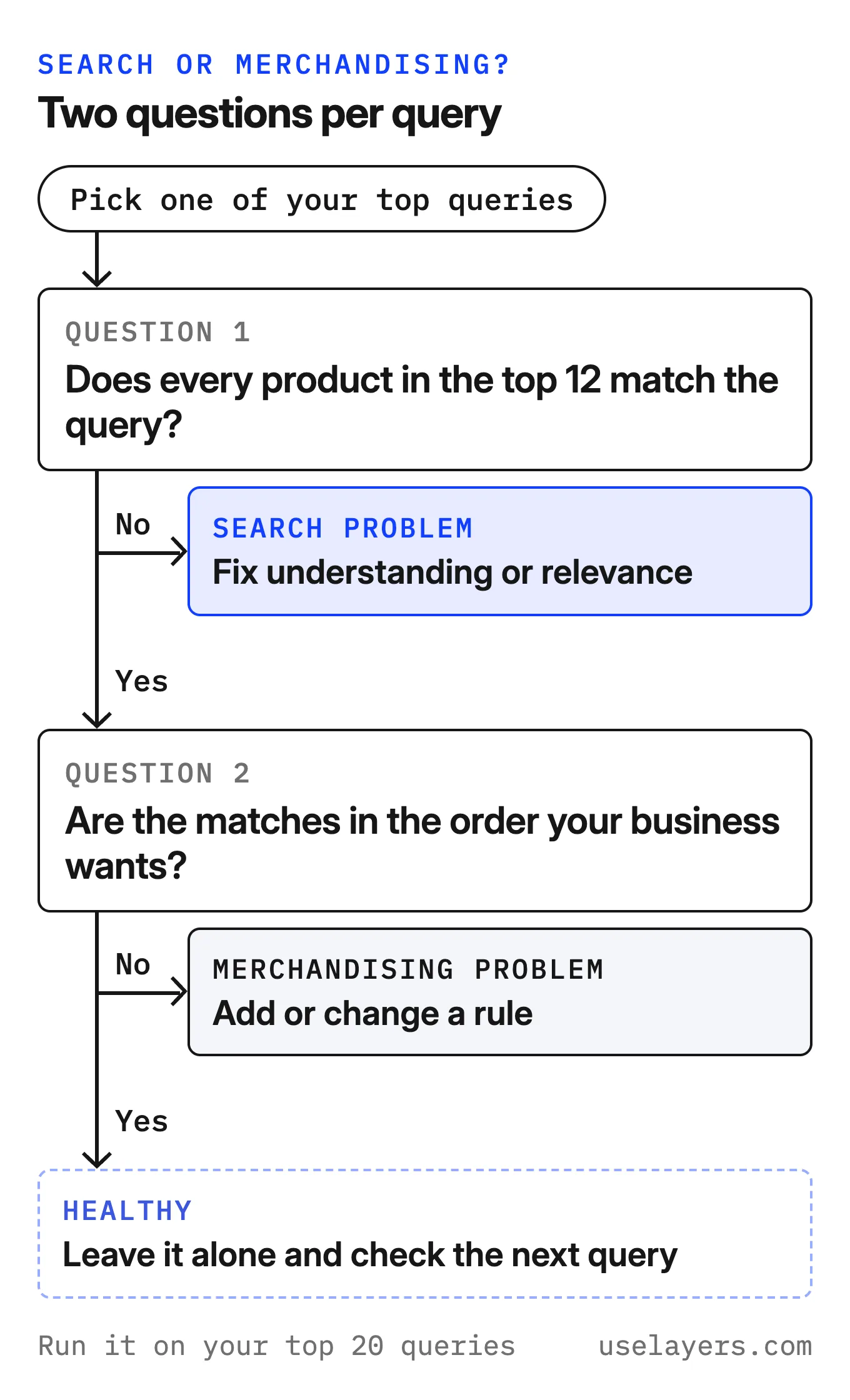
Two questions sort it out on any query:
Question 1: Does every product in the top 12 match the query? If not, it's a search problem.
Question 2: Are the matching products in the order your business wants? If not, it's a merchandising problem. Two yeses mean the query is healthy.
One query can need both fixes. In an example from NN/g's search-log guidance, 11,750 people searched one health-products site for heating pads in a month, and 13 bought one.
NN/g's suggested actions include adding synonyms so "heating pad" finds hot-therapy products, and forcing heating pads to the top as a best bet.
In our terms, the synonym is the search fix and the best bet is the merchandising fix. It comes from one site, so read it as an illustration.
The search side fails often. Baymard's benchmarks, each with its year:
- 56% of sites fail to adequately support users' search needs (2026 benchmark, 170+ sites and apps).
- 66% have issues with non-product searches, like a shopper looking up the return policy (2026).
- Nearly half give shoppers no effective way to recover from a search with no results (updated 2025).
- 46% don't send product-type searches to the matching category (2020).
Fixing jobs 1 and 2 with boosts is the expensive mistake. A boost for a query the engine can't read helps that one query and adds a rule someone has to remember.
Shopify's own guidance warns against boosting many products. Our synonym list article runs the same test on synonyms: keep terms that express a business decision, and let the engine handle language.
| What you see | Which job failed, and where to fix it |
|---|---|
| Zero results for something you sell | Understand the query (job 1). Search: understanding, then zero-result causes |
| Products that don't match in the top results | Retrieve and score (job 2). Search: relevance |
| "Returns" or "shipping" searches showing products | Route (job 6). Overlap: redirect |
| "Men's shirts" landing on a weaker list than the category page | Route (job 6). Overlap: redirect or category routing |
| All matches, sold-out styles first | Stock weight (job 3). Overlap: inventory weight or a demote rule |
| All matches, the launch on page two | Promote or pin (jobs 7 and 8). Merchandising: rule |
| All matches, but a broad query like "gifts" shows a random mix | Rerank (job 4). Overlap: intent reranking |
Measure each side on its own. Shopify's Search and Discovery reports cover searches with no results and searches with no clicks.
Our zero-results metric excludes redirects, SKU lookups, and filtered searches, so it counts searches that "genuinely failed to find relevant products."
Our redirect docs also warn against redirecting queries that should show products. For the revenue side, see what a zero-results page costs.
- Missing or wrong products: search. Right products, wrong order: merchandising.
To run this on your own store, the triage sheet puts the two questions, the table above, the boundary map, and a log for your top 20 queries on one page.
If your triage turns up more search problems than merchandising ones, that's the conversation to have with us. Book a demo and bring the queries.
What can you searchandise with Shopify's native tools today?
Shopify's free Search and Discovery app gives you product boosts, up to 25 filters, product recommendations, and search reports.
You can influence results through product data and boosts, but in Shopify's words, "you can't change how results are ordered."
Shopify native search merchandising (checked November 22, 2026)
- Product boosts
- What it does: A boosted product is listed above the results usually returned for its terms
- Limit: 10 search terms per boost; available-for-sale products only; Shopify advises boosting one or a few products
- Filters
- What it does: Let shoppers refine search and collection pages
- Limit: 25 per store, standard and custom combined
- Recommendations
- What it does: Automatic, plus hand-picked products on product pages
- Limit: Up to 10 related and 10 complementary per product
- Search reports
- What it does: Click rate, purchase rate, no-result and no-click searches
- Limit: Covers Shopify's own search only
- Out-of-stock handling
- What it does: Fully out-of-stock products go last by default
- Status: Changeable in Search and Discovery settings
- Synonyms
- What it does: Developer docs: generated automatically, "so you don't need to create synonym lists"
- Status: Merchants reported the editor "retired" from mid-September 2026; the App Store listing still mentions synonym groups
- Ranking model
- What it does: Shopify tests ranking changes and rolls them out itself
- Limit: No setting for result order or match breadth
We build on Shopify, and for many stores this is the right start: search understanding you don't have to configure, plus a light boost lever.
Where it stops, on the pages we reviewed: boosts, but no documented demotion, pinning, or scheduling, and a ranking model Shopify runs itself.
A third-party search app takes over your online store search. Shopify reports only the searches its own search handles, so move your search reporting before you switch.
Custom synonyms left Search and Discovery in September 2026, according to merchant reports. Shopify's developer docs now say its search generates synonyms automatically.
The App Store listing still offers synonym groups. Our synonym article covers which terms still need a human.
- Native: boosts, filters, recommendations, and reports. Shopify keeps the ranking.
Where do our tools sit on the boundary map?
We keep the jobs apart where a mix-up would hurt. Our query interpretation step ignores merchandising guidance.
Merchandising sits on top: ranking rules for search, sort orders and merchandising rules for collections, and Search Instructions as a plain-English bridge into expansion and intent detection.
- Understanding. Query interpretation makes at most three automatic decisions per query (typo, redirect, SKU) and only acts "when the intent is clear." Typo tolerance corrects a query only at high confidence.
- Relevance. Five signal groups (AI Relevance, Keyword Relevance, Engagement, Freshness, and Inventory) make up every text search score in AI Search, and you set each weight.
- Search merchandising. Ranking rules match queries by exact, contains, or semantic match (50% to 100% similarity), then promote, demote, pin, filter, or sort. Request transforms rewrite queries, inject filters, attach discount entitlements, or override sort orders.
- Autocomplete. Autocomplete curation uses a plain-English brand prompt to suppress or relabel suggestions in bulk. We cover how the dropdown and results drift apart in your autocomplete and results page.
- Collections. In Merchandising, sort orders are the global default and merchandising rules are campaigns on top. Each rule has a Performance sheet with impressions, CTR, add-to-cart rate, purchase rate, revenue, and revenue per impression.
The collection side is where Rainbow Shops leans on that control:
Layers gives us the power to set dynamic, automated sort orders, make manual adjustments wherever needed, and do everything in between.
David Cost, VP of eCommerce and Digital, Rainbow Shops
The separation has a cost. A promote rule can't lift a weak match above stronger ones. If you're sure a weak match belongs at the top, pin it.
Where should you start?
Start with your own search terms. Pull your top 20 queries and every zero-result query, and sort each problem with the triage table above. Fix relevance first, then add rules where every result already fits.
- Pull the queries. Use Shopify's no-result and no-click search reports, or our search (text) dataset in LayersQL.
- Run the two questions on each one. Log the answers on the triage sheet so you see the pattern across 20 queries, instead of reacting to the one that annoyed you.
- Fix in order. Engine problems first, because rules built on weak matches need constant upkeep. Rules second, on queries where every result already fits.
If the triage points at the engine, start with choosing a smart search app.
Want to see the boundary map on your own catalog? Bring your top search terms to a demo.
FAQs
1. Is searchandising the same as search merchandising? Yes. Searchandising, also spelled searchandizing, blends "search" and "merchandising." Both name one practice: applying business rules to the results of your store's own search. Trade press was using the blended word by 2006.
2. Who coined the term searchandising? Nobody can say for certain. The earliest use we found is a July 2006 MediaPost headline, and by 2007 an analyst column and Entrepreneur were using it. No primary source we found settles who coined it.
3. Does Shopify have search merchandising built in? Partly. Shopify's free Search and Discovery app gives you product boosts (up to 10 search terms each), filters, recommendations, and search reports. Shopify keeps the ranking: "you can't change how results are ordered."
4. Are synonyms part of search or merchandising? Mostly search. A synonym that teaches the engine what shoppers mean is query understanding, and Shopify's docs say its search generates synonyms automatically. A brand-coined name only your team knows is closer to merchandising.
5. What is a best bet in site search? A best bet is a result you force to the top for a specific query, like a pin rule. Nielsen Norman Group advises blending these into the main results, because shoppers often ignore separate promoted boxes.
6. How is searchandising different from collection merchandising? Searchandising reorders results for a query a shopper typed, so relevance comes first. Collection merchandising orders a set your team defined, so business rules can lead. On Shopify, boosts change search; collection sort options change collections.
7. How do you measure searchandising? Measure each half on its own. For search, track zero-result and no-click searches. For merchandising, compare what promoted or pinned positions earn against the rest of the page: clicks, add-to-carts, and purchases.
Written by

Jake Casto
Founder, Layers
Jake Casto is the founder of Layers, the enterprise search and merchandising platform built for Shopify Plus. He previously co-founded Proton, a Shopify Plus engineering studio that shipped more than 400 storefronts, where Layers began as an internal tool for a problem that kept repeating. He writes about search infrastructure, performance, and the engineering behind discovery at scale.
View all articlesRelated articles
More reading on search, merchandising, and product discovery.
Strikethrough Pricing in Search Results: When a Compare-at Price Helps and When it Backfires
The median store in our 32-store Shopify sample had 41% of products struck through. Which search tiles should keep that line, and which rules apply?

Lukas Tanasiuk
Nov 24, 2026 · 20 min read
The Complete Guide to Filtering and Faceting on Shopify Plus
Good faceting is an editorial layer. Group, relabel, order, hide, and scope filters to how shoppers actually think. A field guide for Shopify Plus.
Jake Casto
Aug 6, 2026 · 14 min read
Combined Listings and Variant Breakouts on Shopify Plus: When Your Catalog Hides Stock From Search
Combined Listings can hide variant-level stock from Shopify search. What changes, the parent vs children decision, and an audit to find the gaps.
Jake Casto
Jul 1, 2026 · 14 min read