FEATURERuntime Statistics for FunctionsRead more
← Back to Changelog

Image Search Result Scores

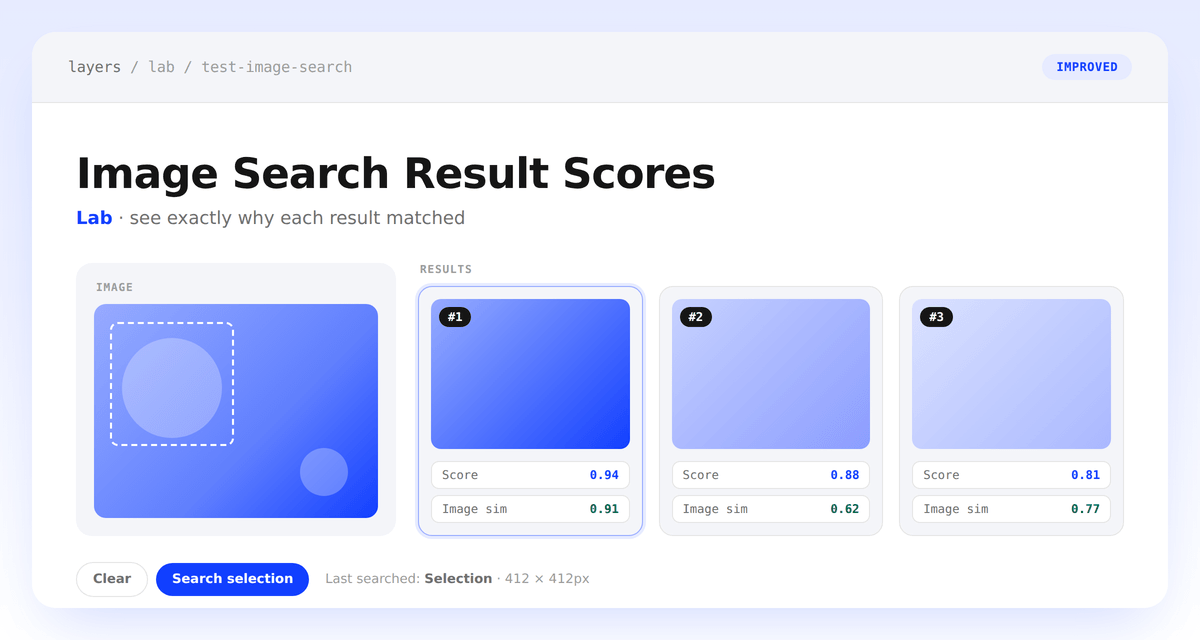
Test Image Search page showing a crop panel on the left and result cards on the right, each with a rank badge and Score and Image sim badges

See exactly why each result matched.

Test Image Search in Lab now shows a #n rank badge and Score / Image sim badges directly on every result card, so you can tell at a glance whether a strong match came from visual similarity or other ranking signals. We also simplified the page: filters and sort are gone, the image stays pinned on the left while results update on the right, and drag-to-crop is more reliable.

Learn more

Subscribe to the changelog

Releases land wherever your team already reads.

Slack

Subscribe to changelog

1

Choose a Slack channel

Open the Slack channel where releases should land. Most teams use #product-updates.
2

Subscribe to releases

Paste this command into the Slack channel.

/feed subscribe https://www.uselayers.com/changelog/rss.xml
3

Approve the confirmation post

Approve the confirmation Slack post. From then on each release arrives as a message with its title, date, and link.