FEATURERuntime Statistics for FunctionsRead more
← Back to Changelog

Grant MCP Connections Access to Future Stores

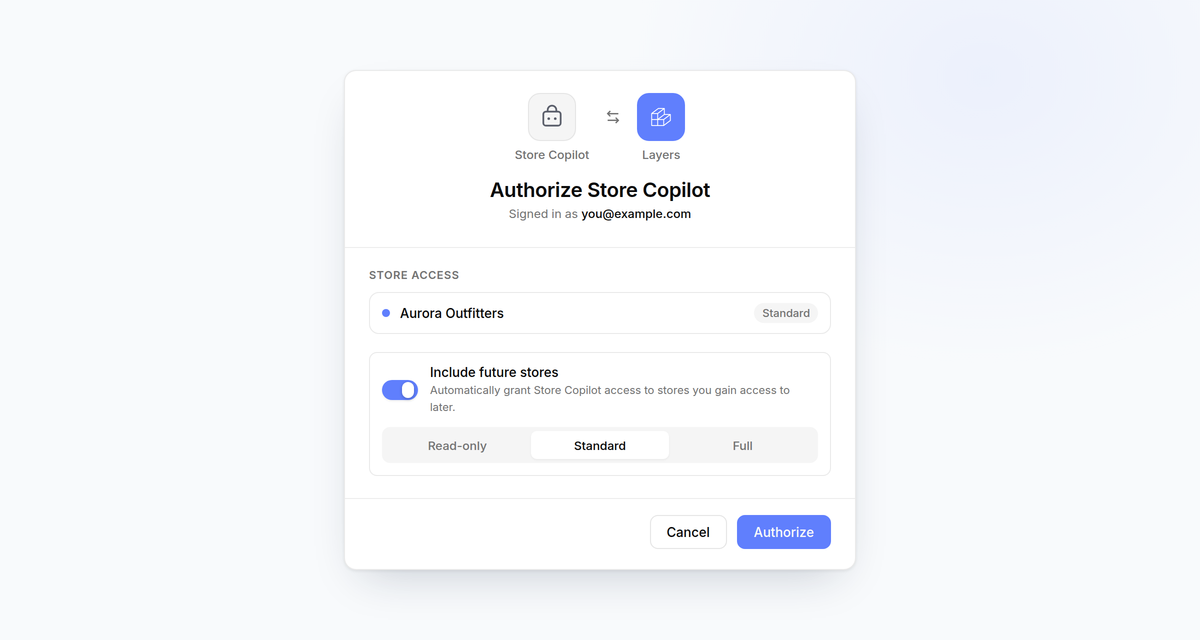
MCP OAuth authorization screen showing an Include future stores toggle turned on, with Read-only, Standard, and Full permission presets and Standard selected

The MCP OAuth consent screen now offers an Include future stores switch, so a connection stays in sync with your account instead of needing re-authorization every time you're added to a new store.

Turn it on and pick a permission preset — Read-only, Standard, or Full — and any store you gain access to after consenting is granted automatically, with permissions intersected against what you actually hold on that store. Stores you already had access to but left unselected stay excluded, re-authorizing an app replaces the setting along with your store grants, and revoking a connection from a store permanently excludes it from future auto-grants.

Learn more

Subscribe to the changelog

Releases land wherever your team already reads.

Slack

Subscribe to changelog

1

Choose a Slack channel

Open the Slack channel where releases should land. Most teams use #product-updates.
2

Subscribe to releases

Paste this command into the Slack channel.

/feed subscribe https://www.uselayers.com/changelog/rss.xml
3

Approve the confirmation post

Approve the confirmation Slack post. From then on each release arrives as a message with its title, date, and link.