Shopify Search Synonyms are Gone, and Search got Looser
Shopify retired search synonyms in September 2026 with no changelog entry. See what native search offers instead and which old synonyms still need a rule.
Key takeaways
On September 23, 2026, a merchant on the Shopify Community searched their own store and got back "hundreds of products - almost all of which are completely unrelated to the search term."
When they opened Search and Discovery to fix it, the Synonyms feature was marked "retired."
Other merchants had reported synonyms disappearing from around September 16, and Shopify's changelog has no post about it. The Help Center no longer documents synonyms.
Shopify now says semantic understanding is part of online store search, with nothing to switch on and no setting that controls how broadly it matches.
This guide covers the documented before and after, the native levers and their limits, how to find the searches the change hurt, and our call on which old synonyms still matter.
We checked every Shopify fact against its docs in November 2026.
What did Shopify change in Search and Discovery in 2026?
In mid-September 2026, merchants found synonyms marked retired in Shopify's Search and Discovery app, with no changelog post. Its Help Center dropped synonyms and now folds semantic understanding into online store search.
Synonyms were groups of terms that Shopify "treats ... as exact matches for one another". Its own example grouped belt bags and slings, so a search for one found the other.
The archived Help page from February 2026 shows the limits: up to five words per synonym, 20 synonyms per group, and 1,000 per store. Synonyms never applied to SKU or barcode matches.
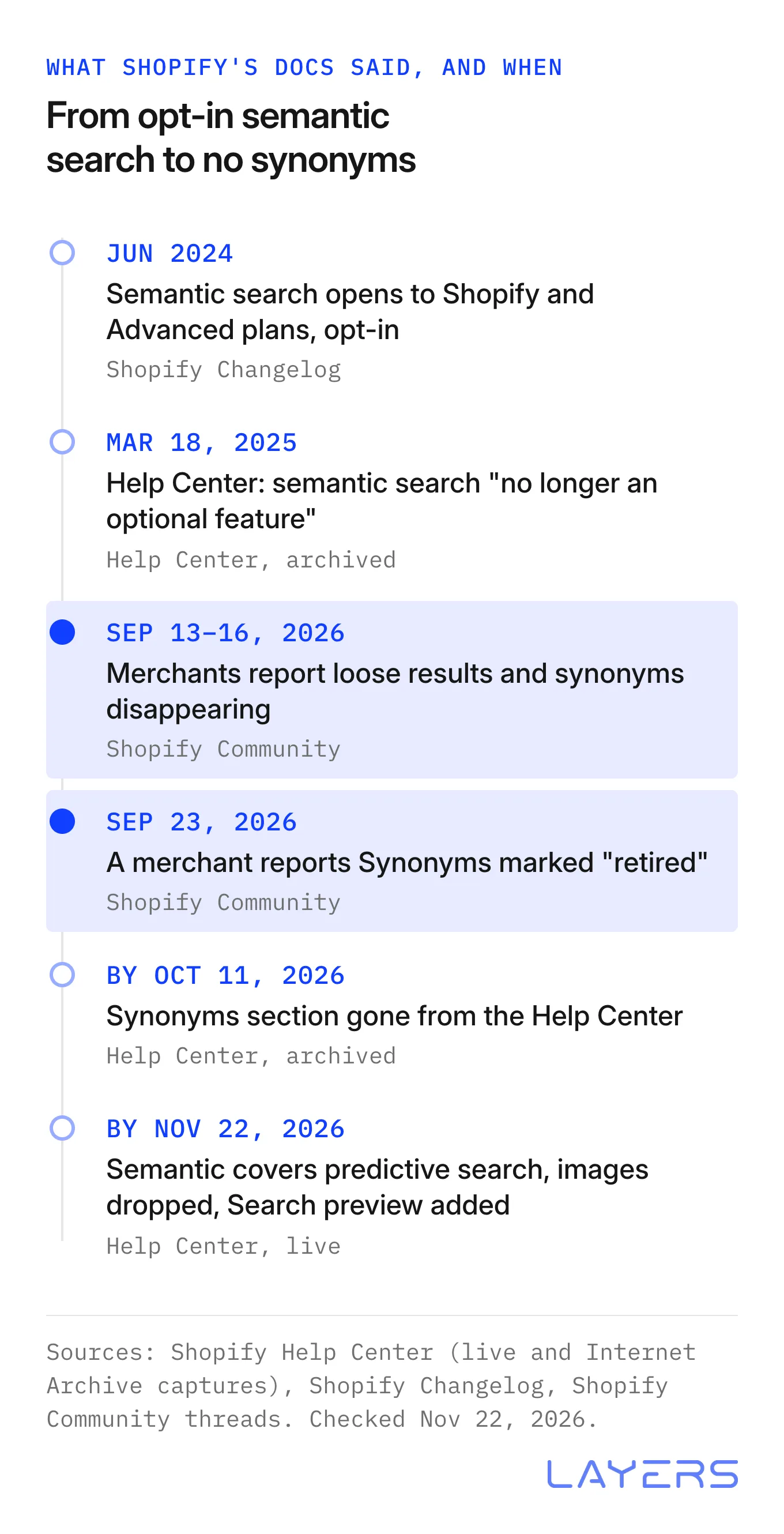
Here is how the documentation moved, date by date:
- June 2024. Semantic search opens to Shopify and Advanced plans as an opt-in feature in Search and Discovery.
- March 18, 2025. The Help Center says semantic search "is no longer an optional feature" in the app.
- September 13–16, 2026. Merchants report loose results and synonyms disappearing, with nothing in the changelog.
- September 23, 2026. A merchant reports the Synonyms feature marked "retired".
- By October 11, 2026. The synonyms section is gone from the Help Center. Semantic understanding is "included" for stores that meet plan and catalog-size requirements.
- By November 22, 2026. The requirements are gone. Semantic understanding also applies to predictive search product suggestions, "Product images aren't used," and a new Search preview page exists.
Versions of that Help page after March 2025 showed a Turn on button again, until at least February 2026.
Shopify's docs changed their story at least four times, so trust the live page and its date over any blog post, ours included.
We found no announcement. The closest thing is documentation: Shopify's headless developer docs now say its search generates synonyms and related terms automatically, "so you don't need to create synonym lists."
The App Store listing still said "Make synonym groups" on November 23, 2026, so don't read it as current. One merchant says Shopify Support told them the new AI search feature can't be reverted.
Every store on Shopify's native search got this change, headless builds included.
Synonyms were part of what headless stores got in 2023, and today's Storefront API feature list has product boosts and no synonyms.
If a third-party app powers your search, Shopify's documented native behavior doesn't describe what your shoppers get.
- If your store runs Shopify's native search, you lost synonyms in September and gained broader matching you can't narrow.
Why does Shopify search now return hundreds of loosely related products?
Semantic search widens a query with related words, so it finds products that never use the shopper's exact terms. That raises recall and lowers precision, and Shopify offers no setting to narrow it.
Four things combine:
- Expansion is the feature. In Shopify's own example, a search for "christmas party shoes" brings up red pumps, though no product mentions Christmas or parties. Shopify's semantic search explainer says the engine "identifies synonyms and related terms to broaden the search."
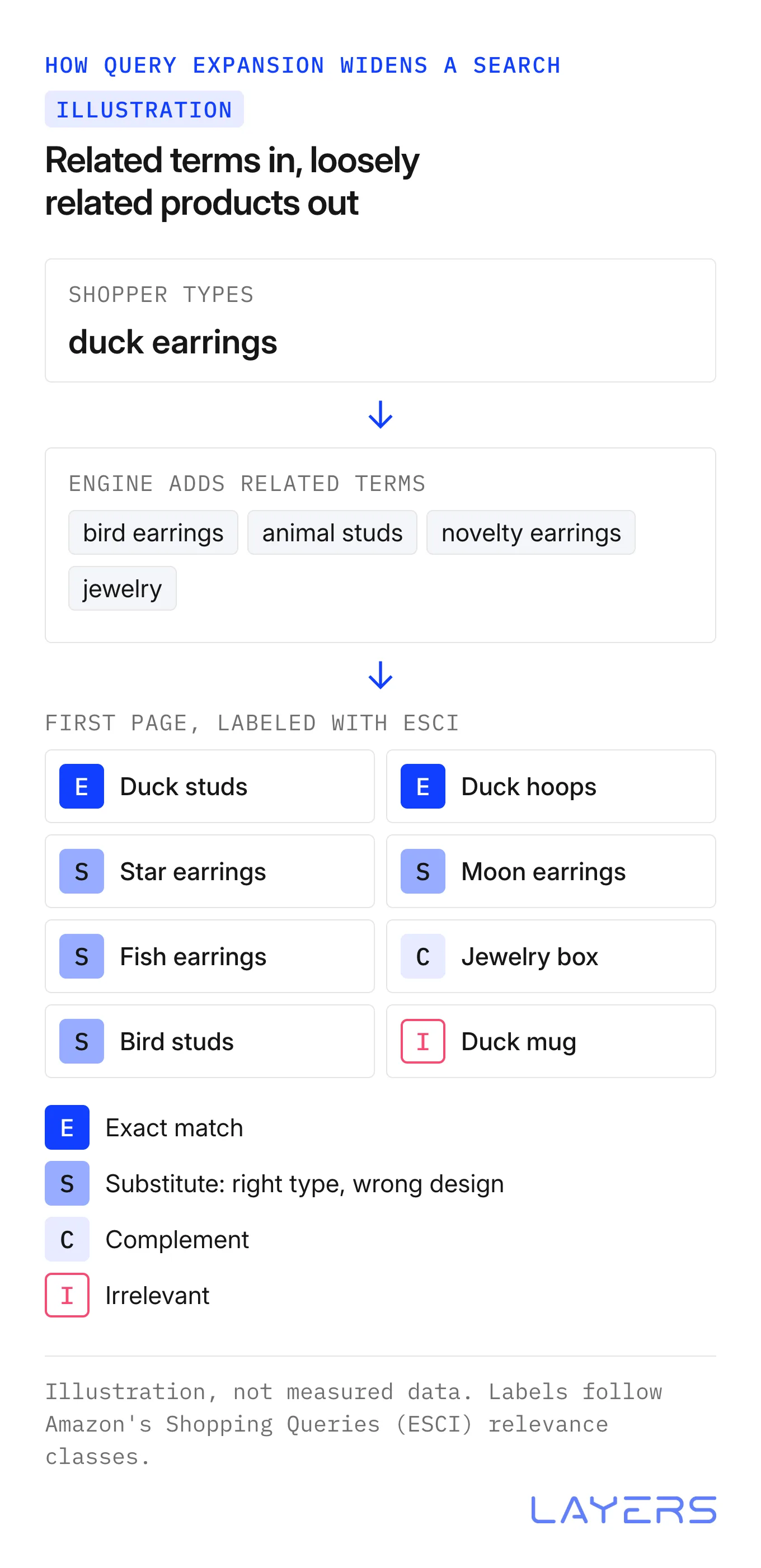
- Broader matching trades precision for recall. Query expansion finds more relevant items, but results for the original query can rank lower after it. Amazon's ESCI relevance labels name what floods in: substitutes, which fail "to fulfill some aspects of the query," and complements.
- Your text is the only input now. Semantic understanding reads the title, description, product type, product category, and tags, not images. Products with identical descriptions look alike to any engine that reads descriptions.
- There's no dial. Shopify says "There's no setting that controls how broadly search matches" and that you can't change how results are ordered. It also tests ranking changes on live stores, so two shoppers can see different orders for the same search.
To be fair to Shopify, semantic matching fixes real gaps. Amazon's semantic product search paper lists what pure keyword matching misses: synonyms, word variants like "woman" and "women," and spelling errors.
The trouble is what comes along with the fixes. A jewelry merchant's search for "duck earrings" showed the relevant products "and then over 900 others."
If those are other earrings, ESCI would label them substitutes: the right product type, the wrong design.
Mechanism three is the one you can measure. We pulled the first 250 products from 35 stores featured in Shopify's case studies on November 22, 2026: 8,191 products in all.
The median store had 4.4% of products sharing a description word for word with another product.
The middle half of stores ranged from 0.8% to 24.0%. Eight stores were at 25% or more, and four were at 70% or more.
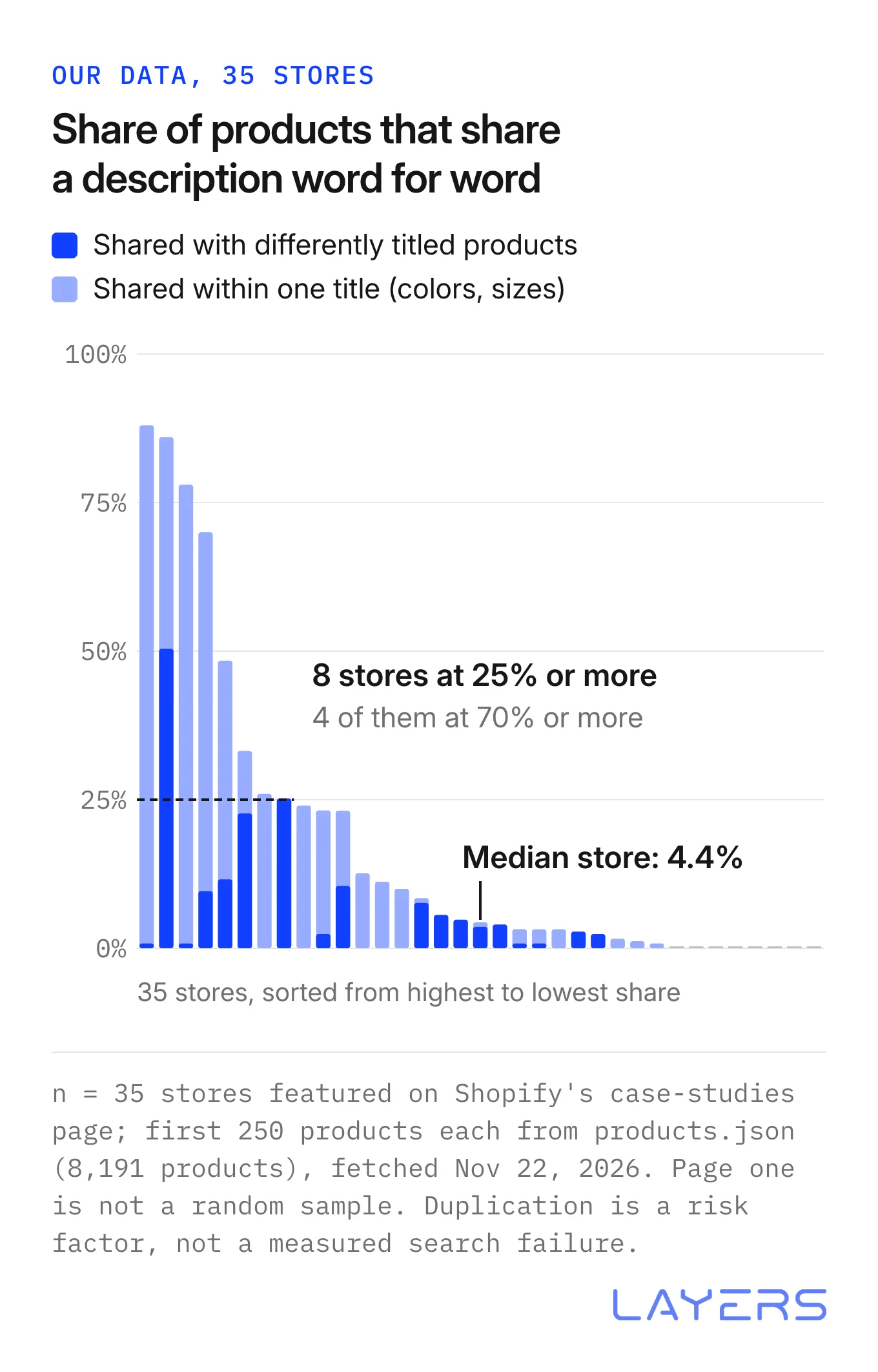
Across all 35 stores, 1,466 of 8,191 products (17.9%) shared a description. Most were one item listed once per color or size.
But 411 of them (28.0%) sat in groups with different titles: distinct designs sharing one care blurb, the duck-earrings shape.
In three stores, more than a fifth of sampled products shared a description with differently titled products.
Two limits apply: page one of a catalog isn't a random sample, and duplication is a risk factor, not a search failure we measured.
Check whether your top-searched products share a description with the products crowding them out.
Loose matches are the mirror image of the opposite failure, a search that returns nothing, and they cost sales in a similar way.
Baymard found test participants "often simply assume that poor or limited results were the site’s full selection."
Baymard also saw shoppers quickly conclude a site doesn't carry a product when a search for its model name or number doesn't surface it.
Baymard's 2026 benchmark found 56% of sites fail to adequately support users' search needs.
A 2021 Harris Poll survey commissioned by Google Cloud found 94% of consumers had received irrelevant results on a retailer's site in the previous six months. Here's what a failed search costs in revenue.
- Broader matching is working as designed. The cost lands on precision, and Shopify gives you no dial for it.
What replaced synonyms natively, and what are the limits?
Nothing replaces synonyms one for one. Product boosts come closest, with two limits: 10 search terms per product, and only products available for sale.
The other native levers are your product data, search syntax, Search preview, the search reports, and unlisted status. Here are all six with their documented limits, checked November 22, 2026:
- What it does: Assigns search terms to a product so it ranks higher for them
- Documented limits: Up to 10 search terms per boost; only products available for sale get boosted; Shopify advises one or a few products per term; not applied when a search uses syntax; metafield edits reach search the same day
- What it can't do: Widen matching or remove loose matches
Product data
- What it does: Semantic understanding reads title, description, product type, product category, and tags; plurals and small typos are handled
- Documented limits: Only the first 10,000 characters of a description are searchable
- What it can't do: Control how broadly search matches
Search syntax links, such as title:duck AND title:earrings
- What it does: Restricts one search to field matches
- Documented limits: Turns off typo tolerance, predictive query suggestions, and semantic understanding for that search; boosts don't apply
- What it can't do: Help shoppers who type their own words
- What it does: Shows which products native search returns for a term, and in what order, without changing your store
- Documented limits: Top searches list holds up to 50 terms from the last 30 days; native results only, so apps and custom templates can differ
- What it can't do: Change anything
Search reports (no clicks, no results, by query)
- What it does: Lists search terms with session counts
- Documented limits: Up to a 72-hour delay; the app view covers the last 30 days; predictive search and preview runs are excluded
- What it can't do: Tell you which results were wrong
- What it does: Keeps a product out of online store search
- Documented limits: Product-level only
- What it can't do: Block or reroute a search term
Three things to know before you lean on boosts:
-
A boost lifts; a synonym widened. A synonym group made one word find products described with another. A boost is searchandising: it puts chosen products first for chosen words, and the 900 other duck-earring results stay below.
-
It's free, and it costs time. Search and Discovery is free, so the cost is merchandiser time per term. Ten terms per product and a few products per term make boosts a tool for top searches.
-
Headless gets boosts too. Boosts carry to the Storefront API, synonyms aren't on that list, and Shopify's headless docs now say synonym lists aren't needed.
-
You get one ranking lever and several ways to look at results, with no control over how broadly search matches.
How do you find the searches the change broke?
Start from demand. Confirm native search runs your results, pull your top searches and Searches with no clicks, then check 10 terms in Search preview and label the first eight results of each.
- Confirm the engine. If a third-party app powers search, none of this applies. Check the dropdown and the results page separately, since Shopify treats them as separate search types. Here's how your autocomplete and results page can disagree.
- Pull demand. In Analytics, open Reports and export Searches by search query and Searches with no clicks. Use Reports for ranges longer than the app's 30 days, such as the weeks around September 16. Reports cover the results page only.
- Pick 10 terms. Take your top 5 by searches and your top 5 by no-click searches. That's where the revenue sits, so don't start with terms you invent.
- Preview each one. Search preview shows the order native search returns. Spot-check three on your live store, because Shopify tests ranking changes that can vary order by visitor.
- Label the first eight results. Mark each E, S, C, or I using Amazon's ESCI definitions, then count exact matches per query. Our heuristic: fewer than four exact matches in the first eight makes it a priority. This is close to how we grade search results.
- Find the field. For each wrong result, note which text matched: title, tags, product type, or description. If one tag or one boilerplate paragraph explains most bad matches, fix that field on a small group first, since it also changes collections and feeds.
- Boost the few. For your top queries, boost one or a few right products. Sold-out products don't get the lift.
- Re-check after a week. Same 10 terms, same labels. Reports can lag by up to 72 hours.
A worked example, with hypothetical counts: "duck earrings" returns two exact matches and six substitutes in its first eight. That's under four, so it goes to the top of your list.
Skip the theme script that rewrites every search into field syntax. It narrows results, but it also switches off typo tolerance and semantic understanding for every search, and boosts stop applying.
- Ten searches, eight results each, four labels: 80 judgments that tell you where to spend boosts.
Which of your old synonym groups still matter?
Sort every old group by why it existed. Shopify handles typos and plurals, and semantic understanding is meant to catch plain synonyms. House names and renamed products still need words on the product. Test compound spellings.
Misspellings (cofee to coffee)
- What Shopify documents today: Typo tolerance for one wrong or two swapped letters; no need to boost misspellings
- What to do on native search: Nothing
- Still needs a rule? No
Singular and plural (puppy, puppies)
- What Shopify documents today: Stemming
- What to do on native search: Nothing
- Still needs a rule? No
Plain synonyms, regional terms (sofa, couch; sneakers, trainers)
- What Shopify documents today: Semantic understanding uses related terms
- What to do on native search: Test your top pairs in Search preview
- Still needs a rule? Rarely, only where a test fails
Abbreviations, slang (lbd, pjs)
- What Shopify documents today: Not documented either way
- What to do on native search: Test; if one fails, add the full term to tags or title
- Still needs a rule? Test
Compound spellings (belt bag, beltbag, belt-bag)
- What Shopify documents today: Old guidance said default search didn't treat these as the same; current docs are silent
- What to do on native search: Test; add variants to tags if they fail
- Still needs a rule? Test
House names (a rainbow print sold as "Shine")
- What Shopify documents today: Semantic reads product text, not images
- What to do on native search: Put the plain words in the product text
- Still needs a rule? Yes, as product data
Renamed or legacy names (old name to new name)
- What Shopify documents today: Not documented; Baymard says alternate titles should still find the product
- What to do on native search: Keep the old name in tags or description
- Still needs a rule? Yes, as product data
Part numbers (partial SKUs)
- What Shopify documents today: Synonyms never applied to SKUs; partial SKU matching works from the start of the code
- What to do on native search: Nothing lost
- Still needs a rule? No
Query-to-page routing ("returns" to the returns policy)
- What Shopify documents today: No query redirect in Search and Discovery's documented features
- What to do on native search: Not available natively
- Still needs a rule? Yes, in an engine with redirects
Never-surface terms (a restricted product kept out of search)
- What Shopify documents today: Unlisted status keeps a product out of search
- What to do on native search: Unlist it, or remove the term from product text
- Still needs a rule? Yes
Loosely related groups (men, boys)
- What Shopify documents today: Shopify warned against these
- What to do on native search: Nothing to keep
- Still needs a rule? No
The rule of thumb: if an engine should understand the mapping, let semantic understanding try first. If only your team could know it, it needs words on the product or a rule.
That's the same principle behind why your synonym list is a bug.
The house-name entry is the one most teams miss. Picture a rainbow-print line your team calls "Shine," with "rainbow" nowhere in its text.
A shopper who searches "rainbow" has nothing to match, and no amount of semantic understanding can guess your internal name.
Regional terms get harder once you sell in several countries; we cover regional language across markets separately. Wherever the list says "Test," use the labeling method above.
- Most old groups are now Shopify's job. The ones that encode your own names or your own routing are still yours.
If the "Yes" entries are long for your store, that's the work a search engine with rules does. See how ours handles it.
Our Synonym Group Triage Sheet puts all 11 group types on one page, with a column for your own groups and a grid to label the first eight results of your top 10 searches.
What does a search engine with explicit controls do differently?
It keeps the language understanding and adds the controls native search lacks. In our engine, the shopper's original words weigh most, a setting decides how widely we look, and weak tail results drop out.
Original words first. Our query expansion adds synonyms and related terms and weights direct synonyms above loose ones. The original query "always carries the most weight."
Expansion also avoids product types your catalog doesn't carry. When a query has several intent signals, all promote conditions must match before a product gets a lift.
A breadth setting. Search Strategy (Fast, Balanced, Deep, Exhaustive) sets how broadly we look through your catalog before ranking. Shopify's native search has no setting for that.
Weak results drop out. After ranking, we filter out results that score far below the top ones, and we learn minimum relevance scores per group of related queries. It won't shrink a broad query where most products score alike.
Keyword matching stays in the score. Every result score blends semantic similarity with keyword matching, engagement, freshness, and inventory.
Rules where you need them. Each "Yes" entry in the list above maps to a control:
- Routing. Semantic redirects send a search to a page, and one redirect covers many phrasings. Our docs say to use them for routing, not to fill gaps in results.
- House and legacy names. Request transforms replace a query or swap specific words in it when the search matches.
- Exclusions. Ranking rule filters limit which products stay eligible for matching searches, and hidden content rules keep items published but out of search.
- Store-wide policy. Search instructions carry plain-English guidance, up to 5,000 characters, into every AI step.
- Per-query targeting. Ranking rules can match a query exactly, by substring, or by semantic similarity with a threshold from 50% to 100%.
No synonym editor. Our docs say it plainly: we have no manual synonym editor. Instead, the Query Understanding panel shows the expansions, intent, and context behind every test search.
Our typo correction also leaves brand names and model numbers alone.
Switching doesn't start from a blank page. On install, we seed search with your last 30 days of Shopify search terms and run a baseline evaluation against the top 250 of those queries.
That's our search. If you're comparing, here's what to ask a search vendor.
I’ve seen a substantially smaller amount of frustration clicks with the search bar. Customers will actually go into a collection... Before, they would just get angry and bounce.
Erin Di Ienno, Shopify Lead, Venus
- The difference is control: you set how widely search looks, and you write the rules for the searches that need them.
Is a synonym list still worth keeping?
Yes, as a record rather than a rulebook. It's the best map you have of how shoppers describe your products. Run its terms through Search preview, then move the failures into product data or rules.
Find it wherever it survives: an old spreadsheet, a past export, or your team's memory.
It now does two jobs:
- The test set for the labeling method above.
- The backlog for product data, since every house name and legacy name on it needs words on the product.
We've argued that a synonym list is a workaround for an engine that can't read language. Shopify's change settles the engine half of that argument.
It doesn't touch the half only your team knows: your house names and your routing.
If your top searches fail the label test and the fixes need rules Shopify doesn't offer, book a demo.
Bring your old synonym list and your top no-click searches, and we'll run them through our search live.
FAQs
1. Did Shopify remove synonyms from Search and Discovery? Yes. Since mid-September 2026, merchants report the Synonyms section shows as retired and can't be edited. Shopify's Help Center no longer documents synonym groups, and the changelog has no post about it.
2. Can I turn off semantic search on Shopify? No. Semantic understanding is part of online store search, and no setting controls how broadly it matches. Search syntax such as title:word turns it off for one search but also drops typo tolerance and boosts.
3. Why does my Shopify search return hundreds of products now? Semantic understanding expands each query with related terms, so products sharing a theme or a boilerplate description can match. Boosts change what appears first, but they don't remove the extra matches.
4. What can I use instead of Shopify synonyms? Boost the right products for your top searches, and add shoppers' words to titles or tags. Search preview shows what native search returns. Query redirects and rewrite rules need an engine that offers them.
5. Do product boosts work like synonyms? No. A synonym group widened matching; a boost lifts chosen products for up to 10 search terms, only while they're available for sale. Boosts also stop applying when a search uses syntax.
6. Did the change affect headless or Hydrogen stores? Plan as if it did. Headless stores could use synonym groups from 2023, and Shopify's headless docs now say search generates synonyms automatically. Test your top searches against the Storefront API.
7. Is my store affected if I use a third-party search app? Mostly not. Shopify's docs don't describe your results when a third-party app powers search. Check that the app covers the results page and the dropdown; a theme can leave one on native search.
8. Did Shopify announce the change? Not publicly that we could find. Shopify's changelog, checked November 22, 2026, has no post about retiring synonyms. The March 2025 semantic default appears only on a Help Center page dated March 18, 2025.
Written by

Jake Casto
Founder, Layers
Jake Casto is the founder of Layers, the enterprise search and merchandising platform built for Shopify Plus. He previously co-founded Proton, a Shopify Plus engineering studio that shipped more than 400 storefronts, where Layers began as an internal tool for a problem that kept repeating. He writes about search infrastructure, performance, and the engineering behind discovery at scale.
View all articlesRelated articles
More reading on search, merchandising, and product discovery.
What is Searchandising? The Line between Search and Merchandising
Search finds the products; searchandising picks which show first. A job-by-job map of the boundary, with what Shopify's native tools let you change today.
Jake Casto
Nov 24, 2026 · 17 min read
Strikethrough Pricing in Search Results: When a Compare-at Price Helps and When it Backfires
The median store in our 32-store Shopify sample had 41% of products struck through. Which search tiles should keep that line, and which rules apply?

Lukas Tanasiuk
Nov 24, 2026 · 20 min read
The Complete Guide to Filtering and Faceting on Shopify Plus
Good faceting is an editorial layer. Group, relabel, order, hide, and scope filters to how shoppers actually think. A field guide for Shopify Plus.
Jake Casto
Aug 6, 2026 · 14 min read